Question

Auto Populate Lot Serial Number when Uploading the PO Receipt to Issue

  • December 4, 2023
  • 5 replies
  • 183 views

cwilliams23
Freshman I
Forum|alt.badge.img

We create a PO Receipt - then upload the data from Excel into the Issue (in Inventory). All the other column fill in correctly - but the Lot Serial number has to be entered into each line manually.
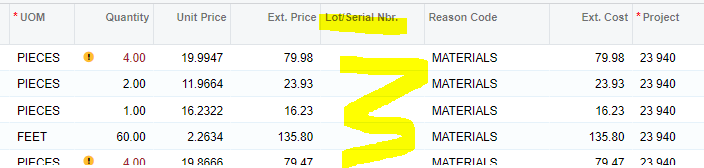
Is there a setting so that the data from the PO Receipt will correctly load into the Issues?

Thank you for all your help.

5 replies

Laura03
Captain II
Forum|alt.badge.img+19
  • Captain II
  • December 4, 2023

Hello,

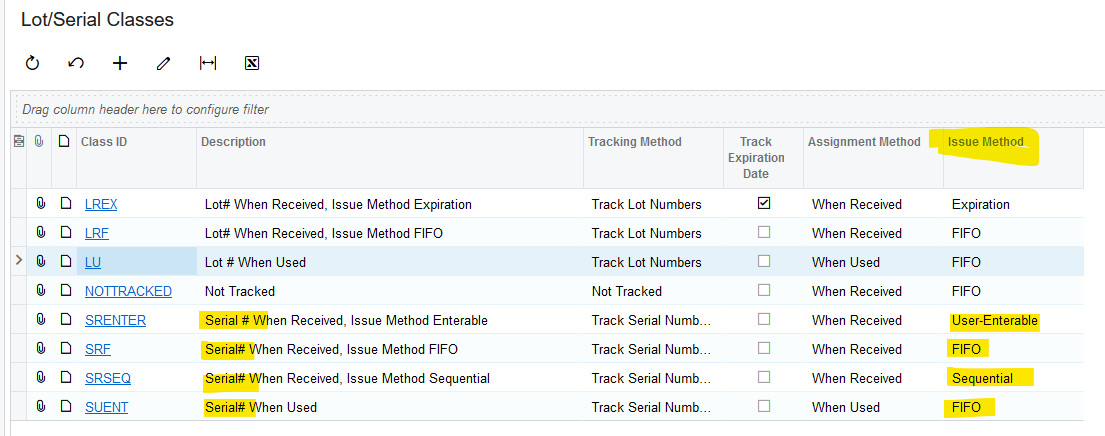
It may be helpful for us to see the Lot/Serial Class configuratipn of the items in question, to know when/how serial numbers are issued.

Laura


cwilliams23
Freshman I
Forum|alt.badge.img
  • Author
  • Freshman I
  • December 4, 2023

They are auto-generated when we receive the purchase order. I’m not sure I know more than that.

Thank you for your support.


Laura03
Captain II
Forum|alt.badge.img+19
  • Captain II
  • December 4, 2023

Hello,

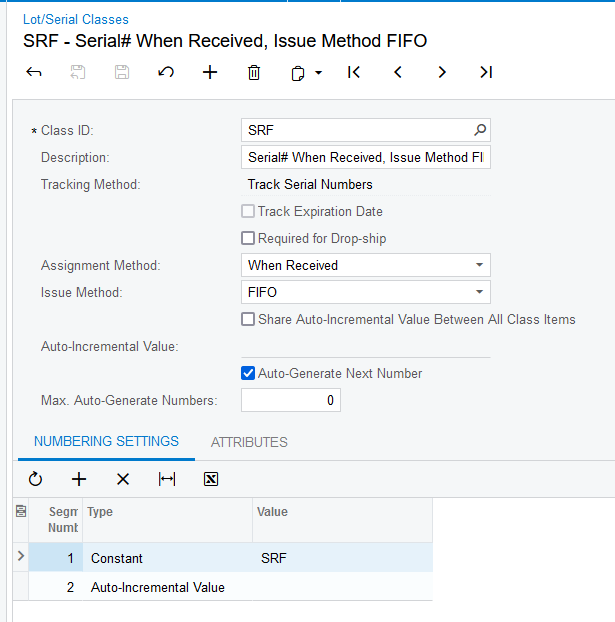
Please look at the items being received in Stock Items screen, to find their Lot-Serial class(es). Then look at Lot/Serial Classes screen as shown above, find the exact class, open the screen, and send a screen shot like this:

Please send a screen shot of the Excel that you are loading, with Lot Serial numbers column visible. Then we can try a test in a demo that matches your settings, and see if we can solve your problem.

Thank you.

Laura


cwilliams23
Freshman I
Forum|alt.badge.img
  • Author
  • Freshman I
  • December 4, 2023

Okay. I’ll send you the information.


Chris Hackett
Community Manager
Forum|alt.badge.img
  • Acumatica Community Manager
  • December 20, 2023

Hi @cwilliams23 were you able to find a solution? Thank you!