Answer

On Hyperlink click, the View.Current does not have current row, instead having first row values

  • August 18, 2022
  • 9 replies
  • 343 views

vivekm
Varsity II
Forum|alt.badge.img

Hi Team,

I have created a Form Detail page where based on some filter conditions loading some records in the grid (from view delegate). For one of the columns having hyperlink using which showing some values and redirecting to another page.

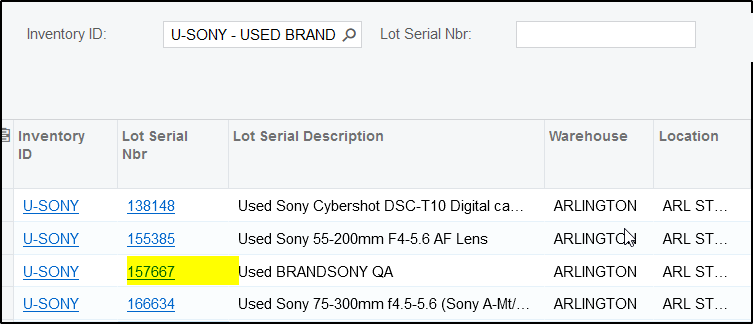
When I am clicking on let’s say 3rd row hyperlink (highlighted in below screenshot), but in View.Current getting first row values only. 


Please find attached document for additional details, please review and share your feedback.

Thank you in advance !

Best answer by Naveen Boga

Hi @vivekm For the Redirection Issue.

I have seen this kind of issue in one of my projects. Please find the details below and hope this helps!

  • This might be an issue with KEY fields, you can introduce one field i.e LineNbr (integer field), and make this as KEY field
  • And, in your view delegate code, while you are preparing the list you make sure to assign the unique value by passing the incremental value of the LineNbr.

This way, your record will be uniquely identified and redirection will be working as expected.



9 replies

Fernando Amadoz
Jr Varsity I
Forum|alt.badge.img+2

Hi @vivekm 

Make sure that the following properties are defined as True in the PXGrid control:

SyncPosition="True"

KeepPosition="True"


vivekm
Varsity II
Forum|alt.badge.img
  • Author
  • Varsity II
  • August 18, 2022

Hi @Fernando Amadoz 

yes those two properties have kept but still facing this issue.


Fernando Amadoz
Jr Varsity I
Forum|alt.badge.img+2

@vivekm please add the customization project in order to try and reproduce it


vivekm
Varsity II
Forum|alt.badge.img
  • Author
  • Varsity II
  • August 18, 2022

@Fernando Amadoz have shared the grid aspx, view and view delegate sample initially, do you need the full customization or the full graph and aspx code ?


Fernando Amadoz
Jr Varsity I
Forum|alt.badge.img+2

@vivekm ideally the full customization in order to jump directly into the test

UPDATE:

Full graph and ASPX and ASPX.Cs could work too.


Also, which Acumatica version you are working on?


vivekm
Varsity II
Forum|alt.badge.img
  • Author
  • Varsity II
  • August 18, 2022

@Fernando Amadoz will prepare and share, this customization has some additional dependencies, will remove those and share the code piece.


Naveen Boga
Captain II
Forum|alt.badge.img+19
  • Captain II
  • Answer
  • August 19, 2022

Hi @vivekm For the Redirection Issue.

I have seen this kind of issue in one of my projects. Please find the details below and hope this helps!

  • This might be an issue with KEY fields, you can introduce one field i.e LineNbr (integer field), and make this as KEY field
  • And, in your view delegate code, while you are preparing the list you make sure to assign the unique value by passing the incremental value of the LineNbr.

This way, your record will be uniquely identified and redirection will be working as expected.



vivekm
Varsity II
Forum|alt.badge.img
  • Author
  • Varsity II
  • August 19, 2022

Thanks @Naveen Boga this does helps and issue resolved.


Naveen Boga
Captain II
Forum|alt.badge.img+19
  • Captain II
  • August 19, 2022

Great @vivekm  Thanks a lot for sharing the update :)