Answer

Import Scenario to delete tax

  • July 6, 2023
  • 8 replies
  • 253 views

Forum|alt.badge.img

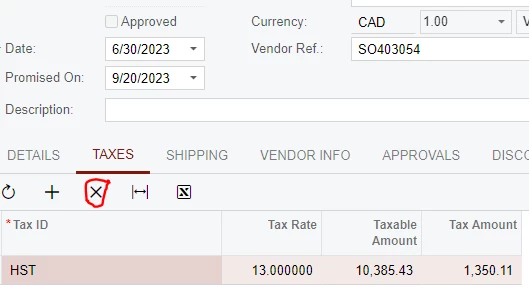
Building an import scenario to delete tax impact on POs - not sure which field to use on import scenario.


I need to:

  • Delete the Tax ID
  • Remove Hold
  • Save

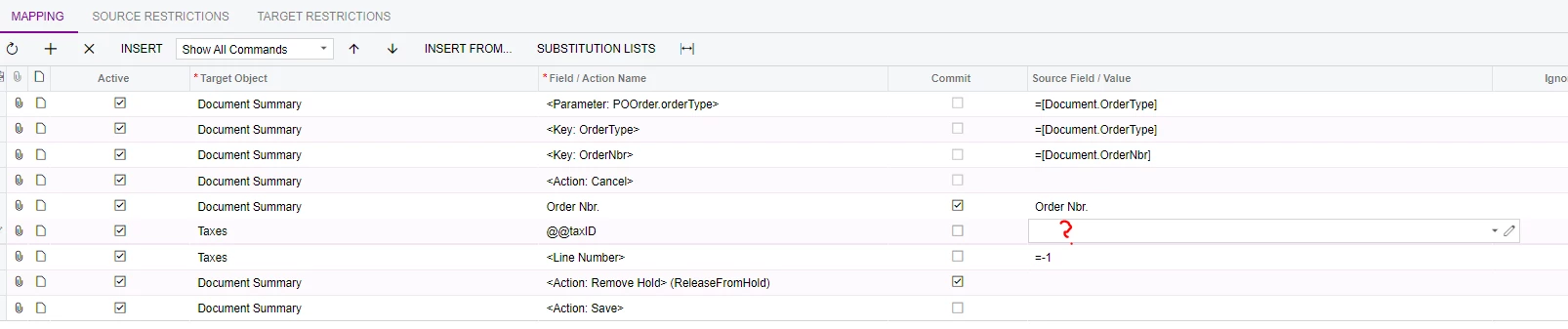
Here is my current import scenario:


Best answer by riglesias

Hello @jwarren 

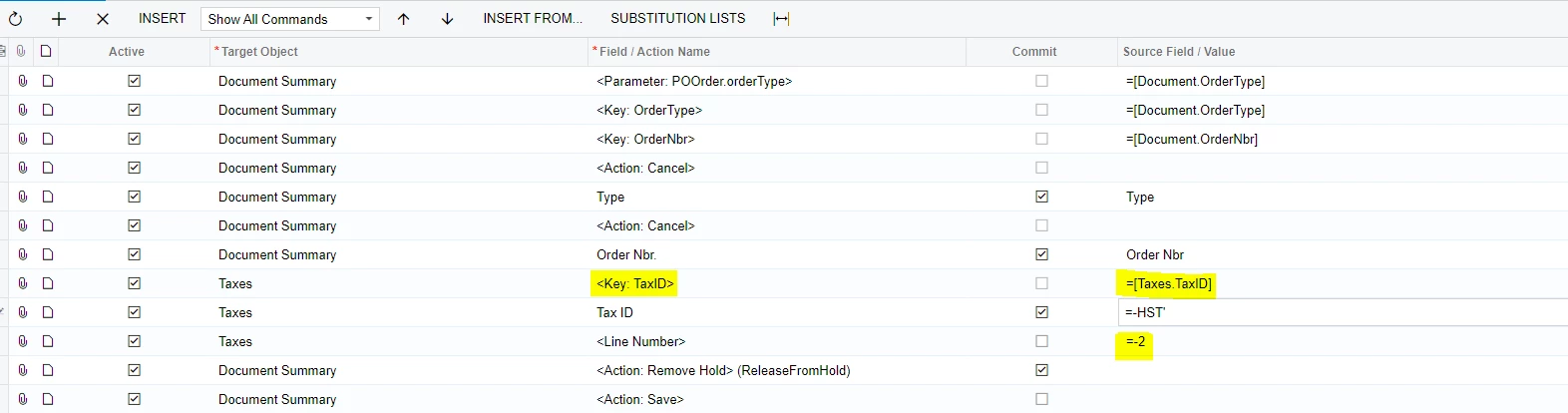
In this case there is no need to use the @@ notation. Tax ID it’s a key field so when you add Tax ID line the system will automatically insert the key line (highlighted below). Also notice that <Line Number> line needs to be mapped to =-2. Like this:


8 replies

riglesias
Acumatica Employee
Forum|alt.badge.img+2
  • Acumatica Employee
  • July 6, 2023

Hello @jwarren ,


To delete a line from a grid you need to map <Line Number> line to =-2.

Here’s a link for a video with instructions on how to map an import scenario to delete lines from a grid (min 57:58)L 


Hope it helps.


Manikanta Dhulipudi
Captain II
Forum|alt.badge.img+15

Please find the import scenario as attached, if you multiple lines details in the import then we need to @@tax ID defined in the below article as suggested @riglesias 

  https://community.acumatica.com/maintenance-and-troubleshooting-15/webinar-common-examples-of-import-scenarios-206

Forum|alt.badge.img
  • Author
  • Semi-Pro I
  • July 6, 2023

Thanks for the info @manikantad18  & @riglesias.


Not sure what I should be putting in this field though?


Manikanta Dhulipudi
Captain II
Forum|alt.badge.img+15

Thanks for the info @manikantad18  & @riglesias.


Not sure what I should be putting in this field though?


For example, in PO if we e 3 types of Tax ID are generated then you need to put the tax ID which you want to remove.

For example : WA City Tax

WA CITY TAX 3.750000 5,005.00 187.69 100.000000 0.00 PO001715
WA COUNTY TAX 0.000000 5,005.00 0.00 100.000000 0.00 PO001716
WA STATE TAX 6.500000 5,005.00 325.33 100.000000 0.00 PO001717

Forum|alt.badge.img
  • Author
  • Semi-Pro I
  • July 6, 2023

Thanks for the info @manikantad18  & @riglesias.


Not sure what I should be putting in this field though?


For example, in PO if we e 3 types of Tax ID are generated then you need to put the tax ID which you want to remove.

For example : WA City Tax

WA CITY TAX 3.750000 5,005.00 187.69 100.000000 0.00 PO001715
WA COUNTY TAX 0.000000 5,005.00 0.00 100.000000 0.00 PO001716
WA STATE TAX 6.500000 5,005.00 325.33 100.000000 0.00 PO001717

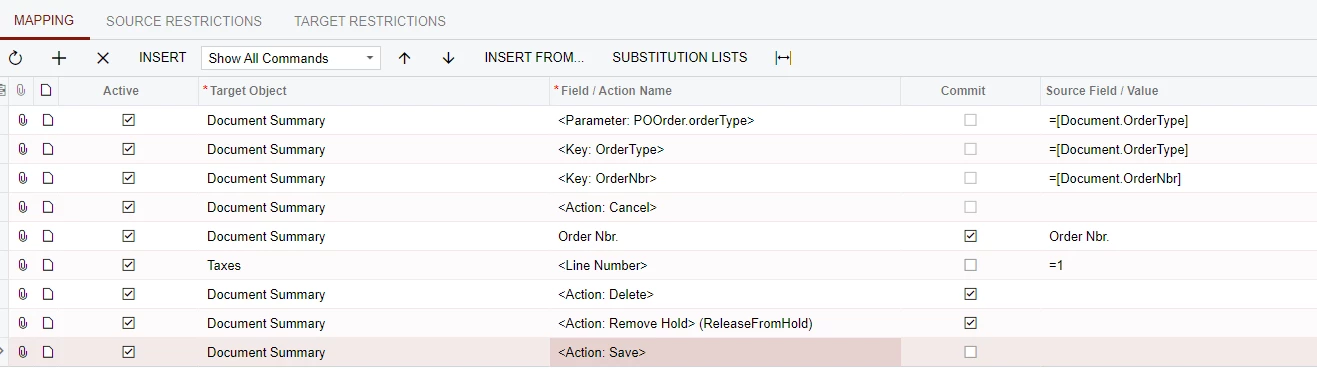
Still not updating the tax in this scenario:


Manikanta Dhulipudi
Captain II
Forum|alt.badge.img+15

Thanks for the info @manikantad18  & @riglesias.


Not sure what I should be putting in this field though?


For example, in PO if we e 3 types of Tax ID are generated then you need to put the tax ID which you want to remove.

For example : WA City Tax

WA CITY TAX 3.750000 5,005.00 187.69 100.000000 0.00 PO001715
WA COUNTY TAX 0.000000 5,005.00 0.00 100.000000 0.00 PO001716
WA STATE TAX 6.500000 5,005.00 325.33 100.000000 0.00 PO001717

Still not updating the tax in this scenario:


Did you follow my Import scenario?

Thanks


riglesias
Acumatica Employee
Forum|alt.badge.img+2
  • Acumatica Employee
  • Answer
  • July 6, 2023

Hello @jwarren 

In this case there is no need to use the @@ notation. Tax ID it’s a key field so when you add Tax ID line the system will automatically insert the key line (highlighted below). Also notice that <Line Number> line needs to be mapped to =-2. Like this:


Forum|alt.badge.img
  • Author
  • Semi-Pro I
  • July 6, 2023

Hello @jwarren 

In this case there is no need to use the @@ notation. Tax ID it’s a key field so when you add Tax ID line the system will automatically insert the key line (highlighted below). Also notice that <Line Number> line needs to be mapped to =-2. Like this:


Fantastic - thanks guys