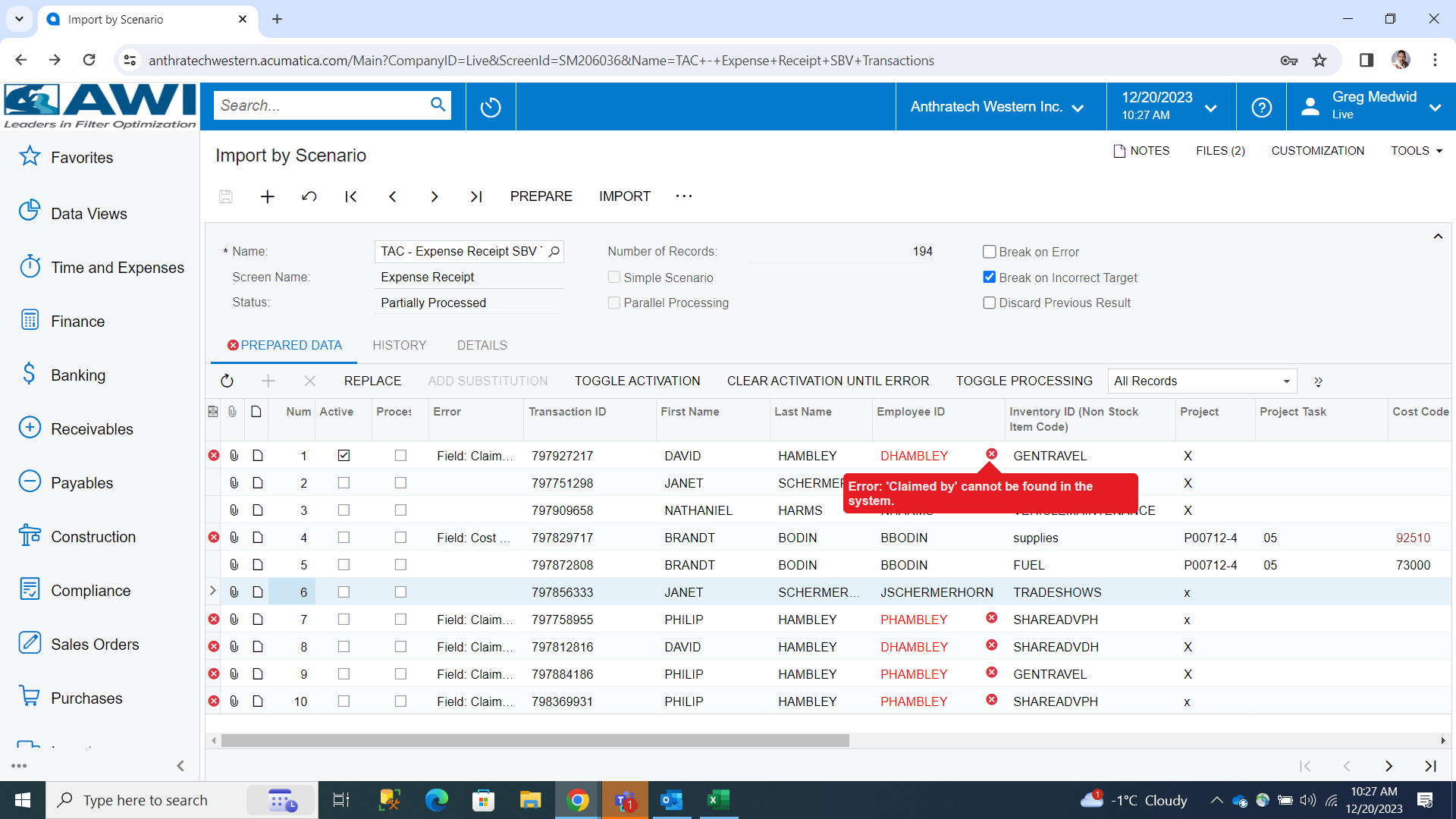
When creating an import scenario in our expense claims, 3 out of 27 employees are not being recognized and it is saying, “Error: ‘Claimed By’ cannot be found in the system.”
However, there is nothing different with these employees that we can see (2 are senior management in the same department and workgroup, but 1 is a front-line hourly employee in a category where the other 3 similar employees are fine) but we’re new enough to Acumatica that this is really confusing us.
Any suggestions of what to look for?
Best answer by Laura03
Hello @gregm ,
Are you able to manually type an expense claim for one of the Employee ID’s that returns an error on import?
Is there any message when you manually type the same entry in Expense Claims screen?
Is it possible the error is related to the company tree and whether the person who is importing is listed on a node of the Company Tree that is above the node of the employee who returns an error?
If you add yourself to the Delegates tab of Employee screen for Employee DHAMBLEY, does it change your ability to import the same Expense Claim?
Are you able to manually type an expense claim for one of the Employee ID’s that returns an error on import?
Is there any message when you manually type the same entry in Expense Claims screen?
Is it possible the error is related to the company tree and whether the person who is importing is listed on a node of the Company Tree that is above the node of the employee who returns an error?
If you add yourself to the Delegates tab of Employee screen for Employee DHAMBLEY, does it change your ability to import the same Expense Claim?
Laura, you nailed it with the Company Tree. While one of our 3 was a spelling error (lol, oops!), the other 2 employees that were “not found” were part of the OWNERS group. In our company tree, they were above accounting, therefore we could not see them in our menus or were able to post to them in our Import Scenario. When we went in and used the “delegate” function, we were able to instantly see them and the upload went without an error.
Still learning, that’s why we’re going to Summit 2024. ;)