Answer

IS It Possible to have a SO Picklist without Splitting Item Based on Lot/Serial number ?

  • January 19, 2024
  • 10 replies
  • 153 views

Forum|alt.badge.img

Is It Possible to restrict Splitting the Item in SO Picklist based on Lot/Serial Number. any Ideas . Currently Showing Multiple Line item  if there is Serial Number 

Best answer by bryanb39

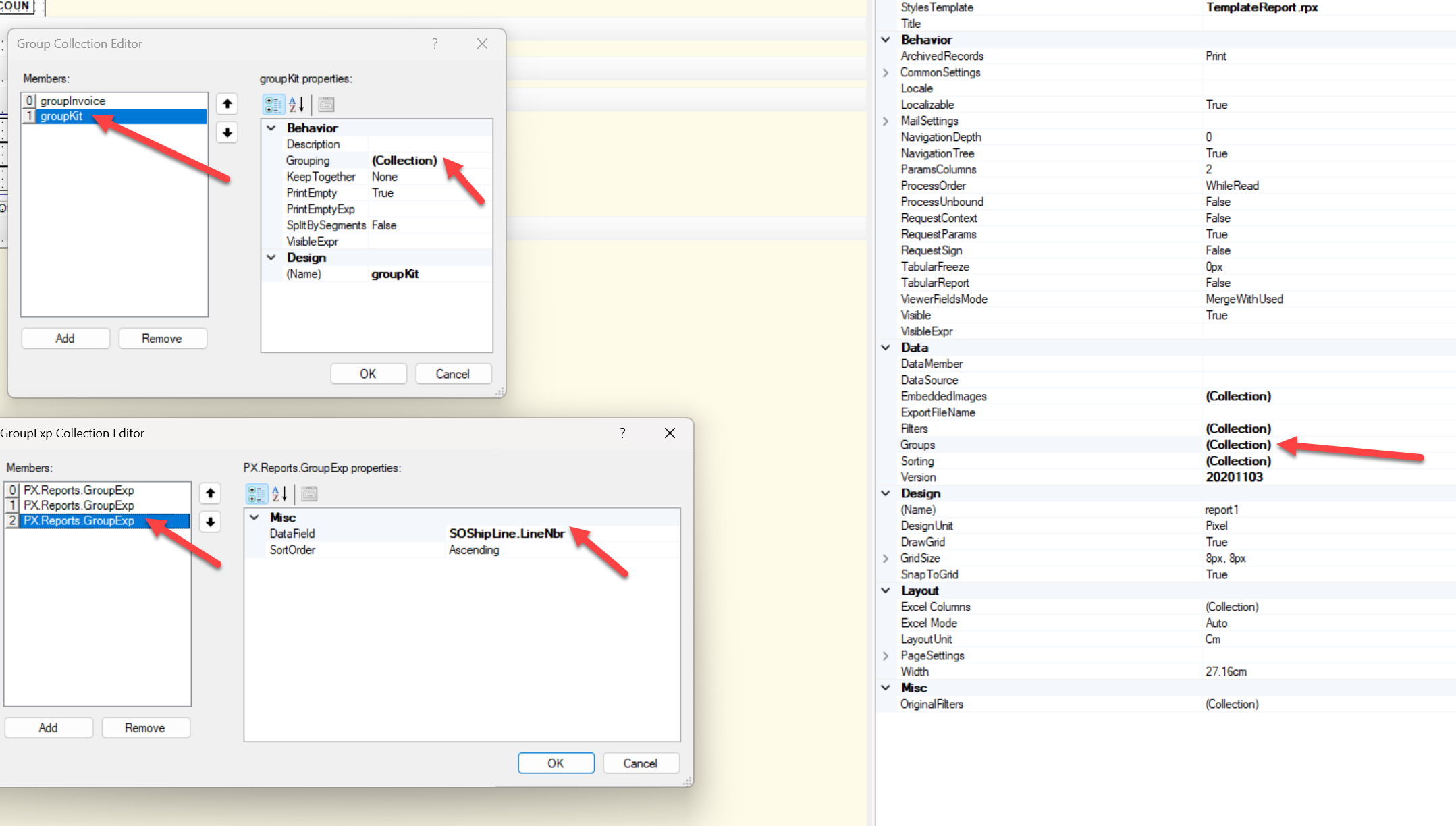
The grouping applies to the header, if you have a detailed section it will break it out to each record or subgroup if you have more groups nested below it.  

If you don’t use the detailed section, but rather the header instead it’ll maintain the grouping.  

The first solution I suggested was just removing the details from the datasource, but since you use locations, that was not a good fix, you still need the data from LineSplit, just not broken out all the way.  

10 replies

bryanb39
Pro II
Forum|alt.badge.img+6
  • Pro II
  • January 19, 2024

You need to change the grouping from Report Designer to use the InventoryID instead of Line Number.  This is report SO644000, the basic pick list for example.    You may need to edit location as well if it still breaks it out too much for your needs.  


Forum|alt.badge.img
  • Author
  • Varsity I
  • January 22, 2024

Thank You for the reply , I have done the same as mentioned , however that is not making any change either . 


bryanb39
Pro II
Forum|alt.badge.img+6
  • Pro II
  • January 22, 2024

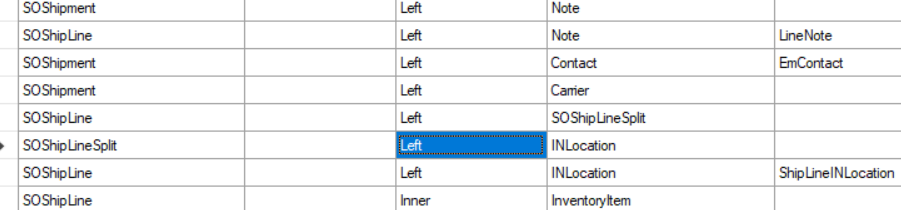
Sorry about that, your issue was similar but not the quite the same as mine.   I’m pretty sure this is your culprit:  

I don’t think that table is called out specifically on the form, but it does create the split you are talking about, that table will have the different lot or serial assignments.

This is in relationships of the Schema. 


Forum|alt.badge.img
  • Author
  • Varsity I
  • January 22, 2024
relationship is same as mentioned , and yes the table has diff Serial numbers for the Items , Serial Number assignment is when it Used , However the same we trying to not get printed in Pick List 


bryanb39
Pro II
Forum|alt.badge.img+6
  • Pro II
  • January 22, 2024

I’m testing it out now.  There’s a few changes to make on the form. 


bryanb39
Pro II
Forum|alt.badge.img+6
  • Pro II
  • January 22, 2024

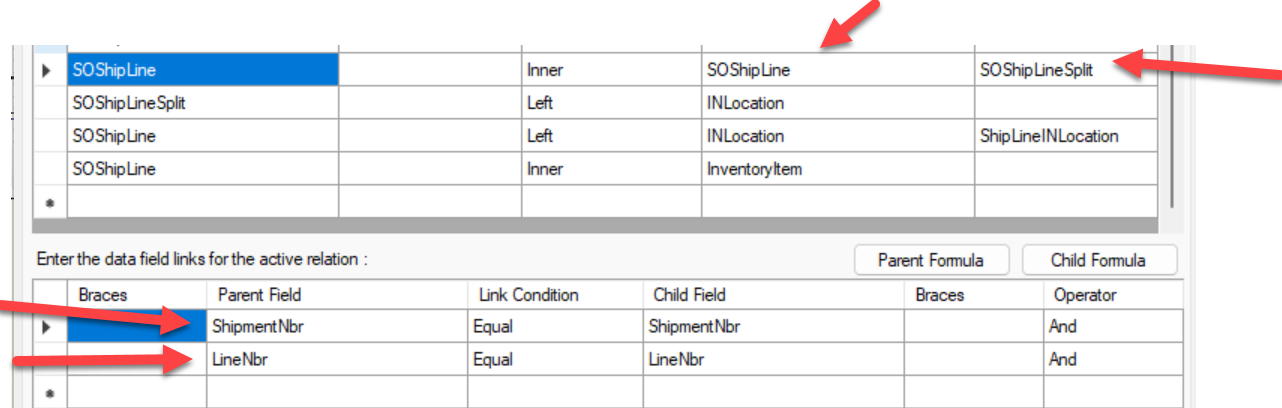
Quick test, change it to a self join and the alias to SOShipLIneSplit. Be sure to redo the relationship below once you change the table, it’ll clear it out.  

Full fix: Remove the relationships sith SOShipLineSplit, then remove all the isNull(SOShipLineSplit.XXX,SOShipLine.XXX) formulas from the report, leaving just SOShipLine.XXX.  There’s several on there in the DetailSections.  

Both methods should solve your issue, the full fix will make sure it runs most efficiently.


Forum|alt.badge.img
  • Author
  • Varsity I
  • January 22, 2024

Noted ..  Thank You for your Support , i tried and changed the form  as mentioned  but this will eliminate the Location , and  yes Inventory ID got consolidated even without grouping .  how to Split  based on Location ID 


bryanb39
Pro II
Forum|alt.badge.img+6
  • Pro II
  • January 22, 2024

Ok, just saw what you are talking about in my system, when the line was split between multiple locations it was blank. 

So I got a simpler solution for you. 
1: Revert back to the previous report version with the Split Line Relationships. 
2: Create another group, same Grouping Collection as the the Kit Group.  ShipmentNbr, Location, LineNbr.  
3: Copy and paste the fields from the Detail1 Section into the header of the new Group.  

Basically the same as the Kit Header, but the kit header needs to stay in case you have some non-stock kits to break out. 

Hide the details panel for the Details1 Group and the new group you just created.  Hide the footer of the new group.  


Forum|alt.badge.img
  • Author
  • Varsity I
  • January 22, 2024

yes.. If the same item in Multiple Location its shows blank , However reverting the table and sorting by INV ID take us back to were we start right  as its not grouping based on Item number in each location.  by removing the split formulas from detail section helps to group the Qty but it still splits to multiple lines based serial though there is only one location .


bryanb39
Pro II
Forum|alt.badge.img+6
  • Pro II
  • Answer
  • January 22, 2024

The grouping applies to the header, if you have a detailed section it will break it out to each record or subgroup if you have more groups nested below it.  

If you don’t use the detailed section, but rather the header instead it’ll maintain the grouping.  

The first solution I suggested was just removing the details from the datasource, but since you use locations, that was not a good fix, you still need the data from LineSplit, just not broken out all the way.