Answer

second child Grid is not refreshing when parent grid selected the row

  • August 11, 2022
  • 7 replies
  • 530 views

Forum|alt.badge.img

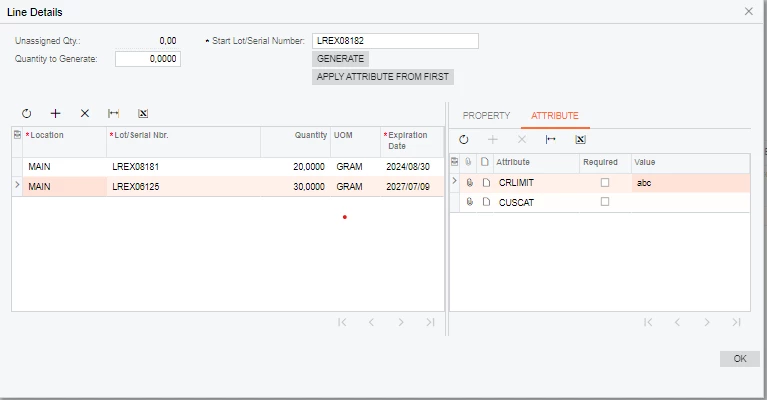
I have done the customization where two Grid’s are depended on the parent grid based on the selection of the parent Grid need to refresh the child grids. I'm inserting the data in to the child Grid’s when parent Grid row is inserted. Switching between the rows in parent grid the data in the child Grid’s should get refreshed. But, on the first child grid is working since the Autocallback of parent gird was Target was assigned a only one child GridID how to assigned the second GirdID in the Target  <AutoCallBack Target="propertyLOTGrid" Command="Refresh" ActiveBehavior="True" />. 
 

Best answer by anahizentella94

One thing that worked for me with several child grids is to add in the callback the RepaintControl attributte in the parent grid.

<AutoCallBack Enabled="True" ActiveBehavior="True"  Command="Refresh"> <Behavior BlockPage="True" RepaintControls="All" /></AutoCallBack>

Now all 4 child grids refresh.

7 replies

anahizentella94
Jr Varsity III
Forum|alt.badge.img

Hello @harikanthm60 

Have you set the property SyncPosition=True in the parent Grid?


Forum|alt.badge.img
  • Author
  • Jr Varsity III
  • August 11, 2022

@anahizentella94  yes its has SyncPosition=True first child Grid is working fine.


Naveen Boga
Captain II
Forum|alt.badge.img+19
  • Captain II
  • August 11, 2022

Hi @harikanthm60  Hope below link will help you resolve the issue.

https://stackoverflow.com/questions/49264233/how-to-create-master-detail-grids-in-acumatica


Forum|alt.badge.img
  • Author
  • Jr Varsity III
  • August 11, 2022

@Naveen Boga I have two detail Grids 


Where Property Tab Gird is working fine & Attribute tab is not refreshing based in the Line Details Grid


Forum|alt.badge.img
  • Author
  • Jr Varsity III
  • August 11, 2022

Hello @harikanthm60 

Have you set the property SyncPosition=True in the parent Grid?

@anahizentella94  yes i have set SyncPosition=True


anahizentella94
Jr Varsity III
Forum|alt.badge.img
  • Jr Varsity III
  • Answer
  • August 12, 2022

One thing that worked for me with several child grids is to add in the callback the RepaintControl attributte in the parent grid.

<AutoCallBack Enabled="True" ActiveBehavior="True"  Command="Refresh"> <Behavior BlockPage="True" RepaintControls="All" /></AutoCallBack>

Now all 4 child grids refresh.


Forum|alt.badge.img
  • Author
  • Jr Varsity III
  • August 15, 2022

@anahizentella94 I have tried with 

<AutoCallBack Enabled="True" ActiveBehavior="True"  Command="Refresh"> <Behavior BlockPage="True" RepaintControls="All" /></AutoCallBack>

its working now.