Answer

refresh value from the database to reflect on the UI

  • August 16, 2023
  • 3 replies
  • 340 views

Michael Ndungi
Varsity I
Forum|alt.badge.img

Hello every one,

I have done a payment integration on AcuPos. when the payment is processed succefully, the provider send back a payment reference.
I have configured the payment reference to be pushed to the database directly upon being receive.
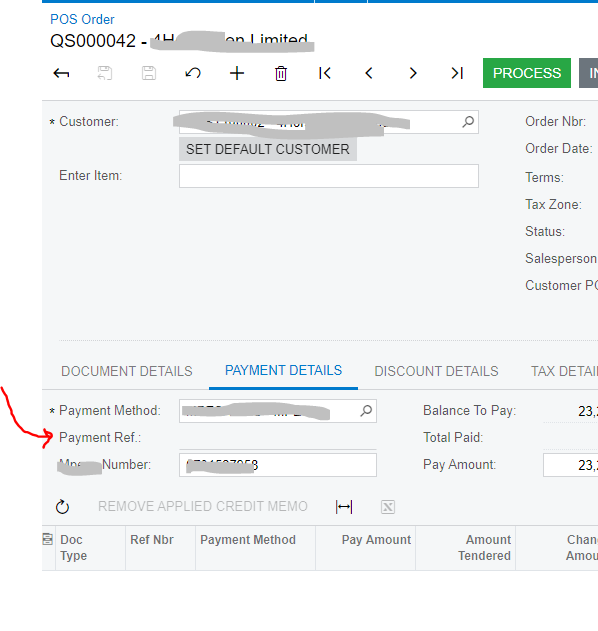
Now, the user have to refresh the browser tab for the reference to reflect from the database to the UI.
see below;
 

is there a way I can refresh the specific field or the column or the tab so that the database value can reflect on the user interface without the user having to refresh the entire tab.

Kindly assist.

any kind of response will be appreciated.

Thank you, great community!

Best answer by Michael Ndungi

@Michael Ndungi, You can try RequestRefresh of the view after persisting the value in the database and see if that helps. 

For more details on it kindly refer, 

Good Luck.!

Thanks

I did it this way and it worked.


public PXAction<IGFS.DAC.IGFSQuickOrder> Refresh;

[PXButton(CommitChanges = true)]
[PXUIField(DisplayName = "Refresh", Enabled = true, MapEnableRights = PXCacheRights.Select, MapViewRights = PXCacheRights.Select)]
protected virtual void refresh()
{
// Ensure that the base graph instance is available
if (Base != null)
{


// Clear and refresh the view
Base.CurrentDocument.Cache.Clear();
Base.CurrentDocument.Cache.ClearQueryCache();
Base.CurrentDocument.View.RequestRefresh();
}
}


3 replies

Vignesh Ponnusamy
Acumatica Moderator
Forum|alt.badge.img+5

@Michael Ndungi, You can try RequestRefresh of the view after persisting the value in the database and see if that helps. 

For more details on it kindly refer, 

Good Luck.!


Michael Ndungi
Varsity I
Forum|alt.badge.img
  • Author
  • Varsity I
  • Answer
  • August 17, 2023

@Michael Ndungi, You can try RequestRefresh of the view after persisting the value in the database and see if that helps. 

For more details on it kindly refer, 

Good Luck.!

Thanks

I did it this way and it worked.


public PXAction<IGFS.DAC.IGFSQuickOrder> Refresh;

[PXButton(CommitChanges = true)]
[PXUIField(DisplayName = "Refresh", Enabled = true, MapEnableRights = PXCacheRights.Select, MapViewRights = PXCacheRights.Select)]
protected virtual void refresh()
{
// Ensure that the base graph instance is available
if (Base != null)
{


// Clear and refresh the view
Base.CurrentDocument.Cache.Clear();
Base.CurrentDocument.Cache.ClearQueryCache();
Base.CurrentDocument.View.RequestRefresh();
}
}


Chris Hackett
Community Manager
Forum|alt.badge.img
  • Acumatica Community Manager
  • August 17, 2023

Thank you for sharing your solution with the community @Michael Ndungi!