




I have a custom table which is used for a selector on my extension of the PMTimeActivity graph.
When you click the lookup, you can see there are two records to choose from:
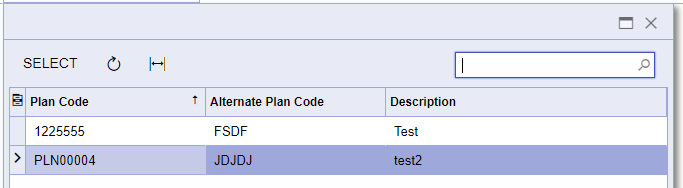
If you type “122”, you can see it finds the first record in the Plan Code field:

If you type “es”, if highlights both of the records in the Description column:

If you type “fs” I want it to show the first record in the selector as that has “FSDF” in the Alternate Plan Code column.

These are the pertinent DAC fields for the custom table
#region PlanCD
[PXDBString(50, IsUnicode = true, IsKey = true, InputMask = ">aaaaaaaaaaaaaaaaaaaaaaaaaaaaaaaaaaaaaaaaaaaaaaaaaa")]
[PXDBDefault]
[PXUIField(DisplayName = "Plan Code", Required = true)]
[PXCheckUnique(typeof(ICSPlan.planCD))]
public virtual string PlanCD { get; set; }
public abstract class planCD : PX.Data.BQL.BqlString.Field<planCD> { }
#endregion
#region LegacyPlanCD
[PXDBString(50, IsUnicode = true, InputMask = ">aaaaaaaaaaaaaaaaaaaaaaaaaaaaaaaaaaaaaaaaaaaaaaaaaa")]
[PXUIField(DisplayName = "Alternate Plan Code")]
[PXDBDefault(PersistingCheck = PXPersistingCheck.Nothing)]
[PXCheckUnique(typeof(ICSPlan.legacyPlanCD))]
public virtual string LegacyPlanCD { get; set; }
public abstract class legacyPlanCD : PX.Data.BQL.BqlString.Field<legacyPlanCD> { }
#endregion
#region Description
[PXDBString(256, IsUnicode = true)]
[PXDBDefault]
[PXUIField(DisplayName = "Description", Required = true)]
public virtual string Description { get; set; }
public abstract class description : PX.Data.BQL.BqlString.Field<description> { }
#endregion
This is the DAC extension field used for the selector
#region UsrPlanCD
[PXDBString(50, IsUnicode = true)]
[PXUIField(DisplayName = "Plan ID")]
[PXSelector(typeof(SearchFor<ICSPlan.planCD>.Where<ICSPlan.active.IsEqual<True>>),
typeof(ICSPlan.planCD),
typeof(ICSPlan.legacyPlanCD),
typeof(ICSPlan.description),
SubstituteKey = typeof(ICSPlan.planCD),
DescriptionField = typeof(ICSPlan.description))]
public string UsrPlanCD { get; set; }
public abstract class usrPlanCD : PX.Data.BQL.BqlString.Field<usrPlanCD> { }
#endregion
Any ideas what I need to do to make the Alternate Plan Code column searchable in the selector? Is my DAC extension and DAC setup properly?

