Answer

Creating new SOOrder PXSelector in CRCAse

  • December 14, 2023
  • 14 replies
  • 150 views

Hello,

I try to create a custom PXSelector reference field in my CRCase (Servicetickets). I want to set a SalesOrder SOOrderEntry as reference field with a selector.
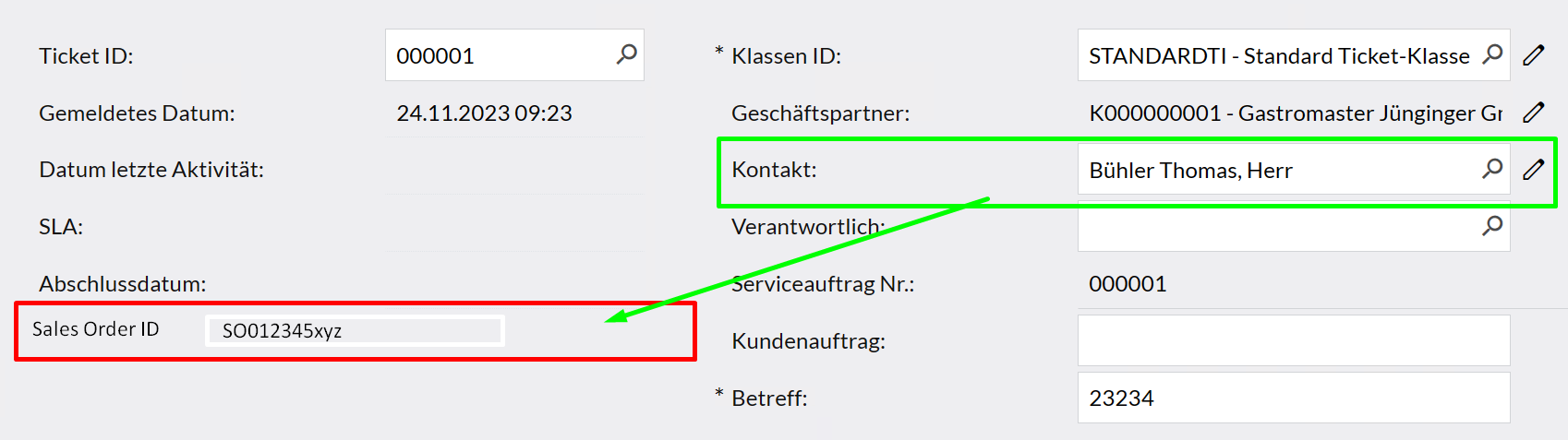
Exactly like the green box but as new field with SOOrder to select.

currently i created a new string field.

every attempt to use a PXSelector with SOOrderEntry fails due to not set references. SOOrderEntry does just not exist in this scope.

CRCase simply has no region for SoOrderID

Best case would be an automaticly set reference in the corresponding order aswell

how can I add the reference and region for SoOrderID and what would be the best approach?


best regards
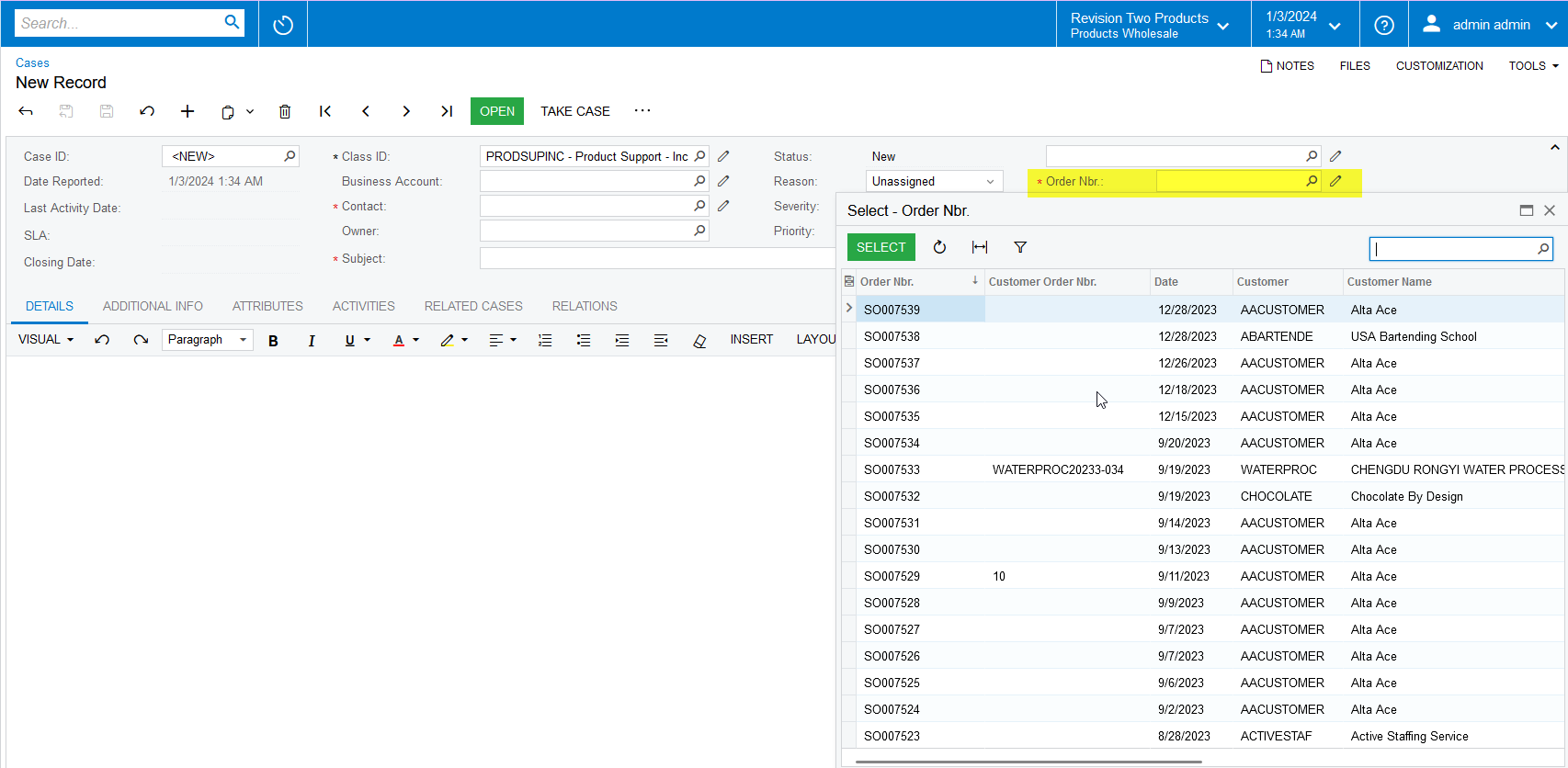
Best answer by Naveen Boga

@RolandZipper  I have resolved these issues and please find the attached latest package.

After publishing the customization package, I can able to see the Order Nbr field in the Cases screen. Please find the screenshot for reference.


14 replies

Naveen Boga
Captain II
Forum|alt.badge.img+19
  • Captain II
  • December 14, 2023

@RolandZipper Do you want to create a Sales Order Nbr (Selector) custom field in the above screen?


  • Author
  • Freshman I
  • December 14, 2023

@Naveen Boga yes


Naveen Boga
Captain II
Forum|alt.badge.img+19
  • Captain II
  • December 14, 2023

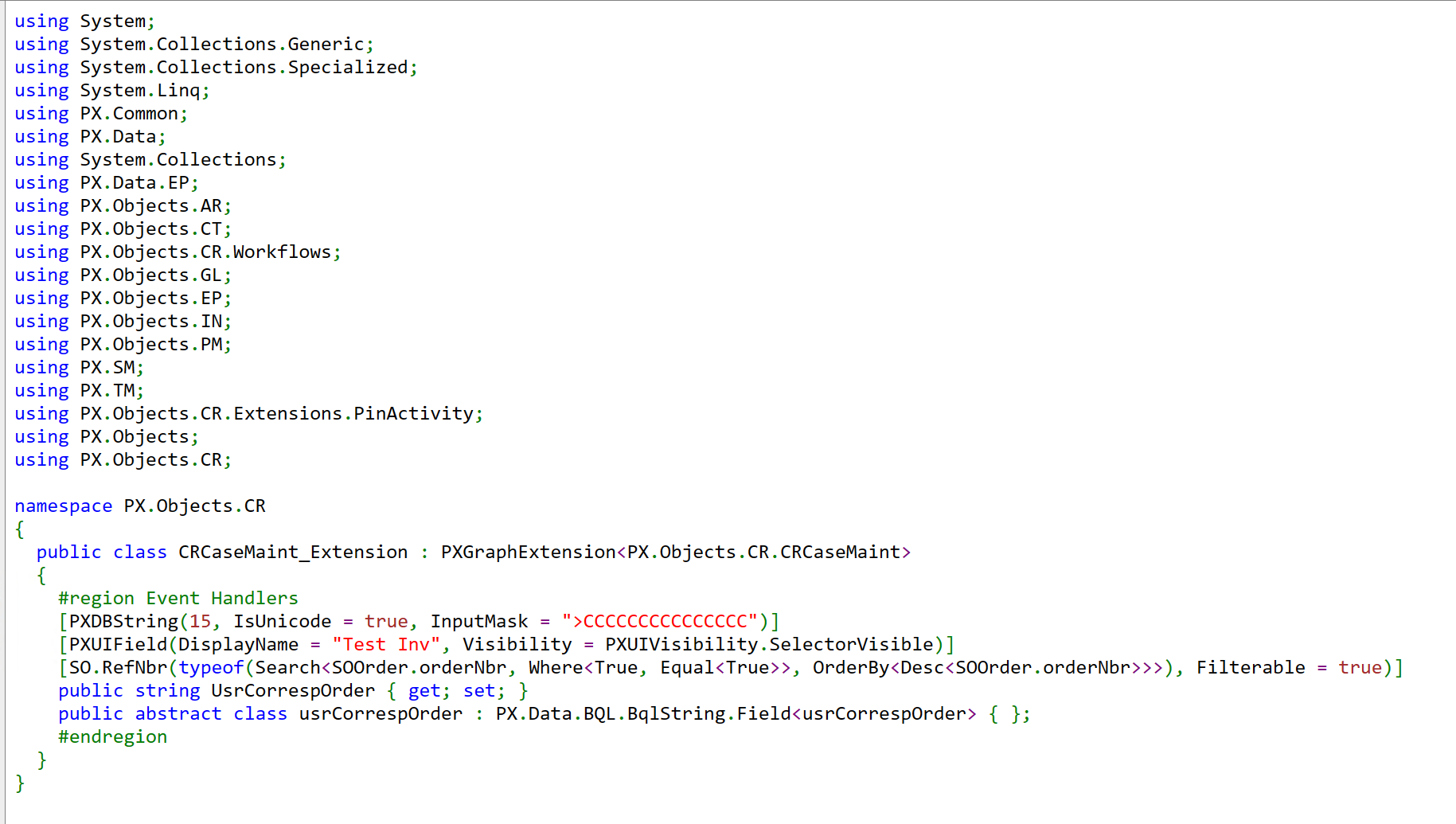
@RolandZipper  Please add the field like below for the Sales Order Nbr lookup field.


	[PXDBString(15, IsUnicode = true, InputMask = ">CCCCCCCCCCCCCCC")]		
[PXUIField(DisplayName = "Test Inv", Visibility = PXUIVisibility.SelectorVisible)]
[SO.RefNbr(typeof(Search<SOOrder.orderNbr, Where<True, Equal<True>>, OrderBy<Desc<SOOrder.orderNbr>>>), Filterable = true)]
public string UsrCorrespOrder { get; set; }
public abstract class usrCorrespOrder : PX.Data.BQL.BqlString.Field<usrCorrespOrder> { };


  • Author
  • Freshman I
  • December 15, 2023

Thank you for the reply.


As expected acumatica shows following behavior when compiling:


\App_RuntimeCode\CRCaseMaint.cs(29): error CS0234: The type or namespace name 'RefNbrAttribute' does not exist in the namespace 'PX.Objects.SO' (are you missing an assembly reference?)
\App_RuntimeCode\CRCaseMaint.cs(29): error CS0234: The type or namespace name 'RefNbr' does not exist in the namespace 'PX.Objects.SO' (are you missing an assembly reference?)
\App_RuntimeCode\CRCaseMaint.cs(29): error CS0246: The type or namespace name 'SOOrder' could not be found (are you missing a using directive or an assembly reference?)
\App_RuntimeCode\CRCaseMaint.cs(29): error CS0246: The type or namespace name 'Filterable' could not be found (are you missing a using directive or an assembly reference?)

Naveen Boga
Captain II
Forum|alt.badge.img+19
  • Captain II
  • December 15, 2023

@RolandZipper Can you share the customization package here?


  • Author
  • Freshman I
  • December 15, 2023

its empty apart from:
 

and


Naveen Boga
Captain II
Forum|alt.badge.img+19
  • Captain II
  • December 15, 2023

@RolandZipper  Why are you adding the Extended field in the Graph Extension. This is completely wrong.

Please extend the DAC of CRCase and add this field also include the below namespace in the DAC Extension and publish the package.


using PX.Objects.SO;


  • Author
  • Freshman I
  • January 3, 2024

Hello, 
Sorry for my late reply, I wish you a happy new year.
You are completly right I added it wrong. 


This is how I added it now, some assembly references seem to be missing.

best regards.


Naveen Boga
Captain II
Forum|alt.badge.img+19
  • Captain II
  • January 3, 2024

@RolandZipper  Happy New Year!!

Please export your customization package and share it here for our review.


  • Author
  • Freshman I
  • January 3, 2024

Here it is


Naveen Boga
Captain II
Forum|alt.badge.img+19
  • Captain II
  • January 3, 2024

@RolandZipper you have shared the XML file, which I can not import into my instance. 

Please export the customization package using EXPORT button from the Customizations Projects screen and share it here.

Here is the screenshot for your reference.


  • Author
  • Freshman I
  • January 3, 2024

I’m sorry, here is the file


Naveen Boga
Captain II
Forum|alt.badge.img+19
  • Captain II
  • Answer
  • January 3, 2024

@RolandZipper  I have resolved these issues and please find the attached latest package.

After publishing the customization package, I can able to see the Order Nbr field in the Cases screen. Please find the screenshot for reference.


  • Author
  • Freshman I
  • January 8, 2024

Thank you.