Solved

Shipping Method when Exporting to BigCommerce

  • January 24, 2022
  • 8 replies
  • 133 views

Yuri Karpenko
Captain II
Forum|alt.badge.img+6

Hello community,

Is there a way to map Ship Via code from Acumatica to Shipping Method in BigCommerce when doing sales orders / shipment export? I’m specifically talking about uploading net new orders from Acumatica to BigCommerce.

The mapping on the BigCommerce Stores > ORDER SETTINGS tab seem to work only one way.

Thank you,

Yuriy Karpenko

Best answer by smarenich

@yurik05 Currently Ship Via is not mapped for export of sales orders.

I think you can use EntitiesMapping window to map ShippingMethod and ShippingZone. If you have more complicated requirements, you can look at the customization capabilities.

I will also add your request for future considerations. 

8 replies

smarenich
Acumatica Moderator
Forum|alt.badge.img+3
  • Acumatica Commerce Edition Team Lead
  • 227 replies
  • Answer
  • January 25, 2022

@yurik05 Currently Ship Via is not mapped for export of sales orders.

I think you can use EntitiesMapping window to map ShippingMethod and ShippingZone. If you have more complicated requirements, you can look at the customization capabilities.

I will also add your request for future considerations. 


Yuri Karpenko
Captain II
Forum|alt.badge.img+6
  • Author
  • Captain II
  • 422 replies
  • January 28, 2022

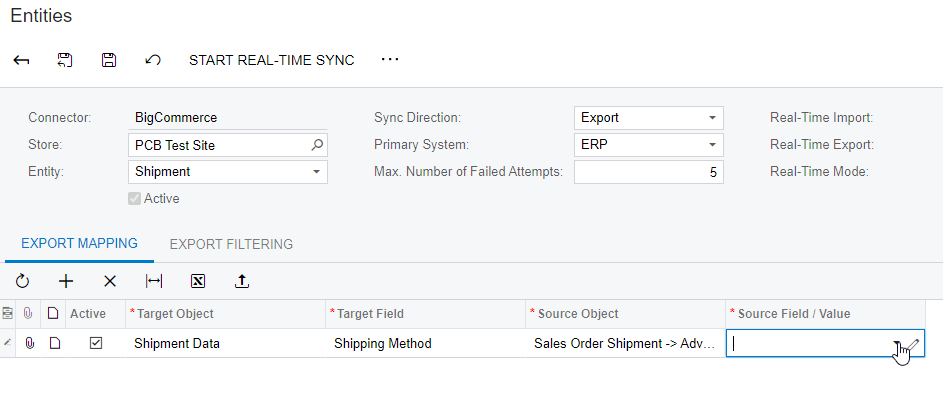
@smarenich , the issue is that on the Entities Mapping screen, source field is empty:

Clicking that dropdown shows nothing to me (tried in a couple different instances. Even if they are there, I’m not sure it’s solving the issue.


smarenich
Acumatica Moderator
Forum|alt.badge.img+3
  • Acumatica Commerce Edition Team Lead
  • 227 replies
  • January 28, 2022

@yurik05  you can type formula in the Source Field/Value, like in the import scenarios

For example: =’fedex’


Yuri Karpenko
Captain II
Forum|alt.badge.img+6
  • Author
  • Captain II
  • 422 replies
  • January 28, 2022

@smarenich , right, but that would be static, no? Do you think this will work?

=switch([SOShipment.ShipVia]='UPSGROUND','UPS Ground',[SOShipment.ShipVia]='FEDEX','FedEx')

Thank you!


smarenich
Acumatica Moderator
Forum|alt.badge.img+3
  • Acumatica Commerce Edition Team Lead
  • 227 replies
  • January 28, 2022

@yurik05 unfortunately, in BigCommerce it a know bug. This problem is fixed in Acumatica 2021r120 version.

Until this build I think I can offer you a customization. Similar to what is suggested by Vivek here - 


Yuri Karpenko
Captain II
Forum|alt.badge.img+6
  • Author
  • Captain II
  • 422 replies
  • January 28, 2022

@smarenich , when are you planning to release 2021R120? Upgrade might be easier in this case (vs. customization). Thanks!


Yuri Karpenko
Captain II
Forum|alt.badge.img+6
  • Author
  • Captain II
  • 422 replies
  • January 28, 2022

@smarenich , ideally, I think it would be nice if we could use the same SHIPPING OPTION MAPPING form on the ORDER SETTINGS tab of the BC201000 screen, so that the export mapping would not need to be re-configured on the Entity Mapping screen.


smarenich
Acumatica Moderator
Forum|alt.badge.img+3
  • Acumatica Commerce Edition Team Lead
  • 227 replies
  • January 28, 2022

@yurik05 the 2021r120 will be released by the end of Feb.

I’ll see of what we can do with mapping, may be in the future versions we can bring the better mapping. Thanks for the suggestion.