

Answer

Issue: Admin Access Rights to Customers Object in GI

  • February 20, 2024
  • 11 replies
  • 1318 views

Summary

We recently updated to 2023 R2.

After the update I am getting an access rights error whenever I attempt to use the Customers table/object in a Generic Inquiry.

I have admin access rights and there was no issue before the update.


Details

The exact text of the error is: 'This field will not be displayed for the current user because the user has insufficient access rights or the required feature is disabled' 
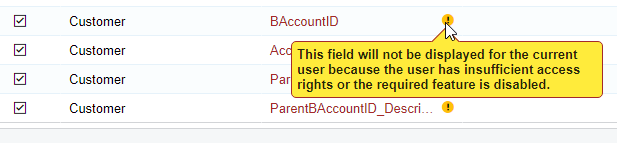


If I do use the fields they will end up blank when I view the GI.
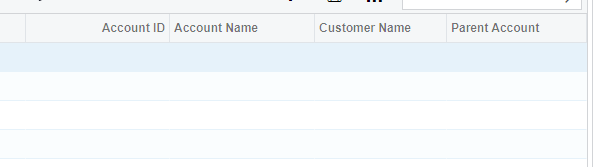
 

This warning does show up in GIs that were made before the update, but the data is not missing when viewing those GIs.

Self-Service Resources


Troubleshooting

  • Access Rights by Roles Screen and Report - The admin role has 'delete' restriction level on everything

  • Access Rights by User Screen - Did not see anything that would result in this issue

  • Restriction Groups - We don't have any restriction groups

  • Users Screen - I removed any other roles from my account besides admin and the issue did not resolve itself

  • DAC Browser - I can view the PX.Objexts.AR.Customer source data with no issues

  • Generic Inquiry Screen Trace - No related trace warnings/issues/info

  • Customer Screen - No Issues opening screen or viewing any data

  • Customer Screen Trace - No related trace warnings/issues/info


I don’t know where else to look or if I overlooked anything.

Any help is appreciated.

Best answer by andrewleusink

Got an unexpectedly quick answer from Acumatica support, props to them:


Hope you are having a great start to the week!

This is a known issue that is scheduled to be fixed in 24R2.

However, it is supposed to be cosmetic and should not have a functional impact.

I am concerned that you have mentioned that new GIs do not show data.

Can you kindly provide the URL to this particular GI as this needs to be investigated.


As for the empty results in the GI, that was a simple error on my end.

Just took opening a case, writing a forum question and multiple attempts over multiple days to figure it out what should have been obvious.

11 replies

kyoung14
Varsity I
Forum|alt.badge.img
  • Varsity I
  • February 20, 2024

I reported this issue as well to the community (see link below).  Also no solution.


  • Author
  • Answer
  • February 20, 2024

Got an unexpectedly quick answer from Acumatica support, props to them:


Hope you are having a great start to the week!

This is a known issue that is scheduled to be fixed in 24R2.

However, it is supposed to be cosmetic and should not have a functional impact.

I am concerned that you have mentioned that new GIs do not show data.

Can you kindly provide the URL to this particular GI as this needs to be investigated.


As for the empty results in the GI, that was a simple error on my end.

Just took opening a case, writing a forum question and multiple attempts over multiple days to figure it out what should have been obvious.


Chris Hackett
Community Manager
Forum|alt.badge.img
  • Acumatica Community Manager
  • February 20, 2024

Thank you for sharing the solution with the community @andrewleusink!


Forum|alt.badge.img
  • Jr Varsity II
  • February 20, 2024

@andrewleusink and @kyoung14 we just upgraded last night to 23R2 and I am experiencing the same error on our GIs. 

Waiting for this to be fixed with 24R2 is not an option.  Were you able to see these fields through some other manner?

Thanks

Patrick


kyoung14
Varsity I
Forum|alt.badge.img
  • Varsity I
  • February 20, 2024

Even though it appears the fields are not available, as mentioned above it is just cosmetic.  GI’s return data for those fields regardless of that error message - at least in my findings so far.


meganfriesen37
Captain II
Forum|alt.badge.img+12

@andrewleusink Thanks!  We just encountered this issue today.  It also appears to be an issue for 24R1 as well.


  • Jr Varsity I
  • August 26, 2024

We just upgraded to 2024 R1 and are seeing the same warning, but also some of our GIs are not loading at all now.  We are getting this message:


The column 'PMBudget_Formula6d964bf6043c44948060150d80d5d558' was specified multiple times for 'InnerQuery'. Or the GIs will load but when we try to filter, we get errors.  I’m not trained in SQL but these were GIs that worked before our upgrade.  Any ideas?


Thanks


Maggie


I’m seeing this same issue however the fields are not all showing up on the GI. Basic fields too from Customer and Invoice. Using an ‘admin’ user.

Just upgraded to 2024 R1.


  • Freshman I
  • August 18, 2025

I’m experiencing the same issue in 2024R1


meganfriesen37
Captain II
Forum|alt.badge.img+12

@salmans90 are you able to run the inquiry or are the results empty?  For the most part, what I’ve observed in 2024R1 is that you get the warning, but then you can run the inquiry with no issues and view all the data.


  • Freshman I
  • August 20, 2025

@meganfriesen37 I’m able to run the GI, but it shows no data. The configured criteria should return purchase orders with overdue promised dates


