

Answer

Authorize.net sandbox processing center setup error

  • September 21, 2023
  • 5 replies
  • 371 views

Forum|alt.badge.img

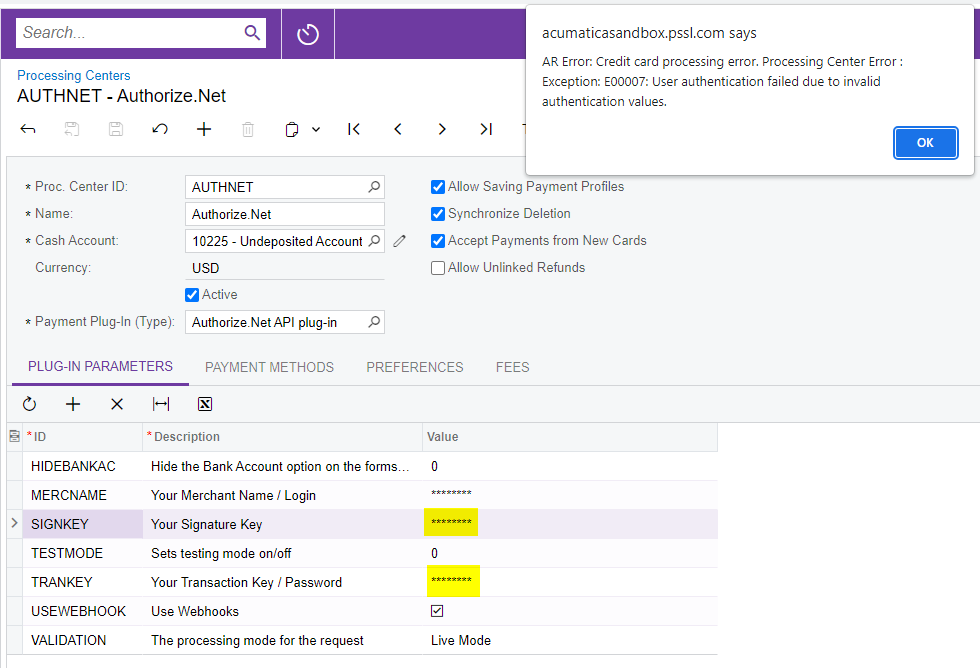
We are trying to set up our Authorize.net sandbox account as a processing center on our Acumatica sandbox tenant, however we’re getting the below error message. I created a brand new Signature Key and Transaction Key and still when I try to test credentials I get this error.

Any ideas how to get around this? I’ve played around with TESTMODE and VALIDATION parameters and that hasn’t helped.
 

Best answer by michaelho

I figured out the issue - the MERCNAME line (with the description of “Your Merchant Name / Login”) is a little misleading; this value actually needs to be the API Login ID:


5 replies

Manikanta Dhulipudi
Captain II
Forum|alt.badge.img+15

Hi @mikeho 

Please try this


Forum|alt.badge.img
  • Author
  • Semi-Pro II
  • September 21, 2023

@manikantad18 - still seeing the same error:


Manikanta Dhulipudi
Captain II
Forum|alt.badge.img+15

In this case please touch base with support team


This error occurs when the Authorize.net API key is different from the keys inputted in your Recharge account. Contact the Recharge Support team with your new keys if your Authorize.net API and transaction keys have changed.


E00007 – User authentication failed due to invalid authentication values.

This error occurs when the API environment doesn't recognize the API Login ID and Transaction Key submitted. There are three possible causes of this error:

  • Posting a live account's API Login ID and Transaction Key to the test environment at https://apitest.authorize.net/xml/v1/request.api -- For live accounts, please post to https://api.authorize.net/xml/v1/request.api instead.
  • Posting a test account's API Login ID and Transaction Key to the live environment at https://api.authorize.net/xml/v1/request.api -- For test accounts, please post to https://apitest.authorize.net/xml/v1/request.api instead.
  • The API Login ID or Transaction Key have errors.

Forum|alt.badge.img
  • Author
  • Semi-Pro II
  • Answer
  • September 25, 2023

I figured out the issue - the MERCNAME line (with the description of “Your Merchant Name / Login”) is a little misleading; this value actually needs to be the API Login ID:


Chris Hackett
Community Manager
Forum|alt.badge.img
  • Acumatica Community Manager
  • September 25, 2023

Thank you for sharing your solution with the community @mikeho!


