Question

Getting the error error":"'POAccrualAcctID' cannot be empty. when submitting a PO Receipt

  • February 12, 2024
  • 7 replies
  • 208 views

In our application we are creating Purchase Order Receipts and they had been working fine, but we had not used this function for 6 months or so  and are using it again. 

We are getting this error

GuzzleHttp\Exception\ClientException: Client error: `PUT https://prestigesalonproducts.acumatica.com/entity/ORDIO/20.200.001/PurchaseReceipt` resulted in a `422 Unprocessable Entity` response: {"id":"15468762-cac9-ee11-65424-12a215648465216","rowNumber":1,"note":null,"error":"'POAccrualAcctID' cannot be empty.;


Here is our code

return [

            'note' => $receipt->comment,

            'VendorID' => ['value' => $po->vendor_id],

            'PostPeriod' => ['value' => now()->format('mY')],

            'Details' => collect($receipt->products)->map(function ($product, $key) use ($po) {

                return [

                    'InventoryID' => ['value' => $product->inventory_id],

                    'ReceiptQty' => ['value' => $product->qty],

                    'POOrderNbr' => ['value' => $po->ref_number],

                    'POOrderType' => ['value' => 'Normal'],


                ];

            })->values()->toArray(),


I don’t see where the variable POAccrualAcctID is part of the API I did find AccuralAccount

and tried adding 

'Account' => ['AccrualAccount' => ['value' => '2222']],

or 

'Account' => ['POAccrualAcctID' => ['value' => '2222']],


Thank you very much for your help 



7 replies

anahizentella94
Jr Varsity III
Forum|alt.badge.img

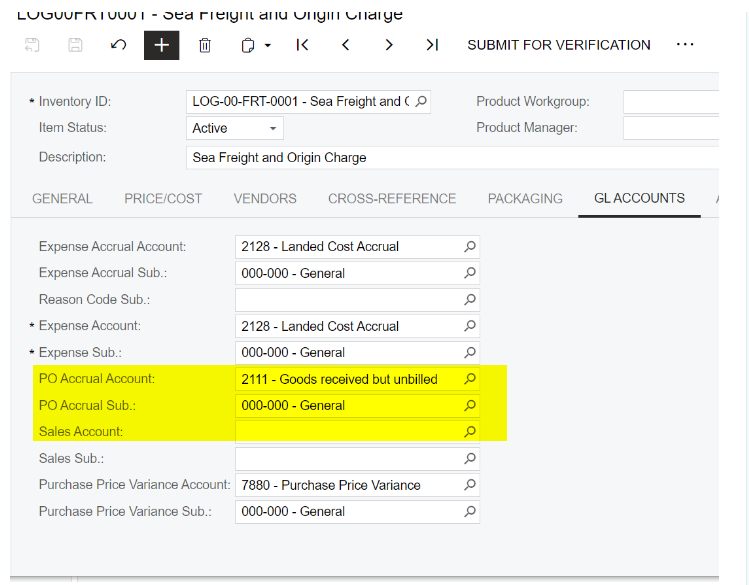
Have you verify that Inventory Item has Purchase Accrual account configured? 


Manikanta Dhulipudi
Captain II
Forum|alt.badge.img+16

@nextgendesigns 

Please check the GL accounts mapping done for Inventory ID and item class 


dcomerford
Captain II
Forum|alt.badge.img+16
  • Captain II
  • February 13, 2024

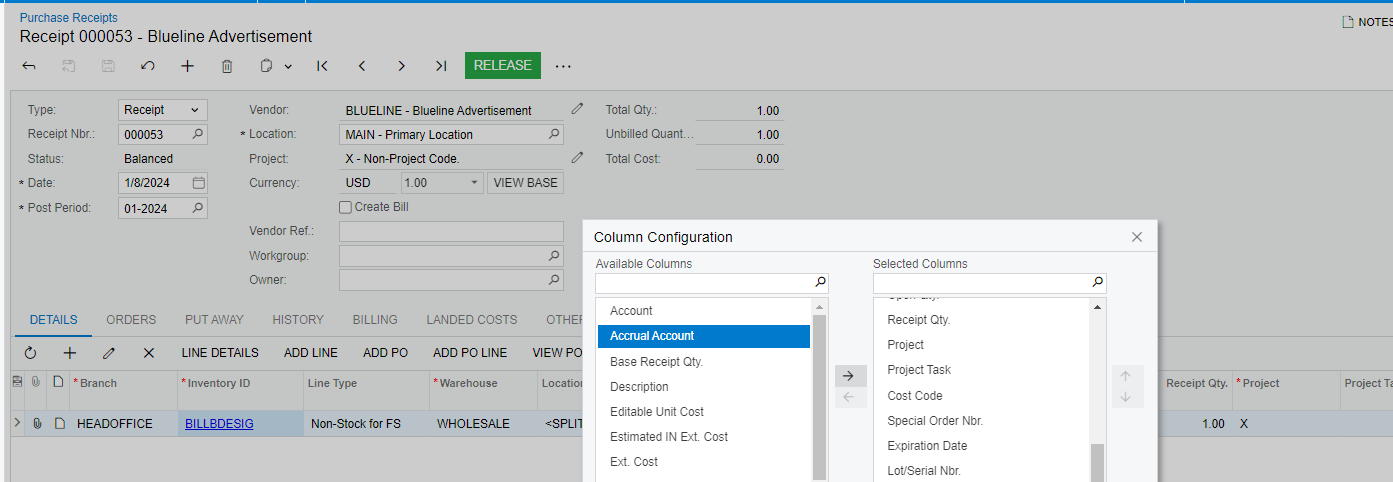
On the Purchase Receipt>Details you can add the Accrual Account so you can see what is being set to. Try manually doing the receipt using the same item and vendor and see if this is getting set as if it is you do not need to sent it in API call unless you want it to post somewhere else


  • Author
  • Freshman I
  • February 14, 2024

Thank you all for the input! I had hoped that was the issue, but I checked and the items that we are having the error on have an AccrualAccount set and when comparing it to ones that do work they match for the Accrual Account

When I get the untruncated api reasponce it is

"AccrualAccount":{"error":"''Accrual Account'' cannot be empty."},

Even if I try to manually add in 


'Account' => ['AccrualAccount' => ['value' => '2222']],

It still gives same the error. 

If I do a manual Receipt it works fine and shows the Accrual account


When I use the API the top one 6700000 fails with the Accrual Account error and the bottom one 6700010 submits just fine if i enter a receipt though the api with just them on there 


Chris Hackett
Community Manager
Forum|alt.badge.img
  • Acumatica Community Manager
  • March 28, 2024

Hi @nextgendesigns were you able to find a solution? Thank you!


  • Author
  • Freshman I
  • January 28, 2026

Hi! Still no solution for this, had set it aside, but now back on it and trying to get it resolved. 


zherring
Freshman I
  • Freshman I
  • January 31, 2026

Not sure if this will help but verify that your endpoint has access to all required fields and that when you do PUT that you are populating those required fields (with the right data).

I've had issues before where my required field for a form or detail was a selector and made up of number and type so just putting the whole selector field on the endpoint was not enough. It wanted me to use both the number and type separately to find the record. It seems like from what you have said in this thread that doing it manually works, so in my eyes the issue lies in the way you do your API request and what fields are available.