Question

Unit Testing Business Logic involving BQL

  • January 11, 2023
  • 3 replies
  • 105 views

Forum|alt.badge.img

I am trying to create unit tests for a graph extension that I’ve developed for ARInvoiceEntry. The business logic depends on the cash account used. So we query the database for the cash account to get all the fields of the CashAccount DAC and its DAC extension. Then depending on the values of the field in CashAccount, the logic will set values in ARRegister. I am stuck on how to set up the ARInvoiceEntry graph to start unit testing the logic. 


I assume that because unit tests don’t use the database, we cannot test logic which use BQL queries or logic which access the database such as [DAC].PK.Find(). Is this the case or am I wrong? Is there a way to either:

1. Create unit tests for logic which query the database.
2. Create code which is unit testable (Maybe best practices would be to always check the cache? So code would be unit-testable as long as we know how to fill the cache.)

Thanks for the help, it is greatly appreciated.

3 replies

Elena Abilova
Community Manager
Forum|alt.badge.img
  • Education Technology Analyst
  • January 11, 2023

Hi @naufal58.

We have the following course on Unit Tests: https://openuni.acumatica.com/courses/development/t280-development-testing-business-logic/. Maybe it can be helpful.


Dmitrii Naumov
Acumatica Moderator
Forum|alt.badge.img+7
  • Acumatica Moderator
  • January 11, 2023

Hello @naufal58 

Things like [dac].PK.Find() should work in unit tests if you pre insert the data in the cache. 

E.g. see the example below where a cash account in inserted in the cache

https://github.com/Acumatica/UnitTestExamples/blob/master/UnitTestsDemo/Tests/CATransferTest.cs


Forum|alt.badge.img
  • Author
  • Jr Varsity II
  • January 12, 2023

Hi, thanks for the replies. I am currently trying to fill the caches as suggested. But setting values of some fields show different results when debugging. For example:

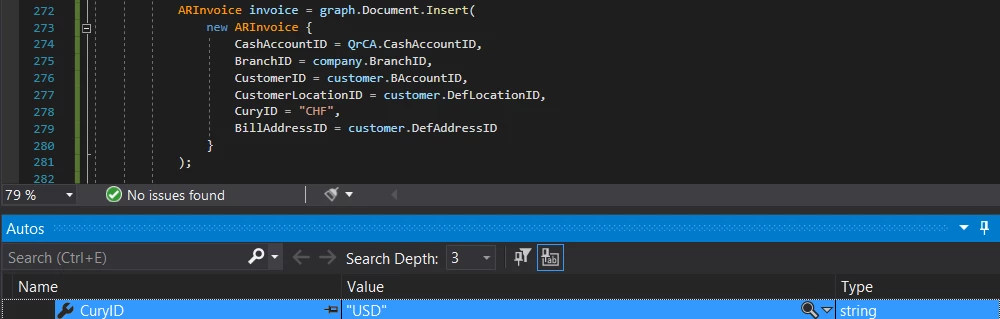
  1. Setting the ARInvoice.CashAccountID to the id of the cash account inserted, ARInvoice.CashAccountID shows null.


  2. Setting ARInvoice.CuryID to “CHF”, debugging shows “USD”
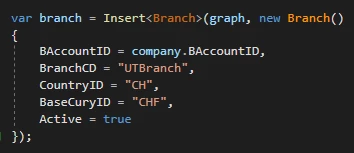
  3. Setting countryID of a Branch also doesn’t have any effect and debugging shows null.

    Setting field values of Branch
    CountryID and BaseCuryID are null


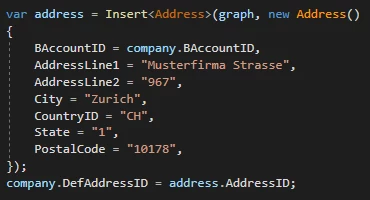
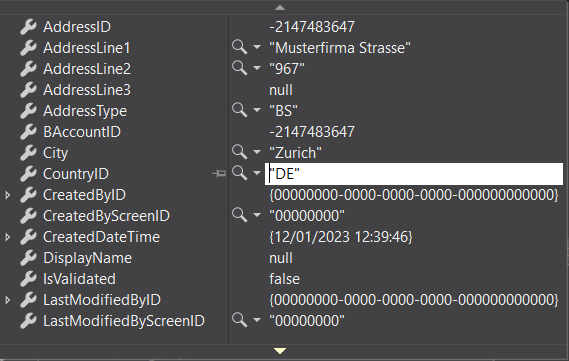
  4. Setting countryID of Address to “CH”, debugging shows “DE”
    Code setting fields of Address record
    Debugging Values of Address