Answer

Type Name does not Exist Error

  • February 19, 2024
  • 6 replies
  • 247 views

Michaelh
Pro I
Forum|alt.badge.img+2

I’m trying to enable a field for edits during any document state.

  • I created the field.
  • I made it into a ComboBox
  • I added it to a screen
  • I enabled it via the workflows to be editable
  • I cannot get the cache to unlock though


Attached is my error:
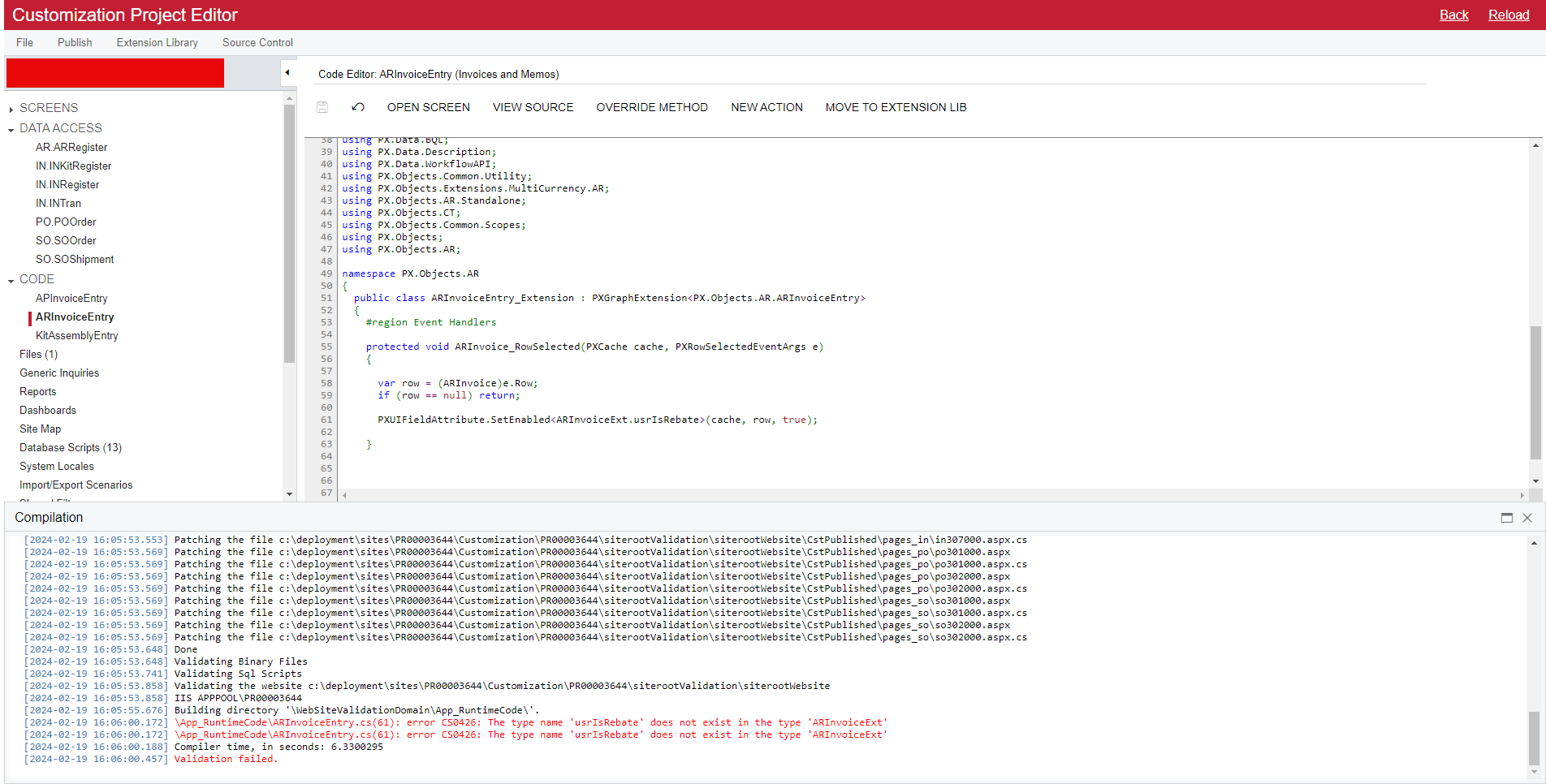


But that field exists and does have that name:
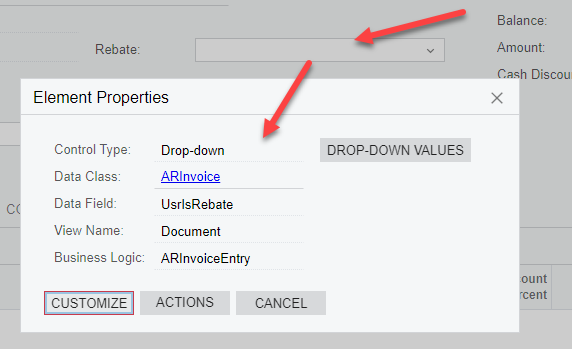


Did I mistype the cache segment? 


I selected the field, I chose EVENTS, I chose ROW SELECTED, I chose ADD HANDLER, KEEP BASE METHOD.

I then inserted two lines into that generated code brick:

      if (row == null) return;

      PXUIFieldAttribute.SetEnabled<ARInvoiceExt.usrIsRebate>(cache, row, true);


Can someone save me here?
Best answer by Zoltan Febert

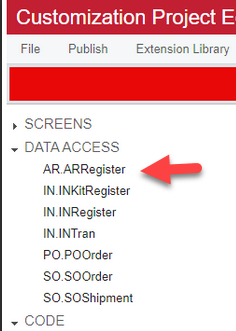
I always use extension libraries instead of customization editor, so it was easy to find the class name in the source code. However, you can also see it in the customization project editor, there is no customized AR.Invoice there, only AR.Register:


6 replies

Zoltan Febert
Jr Varsity I
Forum|alt.badge.img+3
  • Jr Varsity I
  • February 19, 2024

Hi @Michael Hansen,

Your field is created in ARRegisterExt class, you need to use ARRegisterExt.usrIsRebate in your RowSelected Event.


Michaelh
Pro I
Forum|alt.badge.img+2
  • Author
  • Pro I
  • February 19, 2024

Thank you kind sir! What tipped you off to knowing that? I’d like come better prepared for my next adventure.


Zoltan Febert
Jr Varsity I
Forum|alt.badge.img+3
  • Jr Varsity I
  • Answer
  • February 19, 2024

I always use extension libraries instead of customization editor, so it was easy to find the class name in the source code. However, you can also see it in the customization project editor, there is no customized AR.Invoice there, only AR.Register:


Michaelh
Pro I
Forum|alt.badge.img+2
  • Author
  • Pro I
  • February 19, 2024

I must be the luckiest idiot in the world. All my previous segments just happened to match (Purchase Orders being POOrder and POOrderExt). Thank you for this insight, I assumed it was the name given in the variable call:

var row = (ARInvoice)e.row;

I will use the Data Access names going forward.

Marked you as best answer.


Zoltan Febert
Jr Varsity I
Forum|alt.badge.img+3
  • Jr Varsity I
  • February 21, 2024

Hi @Michael Hansen, I found another way to find out the field name:


Michaelh
Pro I
Forum|alt.badge.img+2
  • Author
  • Pro I
  • February 21, 2024

Even better thank you! I wish I could mark two answers here!