



Hi Expert.
I added 2 field this screen FA303000

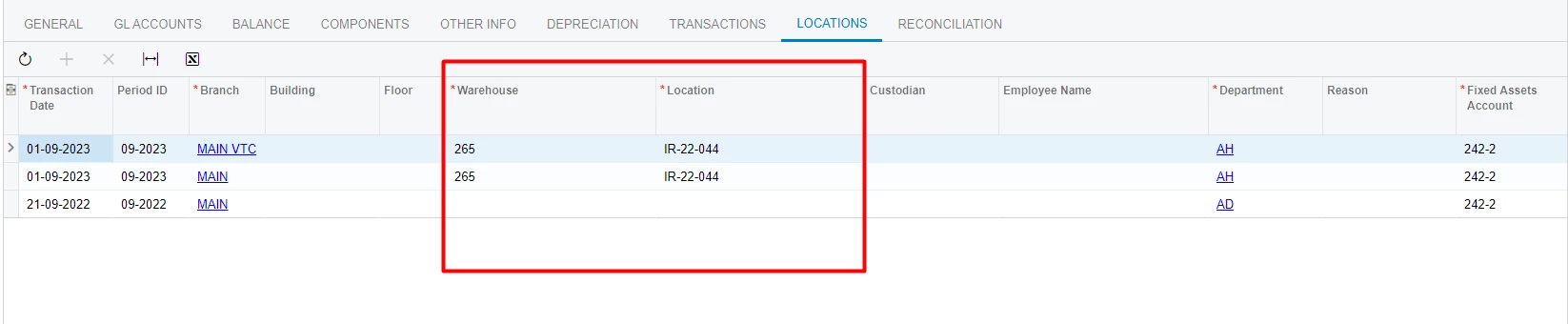
Base locgic: if change value field Department and more.. then tab “Locations” insert a row into FALocationHistory table.
Now I want 2 field Warehouse and Location change value => insert new row into FALocationHistory table (behavior same field Department).
I try many solutions and overried base code but The system is still not working properly.
protected virtual void FixedAsset_RowUpdating(PXCache sender, PXRowUpdatingEventArgs e)

        {

            var newAsset = e.NewRow as FixedAsset;

            var oldAsset = e.Row as FixedAsset;

            if (newAsset == null) return;
            if (this.WillAccountsBeChanged(newAsset, oldAsset, out int? faAccID, out int? faSubID, out int? accDeprAccID, out int? accDeprSubID)

                && FAInnerStateDescriptor.IsAcquired(newAsset.AssetID, this)

                && !FAInnerStateDescriptor.WillBeTransferred(newAsset.AssetID, this)

                )

            {

                if (AssetDetails.Current == null)

                {

                    AssetDetails.Current = AssetDetails.Select();

                }

                if (AssetLocation.Current == null)

                {

                    AssetLocation.Current = AssetLocation.Select();

                };

                FALocationHistory newLocation = PXCache<FALocationHistory>.CreateCopy(AssetLocation.Current);

                try

                {

                    newLocation.RefNbr = null;
                    if (IsImport)

                    {

                        int? organizationID = PXAccess.GetParentOrganizationID(CurrentAsset.Current.BranchID);

                        string periodID = FinPeriodRepository.FindFinPeriodByDate(Accessinfo.BusinessDate, organizationID)?.FinPeriodID;

                        newLocation.PeriodID = periodID;

                    }

                    else

                    {

                    newLocation.PeriodID = GetTransferPeriod(newAsset.AssetID);

                    }
                    newLocation.ClassID = CurrentAsset.Current.ClassID;

                    newLocation.RevisionID = AssetDetails.Current.LocationRevID;

                    newLocation.TransactionDate = GetTransferDate(newAsset.AssetID, newLocation.PeriodID);

                    newLocation = (FALocationHistory)AssetLocation.Cache.Insert(newLocation);

                }

                finally { }

            }

        }
Can you help me? Many thanks everyone.




