


Answer

A/R Auto Credit Memo Application

  • November 17, 2022
  • 3 replies
  • 206 views

jyounes
Jr Varsity II
Forum|alt.badge.img+1

Is there a way to turn off Auto application of Credit memos in accounts receivable?

I want to be able to choose what credits get applied to what invoices so the customer and I are on the same page.  I can do this by un-applying the credits, but this is making more lines than necessary and extra steps to the process.

Best answer by BenjaminCrisman

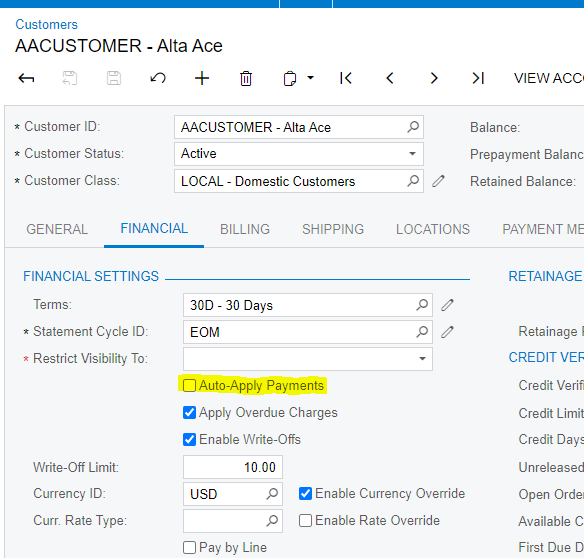
Hi @jyounes! Do you have the option selected on the customer to Auto-Apply Payments?

According to the help documentation this will also apply Credit Memos

3 replies

jyounes
Jr Varsity II
Forum|alt.badge.img+1
  • Author
  • Jr Varsity II
  • November 17, 2022

But wait there is more, the auto application did not factor in the early pay discount (since the credit was a deposit/prepayment)


BenjaminCrisman
Acumatica Employee
Forum|alt.badge.img+4
  • Acumatica Support Team
  • Answer
  • November 17, 2022

Hi @jyounes! Do you have the option selected on the customer to Auto-Apply Payments?

According to the help documentation this will also apply Credit Memos


jyounes
Jr Varsity II
Forum|alt.badge.img+1
  • Author
  • Jr Varsity II
  • November 17, 2022

Thanks! I was looking under A/R Settings!  That customer was checked, I will review my customers and make sure they are off.
