
Question

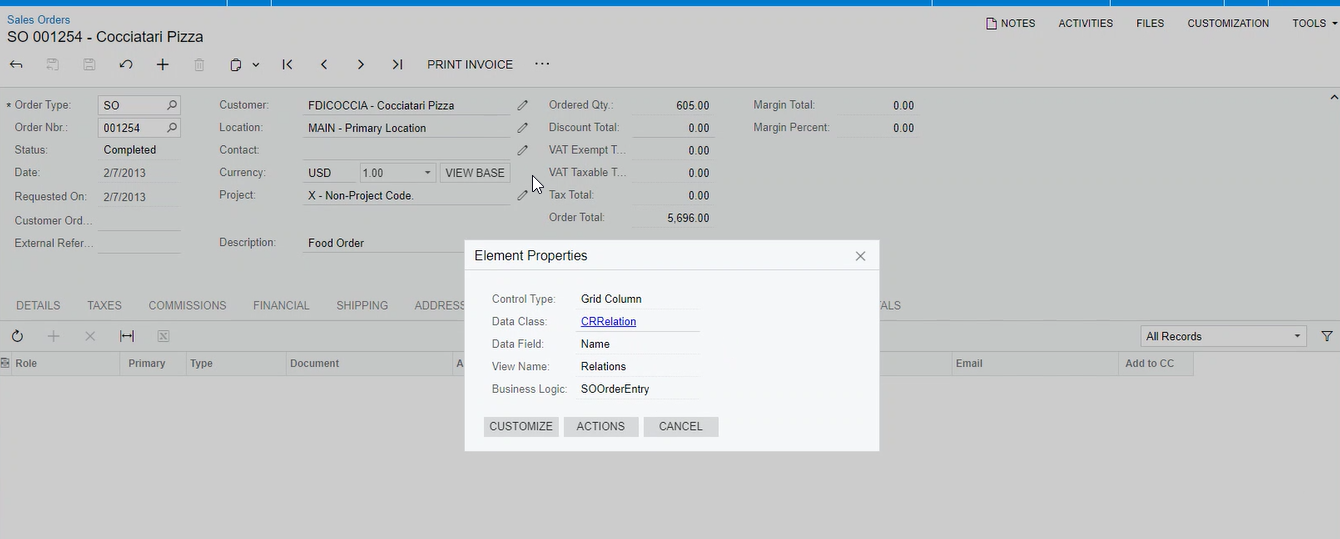
Sales Orders screen Relations tab view is missing in the graph

  • Oct 10, 2023 3:16 PM UTC
  • 5 replies
  • 147 views
  • Translate All

vidyakeerthik
Freshman II
Forum|alt.badge.img

Hi Team,

We don’t see the Relations View in the base graph SOOrderEntry or Extended graphs, whereas available in the aspx.

Could you please help us how to access that view in the custom extension graph of the our customization.


Thanks & Regards,

Vidyakeerthi K

5 replies

hkabiri
Acumatica Moderator
Forum|alt.badge.img+8
  • Acumatica Support Team
  • Oct 10, 2023 3:44 PM UTC

@vidyakeerthik  On the Sales Orders (SO301000) form, the Relations tab is shown only if the Customer Management feature is enabled on the Enable/Disable Features (CS100000) form.

Can you check if you have this feature is enabled?

Translate

palbores
Jr Varsity I
Forum|alt.badge.img+1
  • Jr Varsity I
  • Oct 10, 2023 3:47 PM UTC

Hi @vidyakeerthik, I just found this extension in SOOrderEntry_CRRelationDetailsExt with an inheritance of this below. Maybe you can access the view “Relations” now using that. in CRRelationDetailsExt, you can see the Relations view there. Hope this help.

  public class CRRelationExt : CRRelationDetailsExt<SOOrderEntry, SOOrder, SOOrder.noteID>


Translate

vidyakeerthik
Freshman II
Forum|alt.badge.img
  • Author
  • Freshman II
  • Oct 10, 2023 4:56 PM UTC

@hkabiri 

Thanks for your response. Yes, it’s visible on the UI. Was looking to access the view of that grid from the code.

Translate

vidyakeerthik
Freshman II
Forum|alt.badge.img
  • Author
  • Freshman II
  • Oct 10, 2023 4:57 PM UTC

@palbores 

Thanks, this helps. We will try it and update you.

Appreciate the quick response.


Translate

Forum|alt.badge.img+9
  • Semi-Pro III
  • Oct 11, 2023 6:07 AM UTC

Hi @vidyakeerthik ,

Below is the view used in Code to insert Relations tab Record while creating Sales order (CRCreateSalesOrder graph).

        [PXCopyPasteHiddenView]
[PXViewName("Relations")]
[PXFilterable(new Type[]
{

})]
public FbqlSelect<SelectFromBase<CRRelation, TypeArrayOf<IFbqlJoin>.Append<TypeArrayOf<IFbqlJoin>.Append<TypeArrayOf<IFbqlJoin>.Append<TypeArrayOf<IFbqlJoin>.Empty, FbqlJoins.Left<Contact>.On<PX.Data.BQL.BqlOperand<True, PX.Data.BQL.IBqlBool>.IsEqual<False>>>, FbqlJoins.Left<BAccount>.On<PX.Data.BQL.BqlOperand<True, PX.Data.BQL.IBqlBool>.IsEqual<False>>>, FbqlJoins.Left<Users>.On<PX.Data.BQL.BqlOperand<True, PX.Data.BQL.IBqlBool>.IsEqual<False>>>>.Order<By<PX.Data.BQL.BqlField<CRRelation.createdDateTime, PX.Data.BQL.IBqlDateTime>.Asc>>, CRRelation>.View Relations;

Hope, it helps!

Regards,

Sweta

Translate