Answer

Retention on AP bill not working?

  • October 3, 2023
  • 5 replies
  • 117 views

Forum|alt.badge.img

Hello!


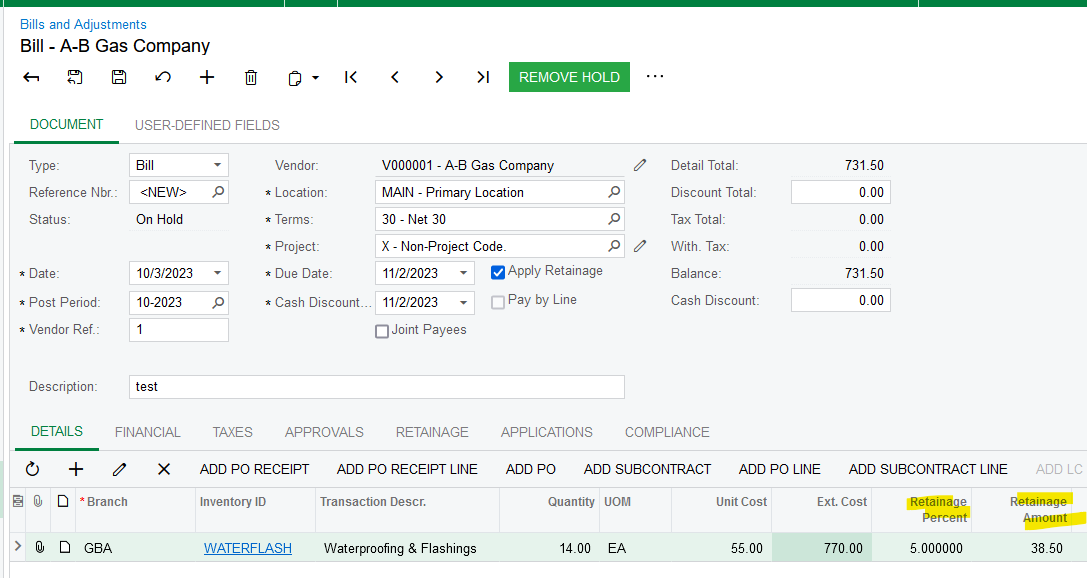
We have AP bills that we are trying to put in and apply retention to put it’s not working.  Some have commitments tied to them, some don’t.  We click the “apply retention” button and nothing is working. 


Can someone help? Seems like we’re doing something wrong.  
Best answer by Laura03

Hello,

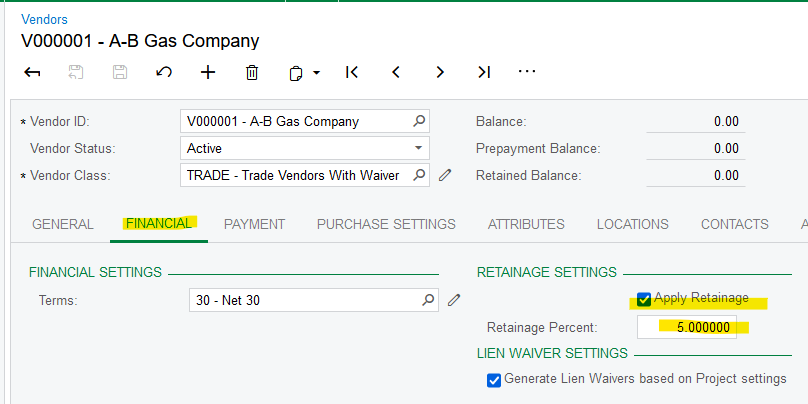
What are the retainage settings on the vendor? You’ll want 5.00 for 5%, not 0.05.

That’s it!  :

Laura

5 replies

Kandy Beatty
Captain II
Forum|alt.badge.img+17
  • Captain II
  • October 3, 2023

Hi @katiedavison 

Can you share what steps you are taking and share possibly screenshots?


Laura03
Captain II
Forum|alt.badge.img+19
  • Captain II
  • Answer
  • October 3, 2023

Hello,

What are the retainage settings on the vendor? You’ll want 5.00 for 5%, not 0.05.

That’s it!  :

Laura


Heidi Dempsey
Community Manager
Forum|alt.badge.img+3
  • Community Manager
  • October 3, 2023

@katiedavison  @Laura02 is correct with the retainage settings


Forum|alt.badge.img
  • Author
  • Freshman I
  • October 3, 2023

is that the primary place that acumatica pulls the retention withholding from? 


Laura03
Captain II
Forum|alt.badge.img+19
  • Captain II
  • October 3, 2023

Hi @katiedavison ,

Please try a new bill.  If the new bill takes on the retention recently added to the Vendor, then delete/re-enter the bill.

If new bills do not take on the retention %, the next step is to find out if customizations have been published, that might be interfering with normal behavior.  If you experience the same behavior with customizations temporarily unpublished, the next step is to raise a case with Acumatica support.

Good luck!


Laura