Answer

Report Designer: How to print the Dollar $ sign within a text box (21R1)

  • September 8, 2021
  • 3 replies
  • 488 views

Forum|alt.badge.img

I have this text in a Text Box control in Report Designer:

=’Where the customer opts to have the company pay a cemetery fee on their behalf, a  $15.00 processing fee will be assessed.’

In the form output, the $ sign is not printed, there is a blank space instead, like this: “a   15.00”.

I’ve tried Format, \$, but I can’t get it to print the $ sign.

Thanks
 

Best answer by TimRodman

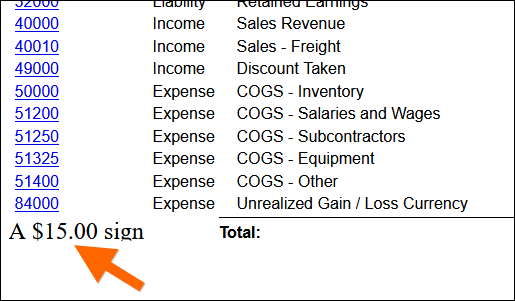
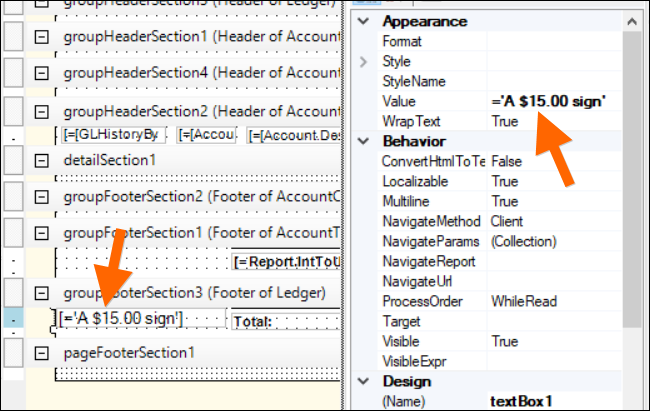
Weird, this works for me in 21.111.0019:


It doesn’t surprise me though that the dollar sign would cause trouble since it’s used to reference a Variable.

3 replies

TimRodman
Pro I
Forum|alt.badge.img+1
  • Pro I
  • Answer
  • September 8, 2021

Weird, this works for me in 21.111.0019:


It doesn’t surprise me though that the dollar sign would cause trouble since it’s used to reference a Variable.


BenjaminCrisman
Acumatica Employee
Forum|alt.badge.img+4
  • Acumatica Support Team
  • September 8, 2021

Hi @gpineda64 !

Do you have any formatting applied or special font on the field?

Can you provide a screenshot of your report field if Tim’s suggestion didn’t help?


  • Freshman I
  • January 20, 2022

...