Answer

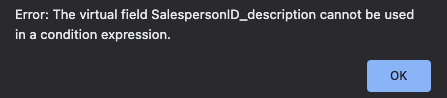
Error: The virtual field cannot be used in a condition expression.

  • January 25, 2022
  • 5 replies
  • 910 views

Forum|alt.badge.img

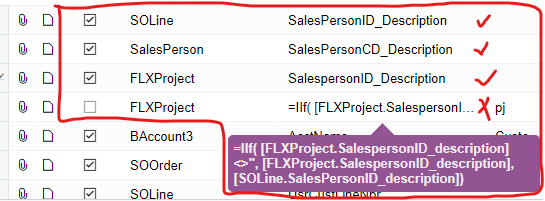
Added this formula in the generic inquiry 

This error appears when trying to view generic inquiry. not sure what does this error means

Best answer by emilythaw16

Quoting : ​@Naveen Boga 

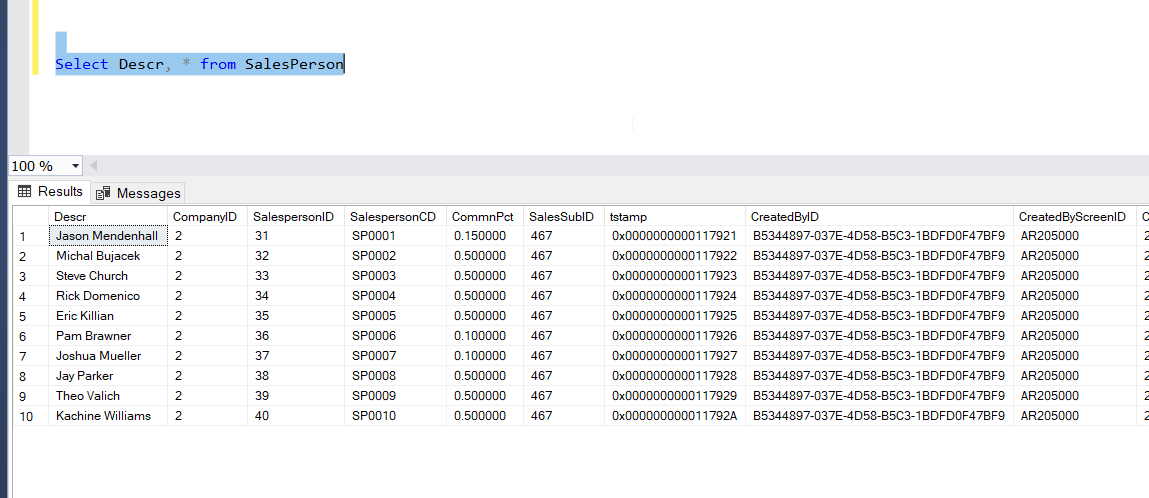
I got the similar error. I used the ‘SalesPerson’ table and then, instead of using SalespersonID_description, used ‘Descr’ field. And it works - I can apply the condition on this field. 

5 replies

deebhane
Semi-Pro I
Forum|alt.badge.img+1
  • Semi-Pro I
  • January 25, 2022

Hi @jechang 

Can you try with SalespersonID instead of salespersonID _ description. 

If you still facing issue, please share the GI in xml format. 


Naveen Boga
Captain II
Forum|alt.badge.img+19
  • Captain II
  • January 25, 2022

Hi, @jechang  Virtual fields we can not use in GI formulas.

If you want to use those fields in formulas, you need to bring these fields from the Main DAC but not reference DAC.

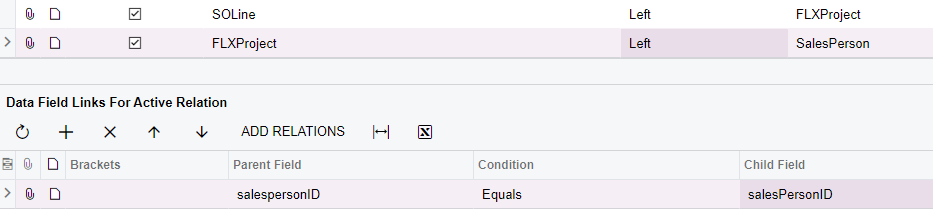
In the above GI, you need to join the SalesPerson table (using SalesPersonID condition) and use the SalesPerson fields in the formulas.


Hope this helps!!


Forum|alt.badge.img
  • Author
  • Freshman I
  • February 7, 2022

hi @Naveen B

I have joined the tables in the GI.

as shown in the screenshot below, the first three works. but when I apply the IIF() Function, I will still face the Error: The virtual field SalespersonID_description cannot be used in a condition expression.


Naveen Boga
Captain II
Forum|alt.badge.img+19
  • Captain II
  • February 7, 2022

Hi, @jechang Hoping that FLXProject is your custom ? Can you please share the XML format of this GI.


  • Freshman II
  • Answer
  • September 18, 2025

Quoting : ​@Naveen Boga 

I got the similar error. I used the ‘SalesPerson’ table and then, instead of using SalespersonID_description, used ‘Descr’ field. And it works - I can apply the condition on this field.