Answer

Calculating on GI for Sales Orders

  • May 30, 2023
  • 3 replies
  • 88 views

Forum|alt.badge.img

Trying to modify the Sales Order GI so it calculates partial price (ignoring or subtracting one of the line items on the Sales Orders). Is this possible?


Example:

SO100038 - Total Order Price of $10,000

  • Item A $2000
  • Item B $5000
  • Item C $3000


In my GI, I want to display an adjusted price column that is calculated by taking total Order Price - Item C Price resulting in an adjusted price of $7,000 per this example.


I can perform joins to bring in the SOLine detail but not sure how I would be able to subtract the correct line item? 


Any thoughts?
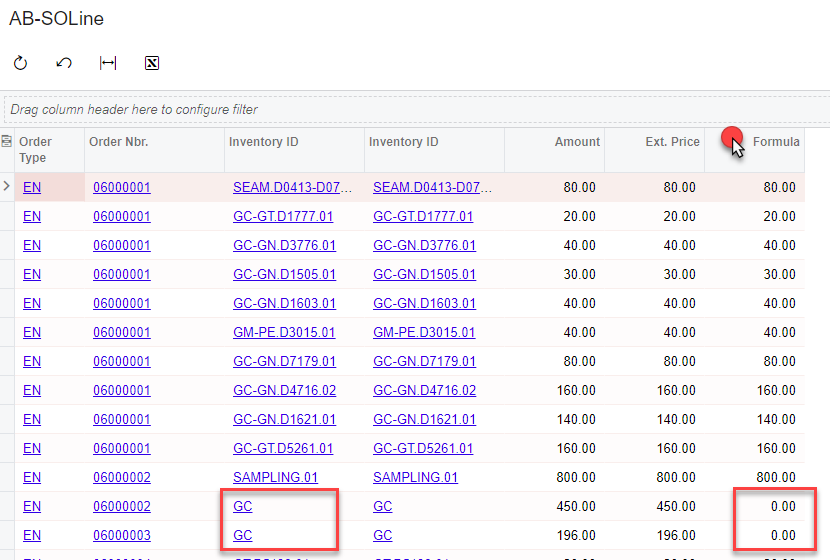


Best answer by aborisova37

Then you simply add a formula to the GI: =Iif([InventoryItem.InventoryCD]='SOLID SURFACE',0,[SOLine.CuryExtPrice])

Attached is a test GI for your reference. You’ll need to activate the grouping if you want to see one line per SO.


3 replies

aborisova37
Semi-Pro I
Forum|alt.badge.img+1
  • Semi-Pro I
  • May 30, 2023


What criteria or condition determines when the line item price should be subtracted? Is this condition consistent for all of your sales orders?


Forum|alt.badge.img
  • Author
  • Semi-Pro I
  • May 30, 2023


What criteria or condition determines when the line item price should be subtracted? Is this condition consistent for all of your sales orders?

If SOLine.InventoryID = ‘SOLID SURFACE’ then we would want that curyextprice to be subtracted from Order total.


Consistent for all SOs - we want Solid Surface to be omitted because these are dropshipped and we are unable to get the accurate costing from the PO


aborisova37
Semi-Pro I
Forum|alt.badge.img+1
  • Semi-Pro I
  • Answer
  • May 30, 2023

Then you simply add a formula to the GI: =Iif([InventoryItem.InventoryCD]='SOLID SURFACE',0,[SOLine.CuryExtPrice])

Attached is a test GI for your reference. You’ll need to activate the grouping if you want to see one line per SO.