

Answer

Cost Roll Selected Checkbox

  • January 3, 2024
  • 2 replies
  • 142 views

Forum|alt.badge.img

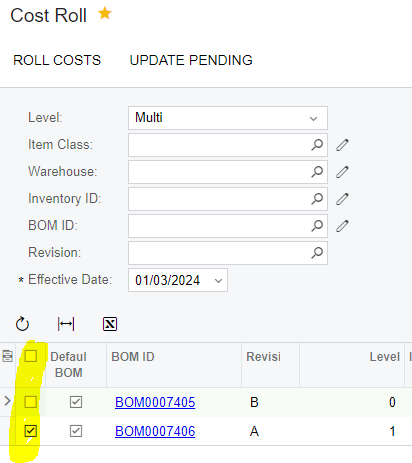
Is there a purpose for the selected checkbox on the Cost Roll Process screen? I thought this would be what to check or uncheck for the parts that I want to update the pending cost on, but this does not work that way. All stock items listed get the pending cost imported when I select the “Update Pending” whether or not the check box next to the item is marked.
 

Best answer by andrestamour43

@jhutchinson there is a community idea to improve the cost roll screen to be less confusing. See: 

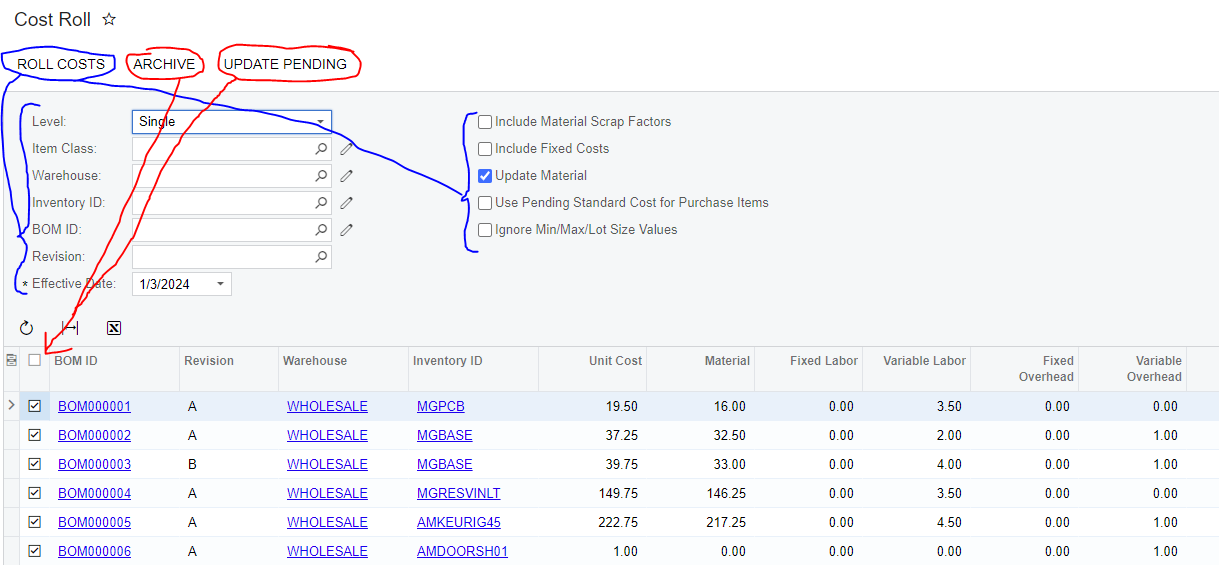
But in short the preferences in blue impact the Cost Roll Process (Roll Costs action) 

This puts results in the grid.

With the results in the grid you can ARCHIVE or UPDATE PENDING for the results that are selected in the grid (see the red arrows) 


Hope this helps and please vote on the idea if you haven’t already! 

Sincerely, 

Andre St. Amour

2 replies

Forum|alt.badge.img+3
  • Acumatica Employee
  • Answer
  • January 3, 2024

@jhutchinson there is a community idea to improve the cost roll screen to be less confusing. See: 

But in short the preferences in blue impact the Cost Roll Process (Roll Costs action) 

This puts results in the grid.

With the results in the grid you can ARCHIVE or UPDATE PENDING for the results that are selected in the grid (see the red arrows) 


Hope this helps and please vote on the idea if you haven’t already! 

Sincerely, 

Andre St. Amour


Forum|alt.badge.img+3
  • Acumatica Employee
  • January 3, 2024

@jhutchinson  Also to add - Update Pending Cost action is used for Standard Cost items. So if all your item’s are Average costed (for example) then this action would not be of use since pending cost is used for Standard Cost Items to eventually update the standard cost.
