Solved

ARM Reports - Unit set by sub account Segment

  • September 21, 2022
  • 5 replies
  • 756 views

Forum|alt.badge.img

Hi,

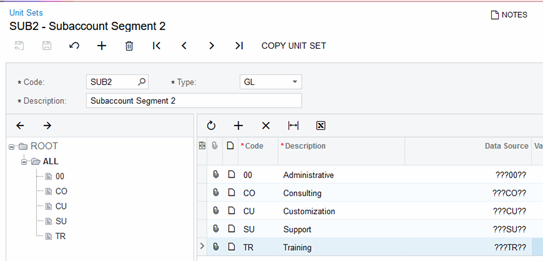
I’m working on a ARM report. The report shows the data expanded by sub accounts for some accounts. I need to add unit set to the report. the unit set should be triggered by a on segment of the sub account (the report should be filtered by the segment of sub account)

Example - Sub Account 1 - ORG-DEP-000. in here, in the middle shows the expense category. there are multiple expense categories which is the second segment of the sub account. 

How can I create a Unit set to filter the report using that middle segment of the sub account. 


Thanks,

Dulanjana 


Best answer by laurabarber45

Hello,

Here is an example Unit Set with complete steps attached:


5 replies

Forum|alt.badge.img
  • Author
  • Varsity I
  • 98 replies
  • September 22, 2022

Hi @laura01,

This woks perfectly. Thank you for your support.


Thank you,

Dulanjana 


laurabarber45
Captain II
Forum|alt.badge.img+19
  • Captain II
  • 3141 replies
  • Answer
  • September 21, 2022

Hello,

Here is an example Unit Set with complete steps attached:


  • Freshman II
  • 7 replies
  • December 16, 2022

Is there any way to make the unit set where the subaccounts are selectable? So you can choose which sub accounts you want to show up on the report, either including or excluding certain accounts?


laurabarber45
Captain II
Forum|alt.badge.img+19
  • Captain II
  • 3141 replies
  • December 16, 2022

Hello,

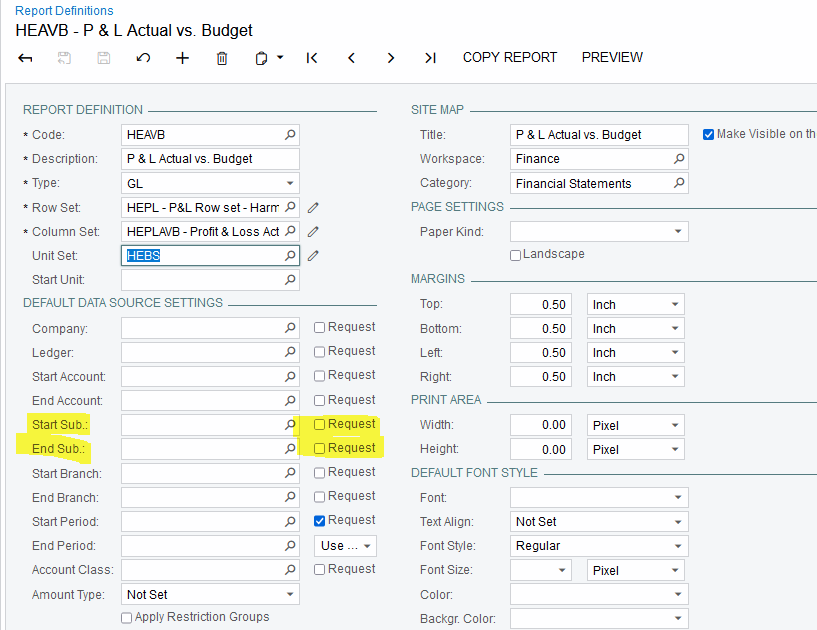
On individual reports, we can make the range of subaccounts selectable.

We have the same choice, to include range of subaccounts in the Data Source section of the Row Set, Unit Set, and Column Set.


  • Freshman II
  • 7 replies
  • December 16, 2022

Thank you!