Solved

Upload images in the app with IOS

  • Dec 19, 2023 1:26 PM UTC
  • 3 replies
  • 201 views
  • Translate All

Forum|alt.badge.img

Is there a solution how to select and upload images from the gallery in the Haufe X360 app in IOS?
But if you have photo optimization and Icloud activated on your iPhone. Does the Haufe app think that this is just a .thumb file.

You then only have the option of taking the photo directly via the app.
Best answer by Kandy Beatty

HI @SchellerFer 

Did the user allow access to photos on the app? I have an IOS device and it allows me to choose photos versus taking them each time. 

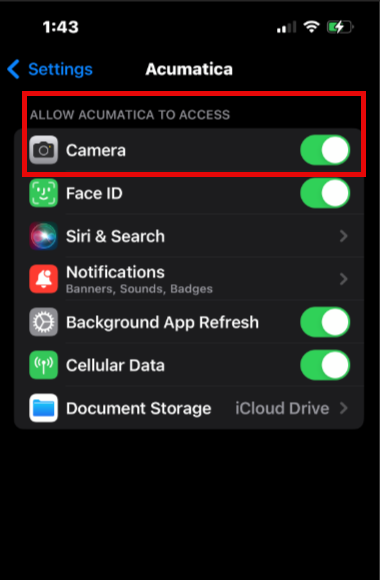
Check the settings on the device to allow photos, go to the Acumatica app:

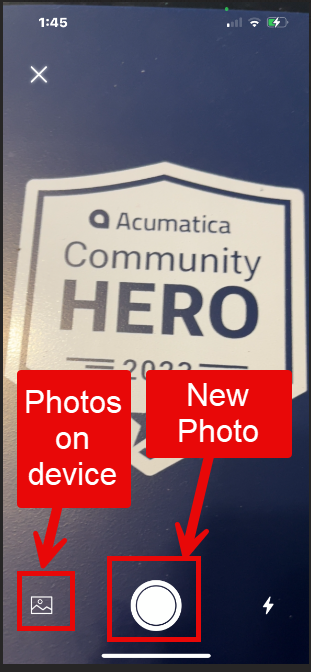
The camera at the top will then allow you to chose a photo or take a new one:


View original

3 replies

Kandy Beatty
Captain II
Forum|alt.badge.img+18
  • Captain II
  • Answer
  • Dec 19, 2023 6:51 PM UTC

HI @SchellerFer 

Did the user allow access to photos on the app? I have an IOS device and it allows me to choose photos versus taking them each time. 

Check the settings on the device to allow photos, go to the Acumatica app:

The camera at the top will then allow you to chose a photo or take a new one:


Translate

Forum|alt.badge.img
  • Author
  • Freshman I
  • Dec 20, 2023 11:34 AM UTC

Thanks, that was actually a solution for this, so the Haufe X360 app then converts the format to a JPEG.
(HEIF images are not displayed in Haufe X360)

Translate

Kandy Beatty
Captain II
Forum|alt.badge.img+18

Thanks, that was actually a solution for this, so the Haufe X360 app then converts the format to a JPEG.
(HEIF images are not displayed in Haufe X360)

Glad it worked and happy to help!

Translate