

Answer

Customers - Shipping Mail has to be Added in GI

  • April 18, 2024
  • 1 reply
  • 52 views

In Customer Screen 
Will have mail In three tab whereas in General Tab , Billing Tab and Shipping Tab 

I have already fixed General Tab Mail and Billing Mail Tab as per the below screenshot 
Need help to fix the Shipping Mail in the Generic Enquiry 
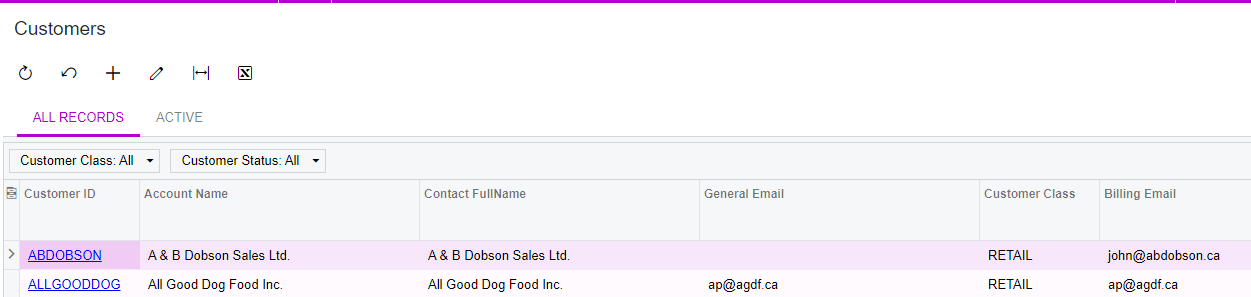
 

Added Xml also - could you help me to add the shipping mail in GI 

Best answer by BenjaminCrisman

Hi @abinayaa94! For this issue you just need to link the location table to the contact table and then display the contact.email.

I checked the GI and you are already linking in LocationExtAddress, so this can work.

Just add the CR.Contact table again and give it an Alias (ContactShip) and make a new relation with LocationExtAddress as the parent joined to ContactShip on DefContactID = ContactID.

Then add the ContactShip.Email field to the results.

Hope this helps!

1 reply

BenjaminCrisman
Acumatica Employee
Forum|alt.badge.img+4
  • Acumatica Support Team
  • Answer
  • April 18, 2024

Hi @abinayaa94! For this issue you just need to link the location table to the contact table and then display the contact.email.

I checked the GI and you are already linking in LocationExtAddress, so this can work.

Just add the CR.Contact table again and give it an Alias (ContactShip) and make a new relation with LocationExtAddress as the parent joined to ContactShip on DefContactID = ContactID.

Then add the ContactShip.Email field to the results.

Hope this helps!
