Answer

Report Designer Formula for Month-End

  • November 15, 2022
  • 7 replies
  • 898 views

kdavis45
Semi-Pro I
Forum|alt.badge.img+1

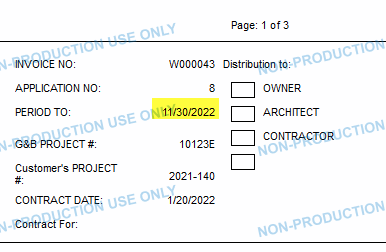
We have a client who wants the “Period to” field on the Pro Forma invoice to reflect the end of the billing month, even when the invoice date is mid-month.

I’ve tried every formula and table I can think of, but haven’t found a permanent work-around. For now, I’m using the month (e.g. If month = 1, 3, 5, 7, 8, 10, or 12 then 31), which will work until leap year in February 2024.

Has anyone else found a formula combination that shows the month-end date?

Best answer by lauraj46

Hi @kdavis45 ,

A trick that I have used sometimes is this:

=DateAdd(CDate(CStr(Month(DateAdd( [PMProforma.InvoiceDate], 'm', 1))) + '/1/' + CStr(Year(DateAdd( [PMProforma.InvoiceDate], 'm', 1)))), 'd', -1)

The idea is to get the first date of the next month, and then subtract one day.  I think the DateAdd by month will account for the different in the number of days per month.


7 replies

Laura03
Captain II
Forum|alt.badge.img+19
  • Captain II
  • November 15, 2022

Hi, We updated dates on the AIA report, pages 1 and 2.  Will this work?  (PM644000).  In our case the actual invoice date was the 20th of the month and shows below with label “Application Date”.

Using this formula:

=iif ((Month([PMProforma.InvoiceDate]) = 1  or Month([PMProforma.InvoiceDate]) = 3 or
      Month ([PMProforma.InvoiceDate])= 5  or Month([PMProforma.InvoiceDate]) = 7 or
      Month([PMProforma.InvoiceDate]) = 8  or Month([PMProforma.InvoiceDate]) = 10 or
      Month([PMProforma.InvoiceDate]) = 12),
      Month([PMProforma.InvoiceDate])+'/31/'+Year([PMProforma.InvoiceDate]) ,
      iif( Month([PMProforma.InvoiceDate]) = 2,
           Month([PMProforma.InvoiceDate])+'/28/'+Year([PMProforma.InvoiceDate]),
           Month([PMProforma.InvoiceDate])+'/30/'+Year([PMProforma.InvoiceDate])))


kdavis45
Semi-Pro I
Forum|alt.badge.img+1
  • Author
  • Semi-Pro I
  • November 15, 2022

That’s effectively what I used as a placeholder, although yours is more elegant. My only concern is that in 2024, February has 29 days instead of 28.

I know the “risk” is minimal for ProForma, but I’d like a formula option that covers the ‘leap year’ variable.

Thank you!


Laura03
Captain II
Forum|alt.badge.img+19
  • Captain II
  • November 16, 2022

I think the above Iif formula needs to be a nested if. Loosely translated, if year not in group (2024, 2028, 2032, etc) then [iif statement above], else [same monthly if statement as above, except for Feb ends on 29th].


Forum|alt.badge.img+3
  • Pro II
  • November 16, 2022

Why wouldn’t you use the FinPeriodID and lookup the period dates from the Calendar?

See my last post here: 


Laura03
Captain II
Forum|alt.badge.img+19
  • Captain II
  • November 16, 2022

Thank you Royce! I was thinking there must be a way to use the Periods in Finance module.. but I’m not a good enough report writer to provide any details for KDavis…

Thank you, again!


lauraj46
Captain II
Forum|alt.badge.img+8
  • Captain II
  • Answer
  • November 16, 2022

Hi @kdavis45 ,

A trick that I have used sometimes is this:

=DateAdd(CDate(CStr(Month(DateAdd( [PMProforma.InvoiceDate], 'm', 1))) + '/1/' + CStr(Year(DateAdd( [PMProforma.InvoiceDate], 'm', 1)))), 'd', -1)

The idea is to get the first date of the next month, and then subtract one day.  I think the DateAdd by month will account for the different in the number of days per month.


kdavis45
Semi-Pro I
Forum|alt.badge.img+1
  • Author
  • Semi-Pro I
  • November 16, 2022

@lauraj46 This is perfect! When I couldn’t figure out a month-end formula (or FinPeriodID linking), this was my next idea and I couldn’t get the formula right.


@RoyceLithgo I tried linking the FinPeriodID and every single variation I tried showed a blank field. But… it could absolutely have been user error.