User was setup with the check box selected to allow them to reset their password. When going to the upper right drop down and selecting MY PROFILE, it takes them to Welcome to Acumatica.
If an additional set-up is required, please provide path.
Thanks.
Best answer by Ed Goodman
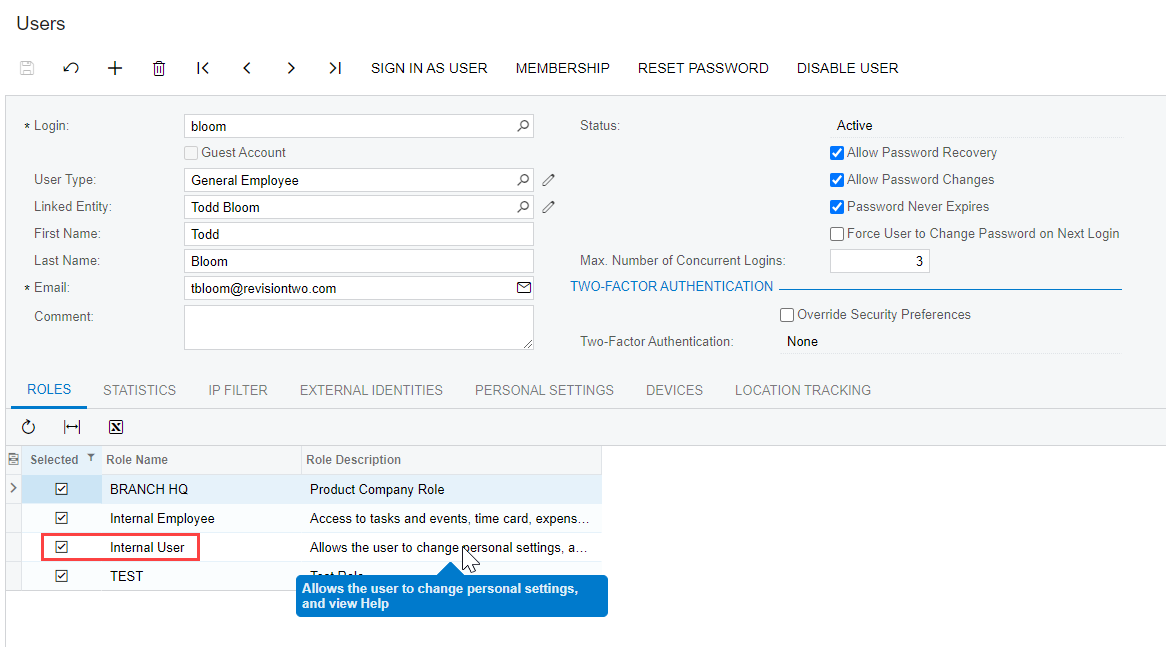
@jddonnell55 Go into the users (SM201010) screen and confirm that the user has been provided with the Internal User role. If they are unable to get into their own profile (redirected to welcome screen), that is normally an indication that they do not have proper access.
Internal User: A user with this role can change personal settings and view Help. It is automatically assigned to all user accounts linked with the Employee user type.
@jddonnell55 Go into the users (SM201010) screen and confirm that the user has been provided with the Internal User role. If they are unable to get into their own profile (redirected to welcome screen), that is normally an indication that they do not have proper access.
Internal User: A user with this role can change personal settings and view Help. It is automatically assigned to all user accounts linked with the Employee user type.