
Answer

Exchange Server Configuration Error message

  • March 15, 2023
  • 3 replies
  • 364 views

Foujan
Jr Varsity II
Forum|alt.badge.img

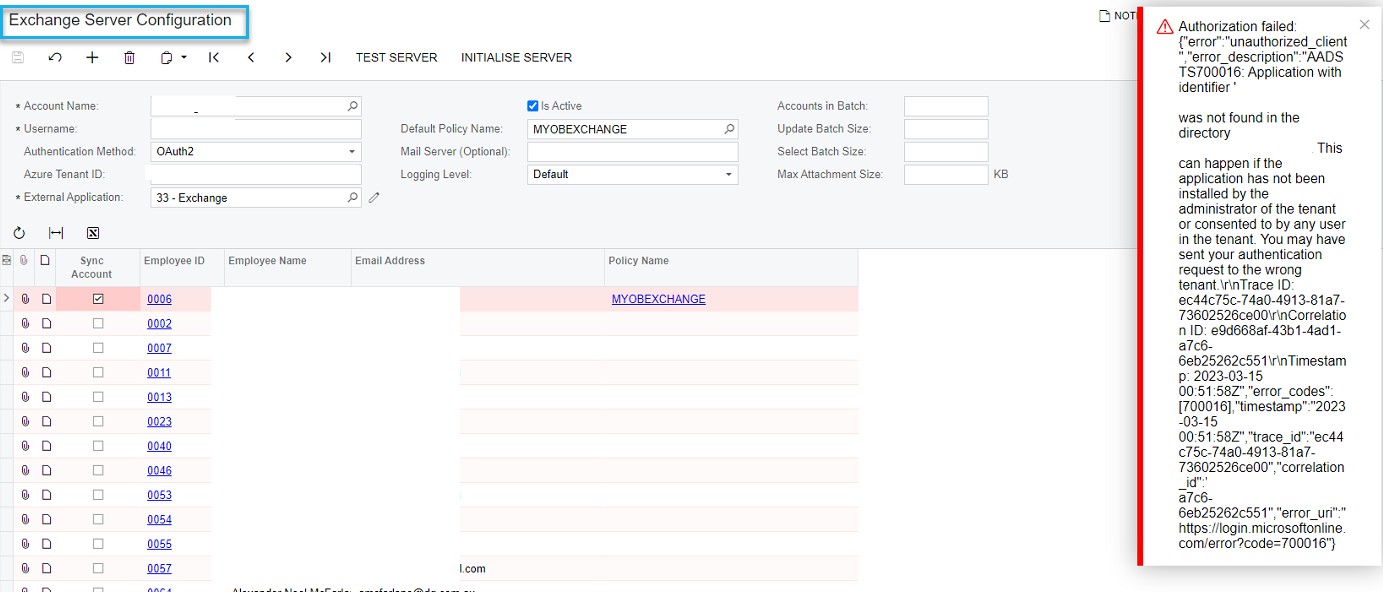
When configuring Exchange Server Integration and select ‘TEST SERVER’, receive this message:

“Application with Identifier was not found in the directory”

Google gives me this article in Microsoft: https://learn.microsoft.com/en-us/troubleshoot/azure/active-directory/error-code-aadsts70001-app-not-found-in-directory

But it does not make sense and resolve my issue.

Anyone faced this error message?


Best answer by JTang

Need the mail server URL entered for sure, which should be something like below. 


https://MAILSERVERURL.com/EWS/Exchange.asmx

3 replies

Kandy Beatty
Captain II
Forum|alt.badge.img+17
  • Captain II
  • March 15, 2023

HI @Foujan 

A few things:

  1. Can you share the entire Trace error?
  2. Did you try to set up this account with the admin login?

Foujan
Jr Varsity II
Forum|alt.badge.img
  • Author
  • Jr Varsity II
  • March 15, 2023

@kandybeatty49


Hi Kandy,

Just tried again and got different error message as per below:

It is not an admin user, but I set it up using my account which is partner admin account.


Error: The Autodiscover service couldn't be located.  Send
  Raised At: 15/03/2023 10:22:28 PM Screen: SM.20.40.15    
 Details:

15/03/2023 10:22:28 PM Error:
The Autodiscover service couldn't be located.

   at Microsoft.Exchange.WebServices.Autodiscover.AutodiscoverService.InternalGetLegacyUserSettings[TSettings](String emailAddress, List`1 redirectionEmailAddresses, Int32& currentHop)
   at Microsoft.Exchange.WebServices.Autodiscover.AutodiscoverService.GetLegacyUserSettings[TSettings](String emailAddress)
   at Microsoft.Exchange.WebServices.Autodiscover.AutodiscoverService.InternalGetLegacyUserSettings(String emailAddress, List`1 requestedSettings)
   at Microsoft.Exchange.WebServices.Autodiscover.AutodiscoverService.GetUserSettings(String userSmtpAddress, UserSettingName[] userSettingNames)
   at Microsoft.Exchange.WebServices.Data.ExchangeService.GetAutodiscoverUrl(String emailAddress, ExchangeVersion requestedServerVersion, AutodiscoverRedirectionUrlValidationCallback validateRedirectionUrlCallback)
   at Microsoft.Exchange.WebServices.Data.ExchangeService.AutodiscoverUrl(String emailAddress, AutodiscoverRedirectionUrlValidationCallback validateRedirectionUrlCallback)
   at PX.Mail.OAuth.Azure.Ews.ExchangeServiceBindingOAuthProvider.GetAutodiscoverUrl(EMailSyncServer config)
   at PX.Mail.OAuth.Azure.Ews.ExchangeServiceBindingOAuthProvider.GetExchangeServiceBinding(EMailSyncServer config)
   at PX.Mail.OAuth.Azure.Ews.AzureOAuthPXExchangeServerProvider.GetExchangeServiceBinding(EMailSyncServer config)
   at PX.Mail.OAuth.Azure.Ews.AzureOAuthPXExchangeServerProvider.GetPXExchangeServer(EMailSyncServer config)
   at PX.Data.Update.WebServices.PXExchangeServer.GetGate(EMailSyncServer email, PXExchangeEventDelegate logger)


JTang
Jr Varsity II
  • Answer
  • September 29, 2023

Need the mail server URL entered for sure, which should be something like below. 


https://MAILSERVERURL.com/EWS/Exchange.asmx