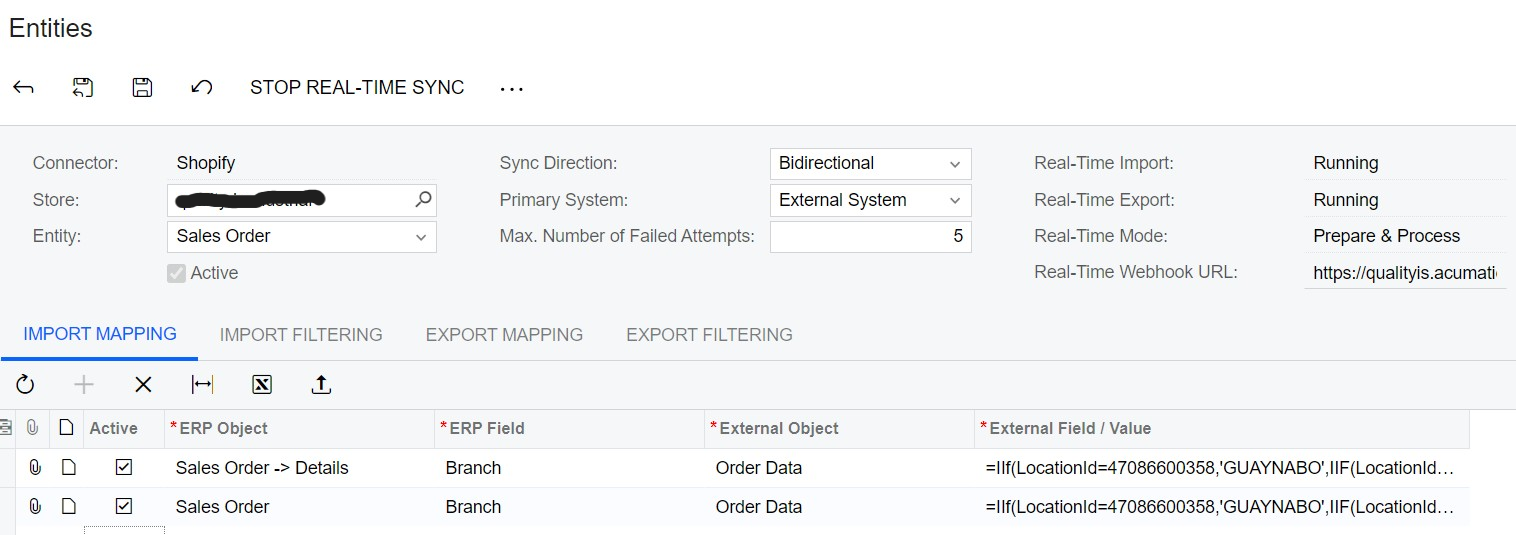
I have been doing a lot of tests and I realized that when I map the Branch field at Order Level, the value is not changed but when I do it at the detail level, it does:
**the 2 lines within the mapping are just an example, I ran the tests with one of them only.
Does anybody found the same issue and a solution?
Thanks!
Best answer by rodrigocid34
Yuri, a feedback after configuration:
I tried with tags but if there are more than one tag assigned to the order in shopify, “catch and submit” the correct value is complicated
I went back to use locations but i have to force the insertion of the value in two fields in Acumatica, in the SO header and in the lines:
With this configuration I was able to separate branches based on locationsId(shopify).
@rodrigocid34 it makes sense. The order is not associated with a location directly. Instead, Shopify groups items into batches and assigns them to locations. Therefore, when you’re referencing Sales Order → Details, you have access to LocationID. But when you use Sales Order object, LocationID is not there, therefore your mapping doesn’t do what you need it to do.
@rodrigocid34 it makes sense. The order is not associated with a location directly. Instead, Shopify groups items into batches and assigns them to locations. Therefore, when you’re referencing Sales Order → Details, you have access to LocationID. But when you use Sales Order object, LocationID is not there, therefore your mapping doesn’t do what you need it to do.
Thank you Yuri, I understand. I tried using Shopify tags but it didn’t work neither. the problem could be the object in Acumatica (Sales Order, Branch)?
That’s because when you use details, you don’t change the branch of the order - you simply change the branch on each line.
But when it works (which it appears, now it does :)), this error is thrown. This error simply means that in your other branch, you don’t have auto numbering set for SPORDER numbering sequence. Go to Numbering Sequences screen, and add a line for your other branch for SPORDER sequence.