Solved

Bi-Directional Sync Issues with Shopify Connector for Acumatica: Handling B2B Contacts as Customer Duplication

  • October 22, 2024
  • 15 replies
  • 502 views

Forum|alt.badge.img

Hello everyone,

We are encountering an issue with the Shopify connector for Acumatica24R1 regarding the synchronization of Business Customers (B2B). Both Company and Customer entities are active and both in bi-direction.

Here’s the scenario:

  1. A business customer categorized as an organization is set up in Acumatica, with several contacts and locations.
  2. When this business customer was synced to Shopify, a Company was created using the same name as the business customer in Acumatica.
  3. All contacts were synced in Shopify as Customers associated with the newly created Company.
  4. The locations were also synced successfully, which looks good.
  5. During the next sync (in the aforementioned bi-directional direction), several new records were synced under the Customer entity.
  6. Upon reviewing the synced customer records, we discovered that the connector had created new Acumatica Customers, categorized as Individuals—one for each contact of the existing Business Customer (Company).
  7. This resulted in the duplication of accounts, with one being a contact of the Business Customer and the other account representing an Individual customer.

I also noticed that Shopify allows Company customers to place personal orders. I conducted a test with the following results:

  • Order1: The Company customer placed an order for the Company, selecting the Company location.
  • Order2: The same Company customer placed an order for himself using the personal order option.

After syncing, here are the results:

  • Order1: Synced as an order in Acumatica with the Business Customer (Company) as the Sales Order Customer and the customer contact as the Sales Order Contact.
  • Order2: Synced as an order in Acumatica where the Sales Order Customer is the duplicated record of the contact defined in Acumatica as another Customer (Individual).

Is this the expected behavior of the Shopify connector? Is there a way to avoid the re-creation of records that are contacts of another Business customer? Any insights you could share would be greatly appreciated!

Thank you!
 

Best answer by Yuri Karpenko

@jib87 , hi there. Yes, it is expected. Because Shopify allows customers to place both, personal and company orders. So, we have 2 issues here:

  1. Duplicate customers created in Acumatica (for individual customers + contacts of a company customer).
  2. Customers in Shopify can place non-B2B / non-company orders.

This is how you can overcome the issues:

  1. For duplicate customers, do not sync customer record on its own. Have it selected, of course, but don’t set up an automated schedule. When a new order is created in Shopify, the connector will update the customer first, and then import the orders. So, if a customer doesn’t place an individual order, no individual customer will be created in Acumatica.
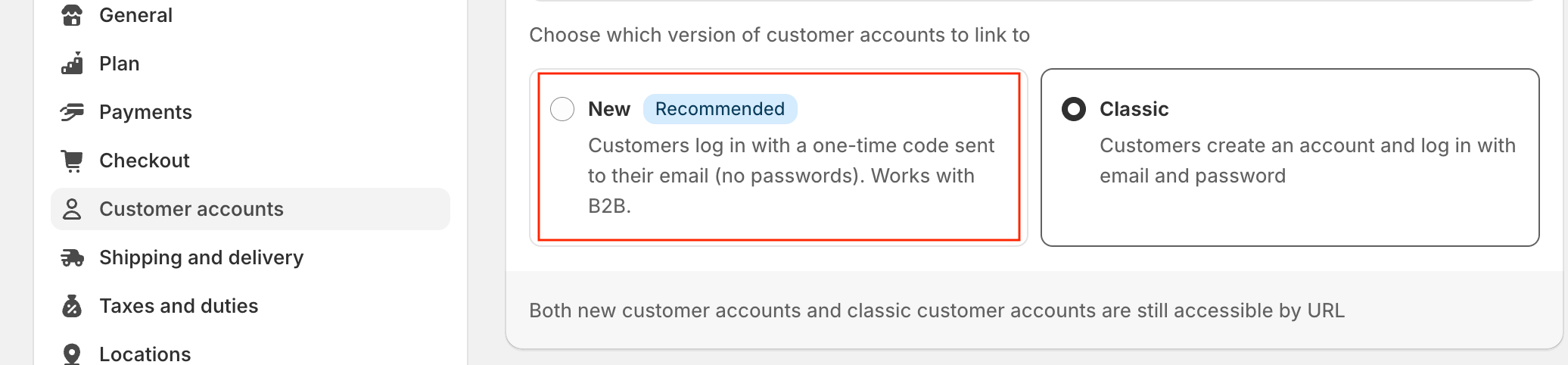
  2. For non-company orders in Shopify, you can use this option in the settings to prevent customers from logging in as individuals:


Let me know if you need more details or have issues with the provided suggestions.

Thanks!

15 replies

Yuri Karpenko
Captain II
Forum|alt.badge.img+7
  • Captain II
  • Answer
  • October 22, 2024

@jib87 , hi there. Yes, it is expected. Because Shopify allows customers to place both, personal and company orders. So, we have 2 issues here:

  1. Duplicate customers created in Acumatica (for individual customers + contacts of a company customer).
  2. Customers in Shopify can place non-B2B / non-company orders.

This is how you can overcome the issues:

  1. For duplicate customers, do not sync customer record on its own. Have it selected, of course, but don’t set up an automated schedule. When a new order is created in Shopify, the connector will update the customer first, and then import the orders. So, if a customer doesn’t place an individual order, no individual customer will be created in Acumatica.
  2. For non-company orders in Shopify, you can use this option in the settings to prevent customers from logging in as individuals:


Let me know if you need more details or have issues with the provided suggestions.

Thanks!


Forum|alt.badge.img
  • Author
  • Varsity I
  • October 22, 2024

Appreciate the response @Yuri Karpenko 

For no.2, we will go with the option you suggested, so I think that’s a good approach.

For no. 1, sorry, but we have to set automated schedule for both Customer and Company entities. I hope there is a way if we can filter-out those records (that is, the records of Shopify customers came from Contacts, that will become Individual Acumatica customer if synced) from the legitimate individual Shopify customers who created their account in Shopify..


KarthikGajendran
Acumatica Moderator
Forum|alt.badge.img+3

@Yuri Karpenko @jib87  Do you guys think Acumatica Shopify Connector should only import the Customers(Company Contacts) for which there are Orders created in Shopify? For the rest, the connector should not import even if the Customer entity is active? 


Yuri Karpenko
Captain II
Forum|alt.badge.img+7

@jib87 , in that case, I recommend setting up a Flow in Shopify that will automatically tag customers that are assigned to a company, with a tag (say, ‘b2b’). And then use the import filtering condition in the Customer mapping like this:


@KarthikGajendran , I don’t think it makes sense to make it universal, because we do have clients who let their customers place B2B and non-B2B orders…


KarthikGajendran
Acumatica Moderator
Forum|alt.badge.img+3

@Yuri Karpenko  My proposal is to import the Customers of category Individual (Company Contacts) only when they place order. 

Example: If the Company has two contacts in Shopify, then in Acumatica we would have one Customer of category Organization, two company contacts and two Customers of category Individual by default.

Instead

I am proposing to create one Customer of category Organization and that's it. If these Customer places a personal order, then we will import into Acumatica as Individual customer, otherwise we will not import it. There will only be the contact of the Customer of category Organization in Acumatica. 


Yuri Karpenko
Captain II
Forum|alt.badge.img+7

@KarthikGajendran , how would we achieve this, other than by _not_ having an automatic import of customer record? (which was my initial suggestion to the OP, but they didn’t like it).


Forum|alt.badge.img
  • Author
  • Varsity I
  • October 23, 2024

Hello @KarthikGajendran !

Regarding your question:
Do you guys think Acumatica Shopify Connector should only import the Customers(Company Contacts) for which there are Orders created in Shopify? For the rest, the connector should not import even if the Customer entity is active? 

Here’s the desired behavior whether we are doing a manual or scheduled automated syncing

  • The connector should be able to import/create a contact in Acumatica if a new customer is added in Shopify and assigned to the same company.
  • The connector should be able to create a customer (individual) in Acumatica if a new non-B2B customer is created in Shopify.
  • The connector can import/create a new customer (individual) in Acumatica that is a contact of another business customer (organization) only if the Shopify customer (under a company) places a personal order

@Yuri Karpenko ‘s suggestion about mapping will work most of the time, but will not apply for point 2.

Additionally, turning off the automated sync for customers makes sense, and I believe that will be the best approach for now (I’ll mark it as the best answer). Our only concern is that it requires manual syncing when:


  • A new individual customer is created in Acumatica (or when there are updates to their details).
  • A new customer is created in Shopify (whether B2B or non-B2B); we need to wait for a sales order placed by them or perform a manual sync (given that real-time sync/auto sync for Import Sales order is active)
  • There are updates to customer details in Shopify (whether B2B or non-B2B); we need to wait for a sales order placed by them or perform a manual sync for the updates to reflect in Acumatica (given that real-time sync/auto sync for Import Sales order is active)

In the coming weeks or months, these customer updates will accumulate under the Prepare screen, making manual syncing more challenging.
 

There’s no perfect solution for now for sure. However, I completely agree with @KarthikGajendran  proposal if we have that something work:
“I am proposing to create one Customer of category Organization and that's it. If these Customer places a personal order, then we will import into Acumatica as Individual customer, otherwise we will not import it. There will only be the contact of the Customer of category Organization in Acumatica. “

Thank you again both for spending your time looking in this!


KarthikGajendran
Acumatica Moderator
Forum|alt.badge.img+3

@jib87  Thank you. We have created a change request internally and will plan for future.

Currently, we are working with RESTApi which has some limitations but with GraphQL which we will be supporting soon, we will be able to identity if the Company Contact has any personal orders created and we can use that value to import or filter it. 

But the individual customers(consumers) will be always imported either they have orders or not. 


Forum|alt.badge.img
  • Author
  • Varsity I
  • October 24, 2024

I’m excited to hear about that! Looking forward to seeing these changes 


bwhite49
Captain II
Forum|alt.badge.img+12
  • Captain II
  • February 26, 2026

Has this been added in 2025 R2 or 2026 R1?

@jib87  Thank you. We have created a change request internally and will plan for future.

Currently, we are working with RESTApi which has some limitations but with GraphQL which we will be supporting soon, we will be able to identity if the Company Contact has any personal orders created and we can use that value to import or filter it. 

But the individual customers(consumers) will be always imported either they have orders or not. 


KarthikGajendran
Acumatica Moderator
Forum|alt.badge.img+3

@bwhite49 ​@jib87 

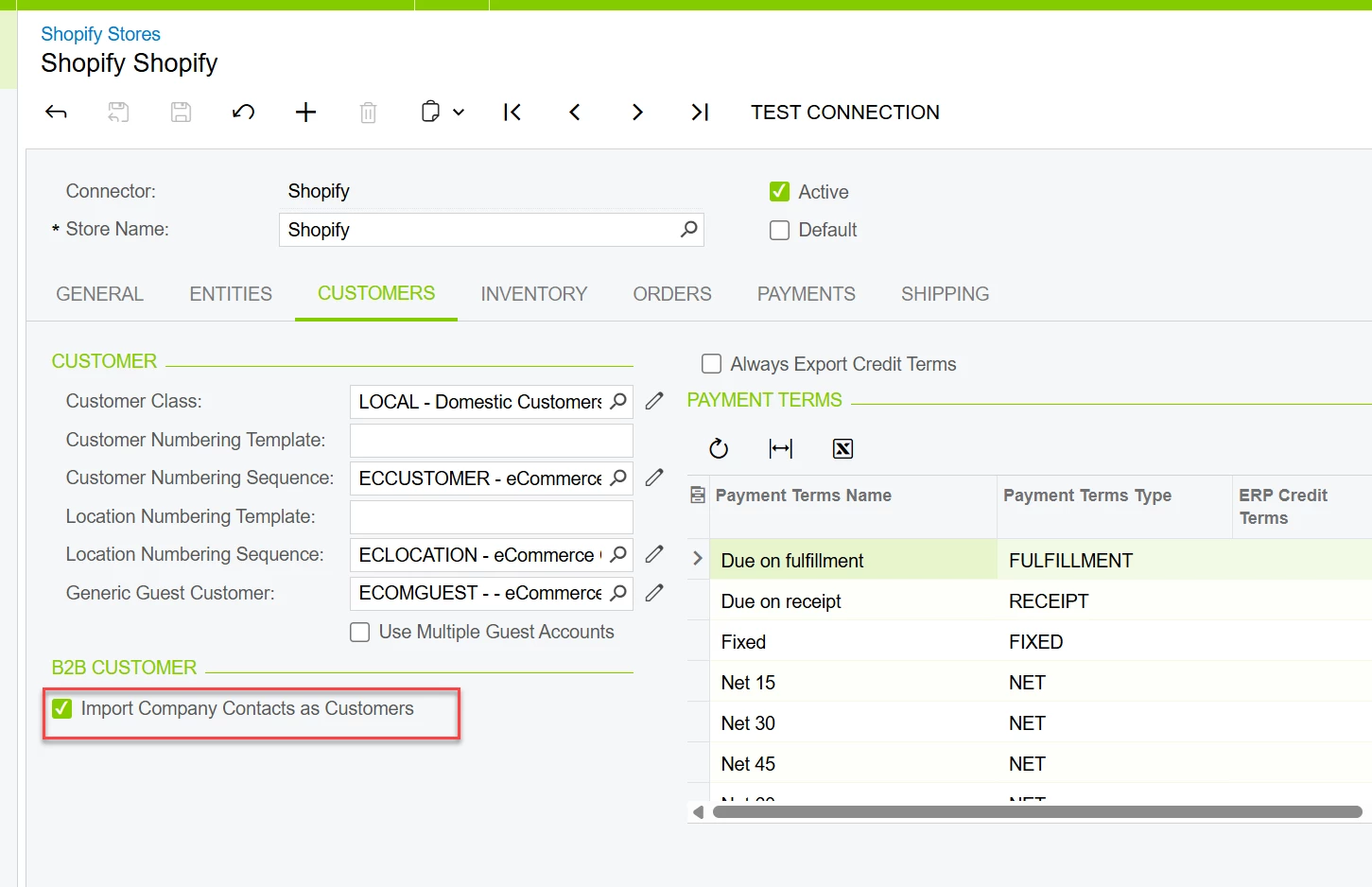
We have added the below option back in 25R2. By default it is checked which means the Company Contacts will be imported as customers in Acumatica. If it is unchecked, then only the contacts that has orders will be imported as Customers in Acumatica. 


  • Freshman I
  • March 11, 2026

@KarthikGajendran 
 

Thanks for the update regarding the option added in 25R2.

However, based on how the connector currently behaves, this still appears likely to be an issue for many B2B implementations using the Shopify connector.

Even with the option disabled so that contacts are only imported when they place orders, the connector logic still treats Shopify customers as individual Acumatica customers first, rather than resolving them against an existing Organization / Company structure in Acumatica.

In a typical B2B setup this creates the following situation:

  • A Company already exists in Acumatica

  • That Company has Contacts under it

  • Those Contacts sync to Shopify as company users

  • When those users interact with the store, the connector creates new Individual Customers in Acumatica instead of linking them back to the existing Organization

This leads to a number of operational problems:

  • Duplicate customer records

  • Contacts becoming separate Individual customer accounts

  • Orders attaching to the wrong customer structure

  • Ongoing cleanup and reconciliation work in Acumatica

The workaround of disabling automated customer sync or relying on Shopify tagging/filtering can help in some cases, but it does not scale well for companies running larger B2B environments.

Something that would help

It would be very helpful if the connector included a simple setting to control customer behavior, something like:

Customer Model

  • D2C (Direct-to-Consumer)

  • B2B (Organization-first)

If B2B mode was enabled, the connector could follow logic such as:

  1. When syncing a Shopify customer or order, first check for an existing Company / Organization in Acumatica

  2. If the company exists, attach the user as a Contact under that organization instead of creating a new Individual customer

  3. If the company does not exist, create a new Organization and add the Contact under it

  4. Only create an Individual customer if the Shopify account actually represents a non-B2B consumer

This would align much better with how most ERP systems structure B2B accounts:

Organization Customer
→ Contacts
→ Orders

Instead of creating separate Individual customer records for each company user.

Another capability that would help

It would also be very useful to have the ability to merge customers after they have already entered the Acumatica ecosystem, or redirect the sync record.

A common situation is:

  1. The connector creates a new Individual Customer

  2. An order comes in under that account

  3. We later realize that customer should actually belong under an existing Organization

At that point we run into a limitation because:

  • The Individual Customer cannot be deleted once a Sales Order exists under that account

It would help a lot if we had the ability to:

  • Merge the Individual customer into the correct Organization account

  • Mark the incorrect account as Inactive

  • Redirect the sync mapping so that future orders attach to the correct Organization and Contact

Right now the system can automatically create these individual customers, but there is not a clean way to correct them afterward once orders exist.


KarthikGajendran
Acumatica Moderator
Forum|alt.badge.img+3

@jscheftic Thanks for the comment. 

I am not sure if I completely understood. Below I have provided my explanation. If you think I haven't got your point, please let me know, I will schedule a call with you and discuss. 

Before we go the message lets us understand the below from Shopify perspective. 

  • Company is Shopify represents an Organization. 
  • Company user is a contact of the organization
  • A Company user can place an order on behalf of a Company or place a personal order which doesn't not belong to a Company. 

Why Acumatica creates Individual customers? It is because we do not have choice. When a customer creates a personal order in Shopify, we cannot place this order under the organization and its contact in ERP. It is against the Shopify business logic. 


Even with the option disabled so that contacts are only imported when they place orders, the connector logic still treats Shopify customers as individual Acumatica customers first, rather than resolving them against an existing Organization / Company structure in Acumatica.


When those users interact with the store, the connector creates new Individual Customers in Acumatica instead of linking them back to the existing Organization

The connector will only create individual Acumatica Customer when there is a personal order created by that customer in Shopify with “Import Company contacts as Customers” option disabled. 


Regarding merging of the customers. 

Connector create individual customers in the below conditions

  1. Import Company contacts as Customers option is enabled
  2. Previously this individual customer was a retail customer and connector imported Individual customer and later the admin in the Shopify moved under a Company. 
  3. User placed a personal order.

If you do not want the individual customer because you have already moved to a company in Shopify then the only possibility in ERP to set the Customer Record as Inactive.


  • Freshman I
  • March 17, 2026

@KarthikGajendran thanks for the detailed explanation!

I think the gap I am trying to highlight is not really around personal orders themselves, but more around how the connector is resolving the customer before deciding to create a new record.

I agree with your point that if a user places a true personal order in Shopify, it makes sense for that to come into Acumatica as an Individual customer. That part is expected.

The issue we are running into is more on the resolution side.

In practice, we are still seeing cases where:

  • A Company already exists in Acumatica

  • The Contact already exists under that Company

  • The same user exists in Shopify under that Company

But when activity happens, the connector still creates a new Individual Customer even though that relationship already exists in ERP.

So the issue is not just personal order equals individual customer. It is that the connector is not always attempting to resolve the existing Organization and Contact first before creating a new record.

Regarding setting the customer to inactive, that does help prevent usage, but it does not really solve the underlying problem because:

  • The duplicate record still exists

  • Orders remain tied to the incorrect account

  • Reporting becomes harder to manage

  • There is no way to redirect future sync behavior to the correct account without deleting the current sync record and forcing a resyc

Over time these records build up and create data integrity issues.

What would help in this scenario is:

  • Stronger resolution logic before creating a new customer

    • Check for existing Company

    • Check for existing Contact by email

    • If both exist, attach to that structure instead of creating a new Individual customer

  • A way to correct records after the fact

    • Merge an Individual customer into the correct Organization

    • Or redirect the sync mapping so future orders attach to the correct Company and Contact

Right now once an order is tied to an Individual customer, there is not really a clean way to fix it beyond setting it to inactive.

At a higher level, I understand Shopify supports both B2B and personal ordering, and the connector needs to support that. But for B2B-heavy environments, it would be helpful if the connector prioritized resolving the existing Organization and Contact first, and only created a new Individual customer when it is clearly required.


Forum|alt.badge.img
  • Freshman II
  • March 17, 2026

I concur with ​@jscheftic

For B2b usage, using specific email addresses exported from ACM is a way to limit access to unauthorized users of the b2b site. 

The structure of the company and user at that company and their email is the only way to enforce that. 

Personal orders should be considered secondarily since as a consumer, as we are all free as consumers to create secondary personal emails.