


My query was working properly until I changed my Acumatica password. Now I am receiving an error that the credentials provided do not authenticate. How do I update the credentials within the odata feature?
Solved
How do I update my odata query after resetting my password?
Best answer by BenjaminCrisman
For Excel you would go here:
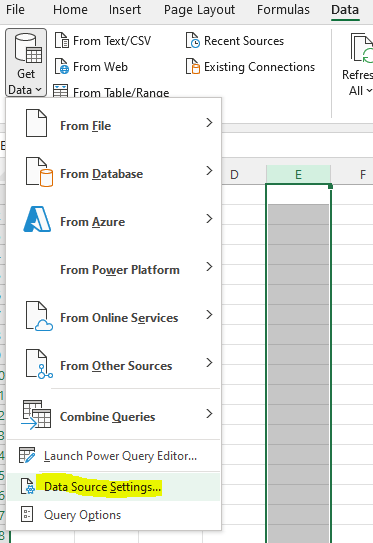
This brings up the Data Sources pop up window:
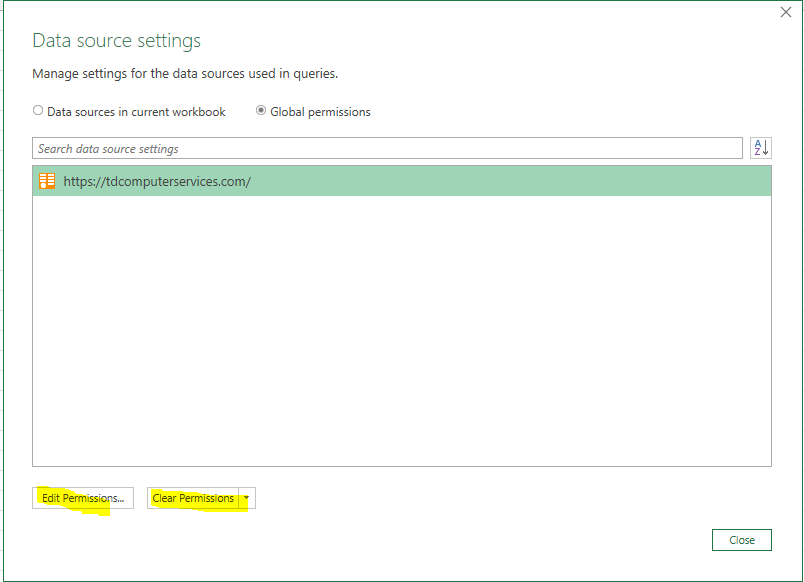
From here you can either Edit to update, or Clear/Delete this source and then re-add it.



Login to the community
No account yet? Create an account
Social Login
Login with your Acumatica accountEnter your E-mail address. We'll send you an e-mail with instructions to reset your password.