Answer

Cash account (not a control account) restrict use

  • May 11, 2022
  • 5 replies
  • 242 views

Janella
Jr Varsity III
Forum|alt.badge.img+1

Is there a way to restrict cash account from being used in Paychecks detail section? We have a client that accidentally entered cash GL account on the details section of a paycheck, they would like to avoid doing this in the future.

 

Best answer by Janella

@tsnyder16 thanks for looking into this and replying, but it’s the actual PR account that the system end user inputted on the Paycheck details where the debit account should be wages. I was just digging around to see if there was a way to restrict this from happening, a warning would be helpful. A stop would be even better I don’t know when or why the cash account would need to be on the trans. details and GL account on the trans. is based on system preferences, it would really help to avoid this end user mistakes. I will add it to ideas. 

5 replies

Kandy Beatty
Captain II
Forum|alt.badge.img+17

Hi @jperez94 

You can not restrict just by one single cash account currently in the system. 


Janella
Jr Varsity III
Forum|alt.badge.img+1
  • Author
  • Jr Varsity III
  • May 11, 2022

@kbeatty21 I sure did not find any way to do it. thanks for replying


Forum|alt.badge.img+1
  • Semi-Pro I
  • May 11, 2022

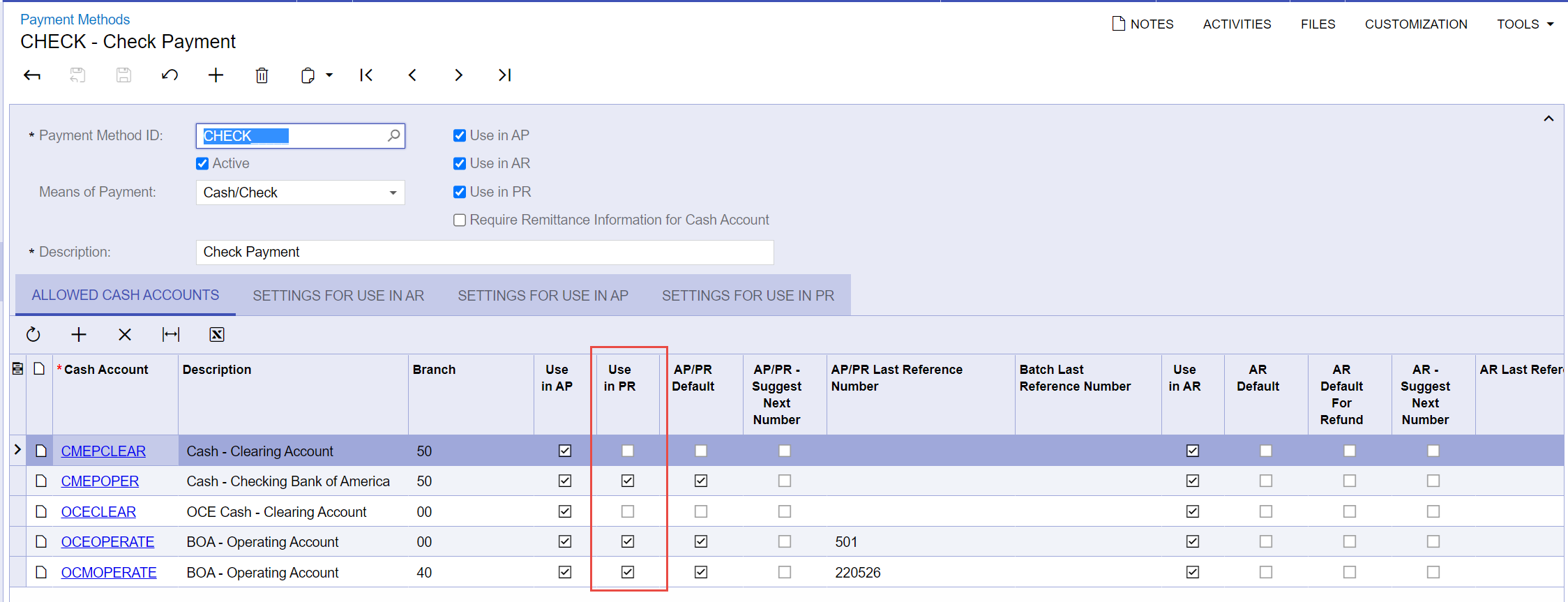
Have you checked the Payment Method’s screen and unchecked the Cash Accounts that should not be used in Payroll (PR)?


Janella
Jr Varsity III
Forum|alt.badge.img+1
  • Author
  • Jr Varsity III
  • Answer
  • May 11, 2022

@tsnyder16 thanks for looking into this and replying, but it’s the actual PR account that the system end user inputted on the Paycheck details where the debit account should be wages. I was just digging around to see if there was a way to restrict this from happening, a warning would be helpful. A stop would be even better I don’t know when or why the cash account would need to be on the trans. details and GL account on the trans. is based on system preferences, it would really help to avoid this end user mistakes. I will add it to ideas. 


Janella
Jr Varsity III
Forum|alt.badge.img+1
  • Author
  • Jr Varsity III
  • May 13, 2022

This is marked as solved but it’s not solved. :( I added to ideas