Question

As Built Configuration Not Displaying Lot/Serialized Parts at the Parent Level Inventory ID

  • February 5, 2026
  • 5 replies
  • 37 views

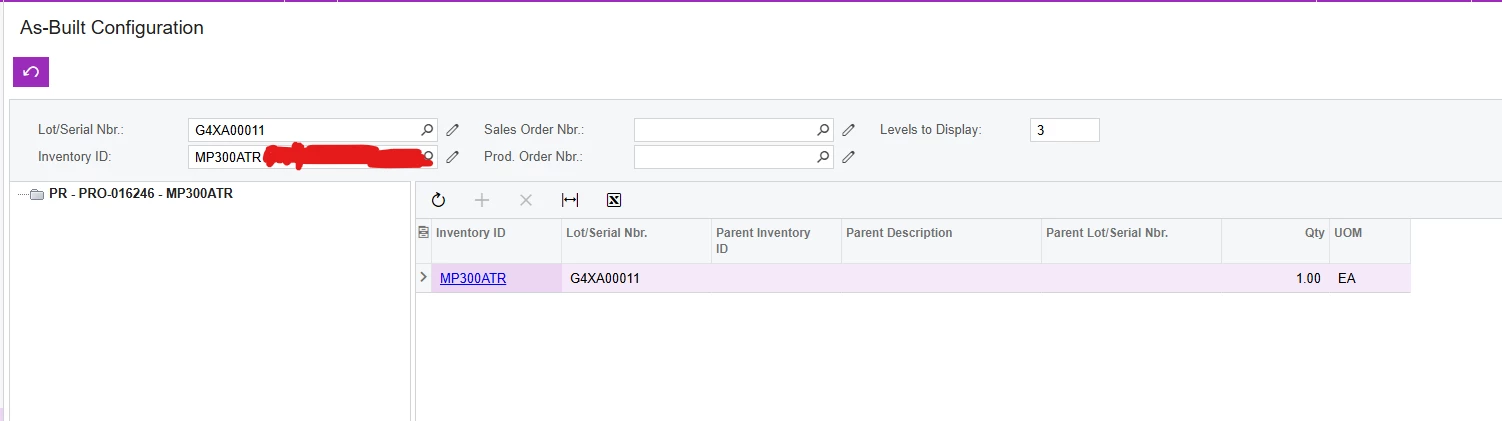
I’m currently testing the ability to find out what lot codes of consumables (like glue, RTV, fujipoly) or serialized parts were used in a serialized product. When I use the As Built Configuration and type in the serial number of the product, I am only shown the details of the parent production order. I’ve set the “Levels to Display” to a higher number than 1, which should have expanded the view to include child production orders, but nothing changed. My company is currently on version 25R1. Would appreciate any assistance getting the As Built Configurator working! Thanks!

5 replies

Debbie Baldwin
Acumatica Moderator
Forum|alt.badge.img+2
  • Acumatica Product Manager
  • February 5, 2026

@mcate - did you use the Preassign capability and assign the serialized parts to the parent? If so when did you assign? Did you assign as you issued? or did you assign at the end. 


  • Author
  • Freshman I
  • February 5, 2026

@Debbie Baldwin I assigned the serial numbers and lot codes as I issued.


Debbie Baldwin
Acumatica Moderator
Forum|alt.badge.img+2
  • Acumatica Product Manager
  • February 5, 2026

@mcate - Can you take a screenshot of how you are filtering? 


Debbie Baldwin
Acumatica Moderator
Forum|alt.badge.img+2
  • Acumatica Product Manager
  • February 5, 2026

@mcate - try entering the Inventory ID plus the Lot/Serial you are looking for - I think this will do the trick. 


  • Author
  • Freshman I
  • February 6, 2026

@Debbie Baldwin Here’s a screenshot with the Inventory ID + Lot/Serial. Still not showing multiple levels…