Answer

Type mismatch in the expression: '-' in ARM report

  • April 12, 2022
  • 4 replies
  • 266 views

pkohler91
Freshman II

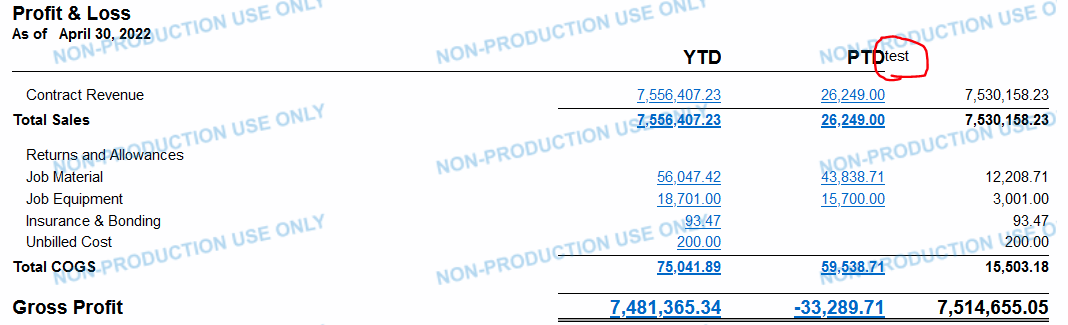
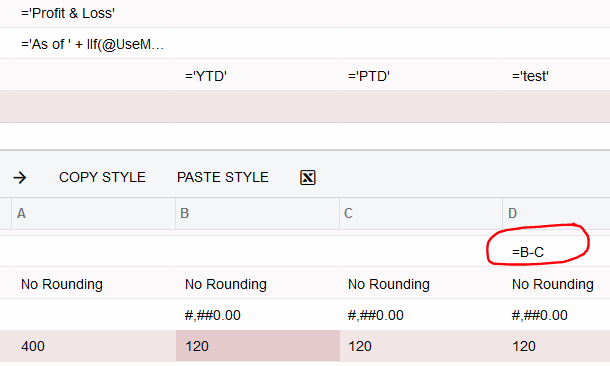
We have recently been getting this error, "Type mismatch in the expression: '-'.", when a calculation in a column attempts to subtract one column from another, i.e.: =B-C. Both columns B and C are GL column types. The formula =B+C works but the formula =B-C does not.

Has anyone encountered this error before?

Best answer by pkohler91

The resolution to this issue was not in the Column Set but rather in the Row Set.

A user had added a row referencing another row without the "=" sign.

i.e., @002200 instead of =@002200

4 replies

Laura03
Captain II
Forum|alt.badge.img+19
  • Captain II
  • April 12, 2022

Hello,

I think it will be helpful to know your version.  I am able to subtract 2 columns. I tested on the demo P & L that comes with Acumatica. I am using 2022 R1. 22.101.0085. Maybe try =(B-C)? Are there any calculations in other places, such as in the row, that might be in conflict? 


pkohler91
Freshman II
  • Author
  • Freshman II
  • April 12, 2022

Hi Laura,

The version is 21-204-0055 which we have been using for quite some time.

The report in question has been running fine for quite some time and has just recently generated this error.

All other reports with similar formulas are generating the same error.

I have submitted a case to Acumatica.

Thanks.


pkohler91
Freshman II
  • Author
  • Freshman II
  • Answer
  • April 12, 2022

The resolution to this issue was not in the Column Set but rather in the Row Set.

A user had added a row referencing another row without the "=" sign.

i.e., @002200 instead of =@002200


Chris Hackett
Community Manager
Forum|alt.badge.img
  • Acumatica Community Manager
  • April 12, 2022

Thank you for sharing the resolution with the community @pkohler91 !