I’m hoping someone can help us with a workflow hang-up we’ve run into several times. We are a contractor supply store and often place custom orders for customers or drop ship and/or ship material from our location to a jobsite.
When we custom order products, we pass the our vendor’s shipping cost along to the customer unless we can add it to one of our normal stocking orders.
When we drop ship, we add the shipping expense to the Sales Order.
When we ship from here, whether it’s using the UPS integration within Acumatica or LTL freight, we add that expense to the Sales Order.
What is the recommended workflow from Acumatica or something that works for YOUR company for charging customers before the exact shipping amount is known?
I see a “create pre-payment” button next to the “create payment” button, and when we create payments there are options for “authorize” and “capture.” My understanding of these 4 is as follows -
“create pre-payment” - pulls partial funding to be used toward the order total
“create payment” - is complete payment for the full order
“capture” - is the process of sending a signal to the CC processor (we use Acumatica Payments/Fortis) to collect payment
“authorize” - is the process of creating a record of a given dollar amount that the customer is okay with spending, but it does NOT charge the card yet
So… would it make sense for us to “authorize” a payment of the order cost + expected shipping? If we do that, what is the workflow to go back and actually capture the correct payment once the shipping expenses are finalized?
Thank you for your help!
Best answer by plambert
I hope this issue hasn’t been a problem in the year since you asked this question. We have many customers which are handled in a similar way, with pre-authorization required for funds before the order ships including a freight estimate. We built a customization to streamline the process, but I can post the general process that has worked for us. We also use Acumatica Payments/Fortis.
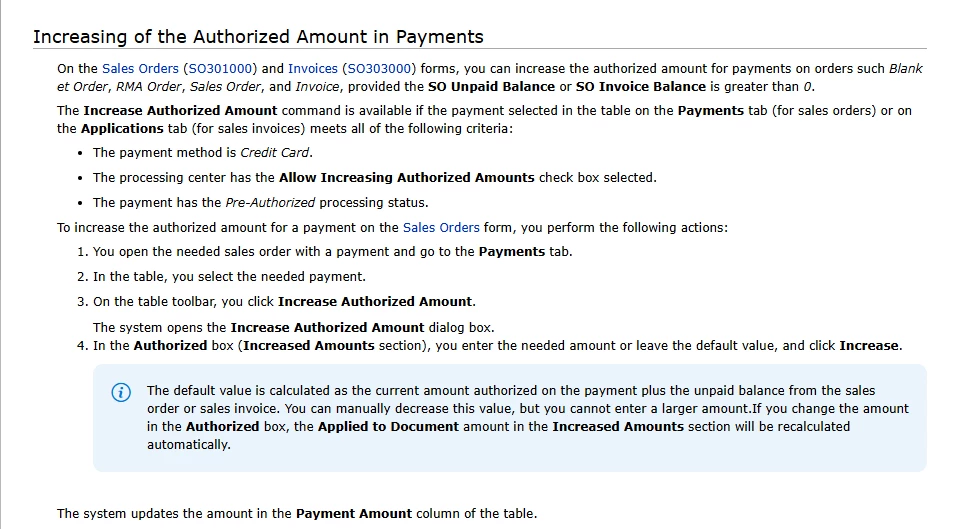
Authorize vs Capture - you’re correct. An authorization only reserves credit from the customer without requiring it to be paid. Then you can capture an amount at a later time from that authorization up to the amount authorized. So the general idea is to authorize for an amount that will cover the order cost and expected shipping so that you don’t have to come back later for a second charge. The workflow we follow is like this, assuming that expected freight is 8-10% of the order:
Get an order for $1000 of items.
Create an authorization for $1100, to cover the order and high estimate of freight. Apply $1000 of that created payment authorization to the sales order to satisfy our prepayment requirement. This does leave a $100 open, unapplied balance on the Customer’s account for later use.
(Drop)Ship the items, getting the actual value of freight for $70. Update the freight value on the sales order with that amount.
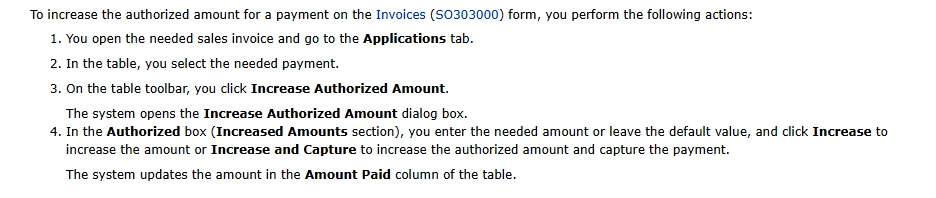
When the invoice is made for $1070, the $1000 initial application from the sales order transfers over. Update the application amount on the invoice and then capture the funds. In some cases you may have to make an additional authorization/capture if the freight exceeded the buffer of the initial authorization. Depending on your customers, you may be able to authorize a larger estimate (12%) or freely make that second charge.
Of course, communicate with your customers if you are over-authorizing for a freight estimate like this to avoid angry calls about why you ‘charged’ them $1100 for a $1000 order.
I hope this issue hasn’t been a problem in the year since you asked this question. We have many customers which are handled in a similar way, with pre-authorization required for funds before the order ships including a freight estimate. We built a customization to streamline the process, but I can post the general process that has worked for us. We also use Acumatica Payments/Fortis.
Authorize vs Capture - you’re correct. An authorization only reserves credit from the customer without requiring it to be paid. Then you can capture an amount at a later time from that authorization up to the amount authorized. So the general idea is to authorize for an amount that will cover the order cost and expected shipping so that you don’t have to come back later for a second charge. The workflow we follow is like this, assuming that expected freight is 8-10% of the order:
Get an order for $1000 of items.
Create an authorization for $1100, to cover the order and high estimate of freight. Apply $1000 of that created payment authorization to the sales order to satisfy our prepayment requirement. This does leave a $100 open, unapplied balance on the Customer’s account for later use.
(Drop)Ship the items, getting the actual value of freight for $70. Update the freight value on the sales order with that amount.
When the invoice is made for $1070, the $1000 initial application from the sales order transfers over. Update the application amount on the invoice and then capture the funds. In some cases you may have to make an additional authorization/capture if the freight exceeded the buffer of the initial authorization. Depending on your customers, you may be able to authorize a larger estimate (12%) or freely make that second charge.
Of course, communicate with your customers if you are over-authorizing for a freight estimate like this to avoid angry calls about why you ‘charged’ them $1100 for a $1000 order.