Solved

How to Find an Inventory Item's Purchase $ for the Period

  • March 20, 2026
  • 6 replies
  • 35 views

Forum|alt.badge.img

Hi all,

I’m trying to write a generic inquiry to calculate the total purchase $ for an item by warehouse by period. My first thoughts were to go at it using INTran and just check the Tran Type. 

Is this the correct route or is there a better source? Also, what transaction types do I need to check for in order to ensure i’m aggregating ONLY vendor purchase $?

thank you!

Joseph

Best answer by jhalling52

Hi ​@JHuang,

I believe the INTran table should meet your requirements here.

If you’re looking to isolate only IN Receipts that originate from a Purchase Receipt, you can add a condition where POReceiptNbr is not empty.

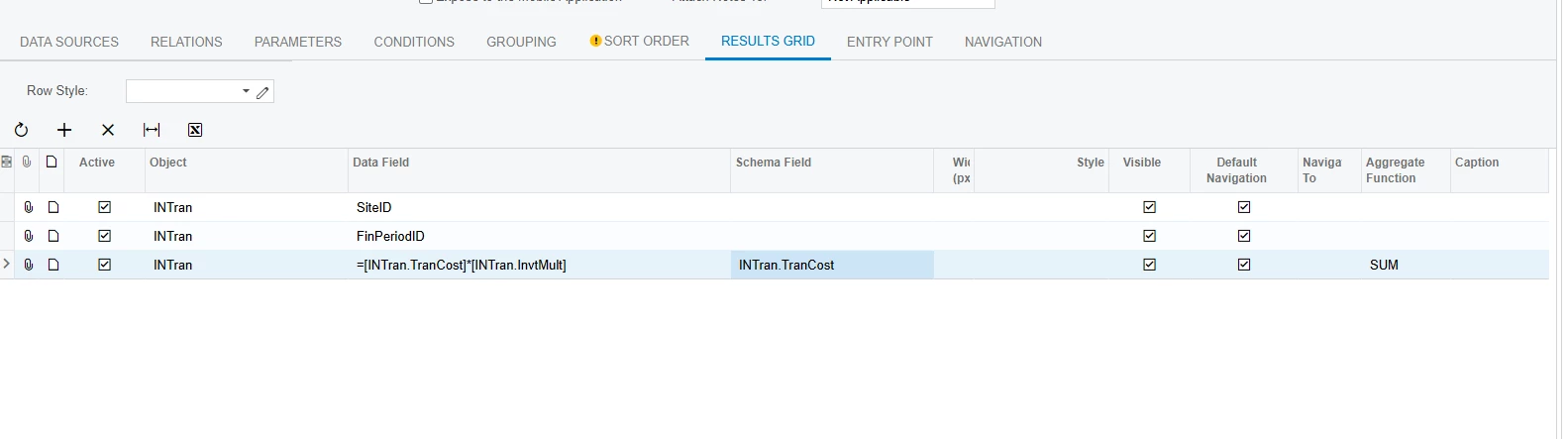
To properly account for Purchase Returns, consider adding a calculated field that multiplies Tran Cost by InvtMult. This will ensure returns are reflected as negative values. Be sure to apply the SUM aggregate function to this calculation.

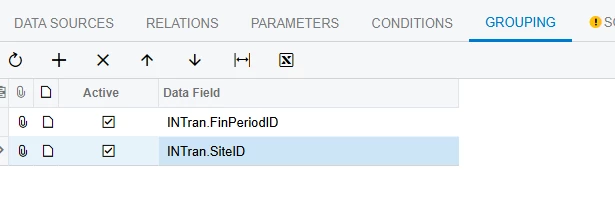
You’ll also want to include groupings by FinPeriod and SiteID to organize the results appropriately.

This example will include landed costs. If you don’t want landed costs included, you could add a condition so the Reason Code does not equal the Landed Cost Reason Code.

6 replies

jhalling52
Jr Varsity I
Forum|alt.badge.img
  • Jr Varsity I
  • Answer
  • March 20, 2026

Hi ​@JHuang,

I believe the INTran table should meet your requirements here.

If you’re looking to isolate only IN Receipts that originate from a Purchase Receipt, you can add a condition where POReceiptNbr is not empty.

To properly account for Purchase Returns, consider adding a calculated field that multiplies Tran Cost by InvtMult. This will ensure returns are reflected as negative values. Be sure to apply the SUM aggregate function to this calculation.

You’ll also want to include groupings by FinPeriod and SiteID to organize the results appropriately.

This example will include landed costs. If you don’t want landed costs included, you could add a condition so the Reason Code does not equal the Landed Cost Reason Code.


Forum|alt.badge.img
  • Author
  • Freshman I
  • March 20, 2026

@jhalling52  this is awesome thank you!! Is there a resource for the list of available reason codes so that I can avoid cycling this in?


jhalling52
Jr Varsity I
Forum|alt.badge.img
  • Jr Varsity I
  • March 21, 2026

The Landed Cost Reason Code is defined on the Landed Cost Codes screen (IN202000). Other Reason Codes are configured on the Purchase Order and Inventory Preferences screens.

Thinking about it further, an alternative to filtering by Reason Code would be to add a condition where the Tran Type is not equal to “Adjustment.” This approach is more flexible, as it allows the GI to be used across any site without needing to identify and maintain specific Reason Codes for each one.


Forum|alt.badge.img
  • Author
  • Freshman I
  • March 25, 2026

@jhalling52 You are awesome and thank you for all the insight :) My last question is in regards to INItemCostHist… I understand there is a column for receipt $ and that this is a gross column containing any items coming in via receipt. would this be similar to seeing the purchase $? Only reason I ask is we’re building checks and balances in our reporting to ensure that our internal team isn’t reading the wrong $.


jhalling52
Jr Varsity I
Forum|alt.badge.img
  • Jr Varsity I
  • March 25, 2026

I believe the Receipt Cost field on INItemCostHist represents the total cost of inventory coming into stock, regardless of the source. This includes both Purchase Receipts (from POs) and Direct Inventory Receipts (entered in IN301000).

If you are fine referencing all incoming cost, regardless of whether created through a PO, then this field works.


Forum|alt.badge.img
  • Author
  • Freshman I
  • March 25, 2026

@jhalling52  thank you very much for all these responses :)