



Solved

URL field

  • February 20, 2024
  • 2 replies
  • 140 views
  • Translate All

dcomerford
Captain II
Forum|alt.badge.img+16

I have added a URL field to the Sales Order Details tab and it works correctly
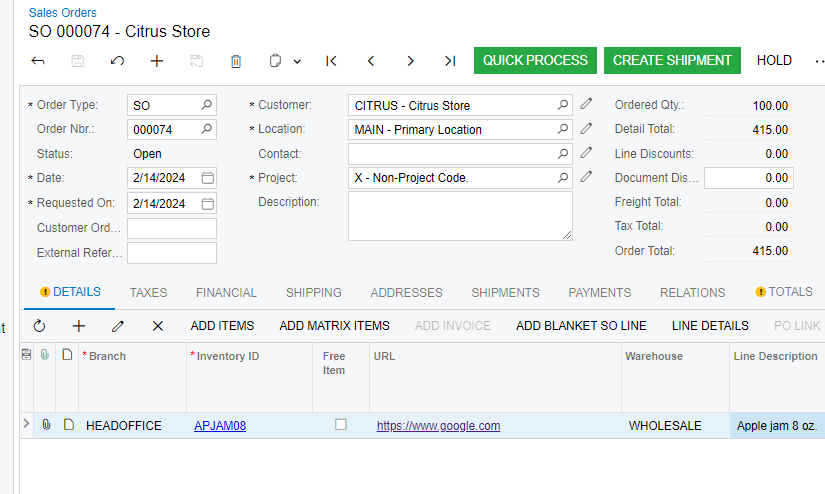
Is there a way i can hide the URL itself as some of them will be very long and instead just display an image or the word URL in the column so the column width can be kept small. If the user clicks on this then it will take them to the embedded URL


Best answer by jinin

 Hi @dcomerford 

You can try using the PXRedirectToUrlException within the field selecting event.

Example,

    throw new PXRedirectToUrlException(redirectUrl, PXBaseRedirectException.WindowMode.New, string.Empty);

View original

2 replies

RohitRattan88
Acumatica Moderator
Forum|alt.badge.img+5

@dcomerford 

I have seen it done in GI, Navigation Configuration: To Configure Navigation to an External URI

but not sure how to configure for detail grid. maybe I will learn today 😉

Translate

jinin
Pro I
Forum|alt.badge.img+12
  • Pro I
  • Answer
  • February 20, 2024

 Hi @dcomerford 

You can try using the PXRedirectToUrlException within the field selecting event.

Example,

    throw new PXRedirectToUrlException(redirectUrl, PXBaseRedirectException.WindowMode.New, string.Empty);

Translate
