

Hello and thanks for the input to all my reporting & Generic Inquiry people!
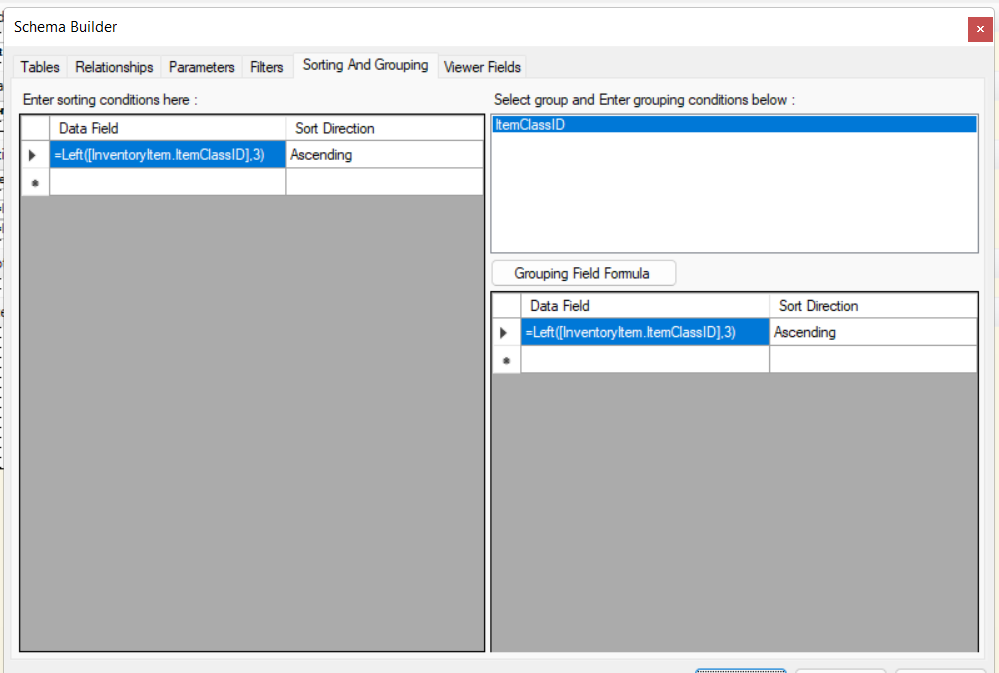
I'm attempting to create a hierarchical sorting structure for a Report Designer Report. I'm following documentation but can't seem to get the data to sort in the intended order.
The goal is to sort the Item list by the first 3 numeric values within a 3-segment Item Class code.
I can return the value I want in a separate text field:
Left([InventoryItem.ItemClassID],3)
But I can’t seem to sort on it.
As an example, here are a few item classes in their intended sort order:
1. 210FENCE 100BARB 100SHEFF
2. 210FENCE 100BARB 200OKSW (note the first 3 digits of the third segment are 200 (for 200OKSW ) , so this would come after 100SHEFF)
3. 210FENCE 100BARB 400BEKHRT
4. 215LVSTOCK100GATES 200METRO (note the first 3 digits are 215, so this would come after 210FENCE)
5. 215LVSTOCK100GATES 200METRO
6. 230GARDN 100GDNSPLY (note the first 3 digits are 230, so this would come after 215LVSTOCK)
The thing that is not working correctly is the overall report sort order. It is not responding to the formula I have established.
In the schema builder, I navigate to Sorting and Grouping, and am attempting to sort by the Data Field : Left([InventoryItem.ItemClassID],3) Ascending.
I suspect that I am not correctly sorting the ENTIRE report by these values.
As a secondary concern, I also want to be able to return the first 3 values of the second segment, and secondarily sort by those.
Thanks for any ideas about this first sorting quandary and what may need to change.