Answer

IF Statement in GI

  • December 13, 2023
  • 6 replies
  • 449 views

Forum|alt.badge.img

Hi,


Trying to build out a GI and needing some help on an IF statement.


Here’s the scenario. 

If Qty in APTran more than 0 (red check), it will return data Inventory acc ID (yellow checks) else will return AP Acc ID (Blue Check).
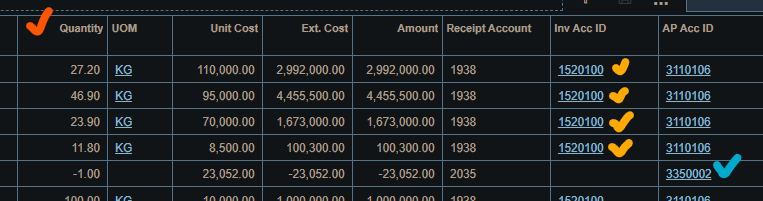
 

So, here is my formula:

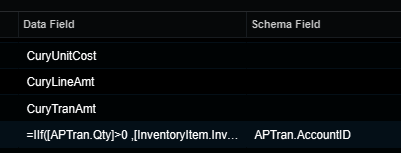
Receipt Account=IIf( [APTran.Qty]>0,[InventoryItem.InvtAcctID], [APTran.AccountID])


and  when applied it on Receipt Account field, it revert to “something else” value which shown above did not return as well as they taken individually.


Need your advice on this problem.

Thank you in advance.

Best answer by Naveen Boga

@satwikh1  I have modified your GI by adding additional JOINS. Now, it is showing the right Receipt Account based on the conditions. Please find the attached GI here.


6 replies

Robert Sternberg
Captain II
Forum|alt.badge.img+7

Set your schema field on Receipt Account to APTran.AccountID. 


Let us know the results. 
If more help is needed upload your GI’s XML here and we can assist further.  
 

This happens because the column is returning the Account’s ID rather than the Accounts CD.  Setting the schema field lets Acumatica know the format of your result and will correctly translate the ID → CD


Naveen Boga
Captain II
Forum|alt.badge.img+19
  • Captain II
  • December 13, 2023

@satwikh1  Please share your XML format of your GI here. 


Forum|alt.badge.img
  • Author
  • Jr Varsity II
  • December 13, 2023

Hi all,


Thanks for your reply. 

applied APTran.AccountID on Schema Field also produce the same result.

please find attached the XML for further assist.


Naveen Boga
Captain II
Forum|alt.badge.img+19
  • Captain II
  • Answer
  • December 13, 2023

@satwikh1  I have modified your GI by adding additional JOINS. Now, it is showing the right Receipt Account based on the conditions. Please find the attached GI here.


Forum|alt.badge.img
  • Author
  • Jr Varsity II
  • December 14, 2023

@satwikh1  I have modified your GI by adding additional JOINS. Now, it is showing the right Receipt Account based on the conditions. Please find the attached GI here.


Now it’s worked well, with simple modification. Thanks @Naveen Boga  


Naveen Boga
Captain II
Forum|alt.badge.img+19
  • Captain II
  • December 14, 2023

@satwikh1  Great :) Thanks for sharing the update.