Answer

Cannot reduce white space in the header of the PO form po641000.rpx

  • November 29, 2022
  • 6 replies
  • 353 views

Forum|alt.badge.img+5

Hello,

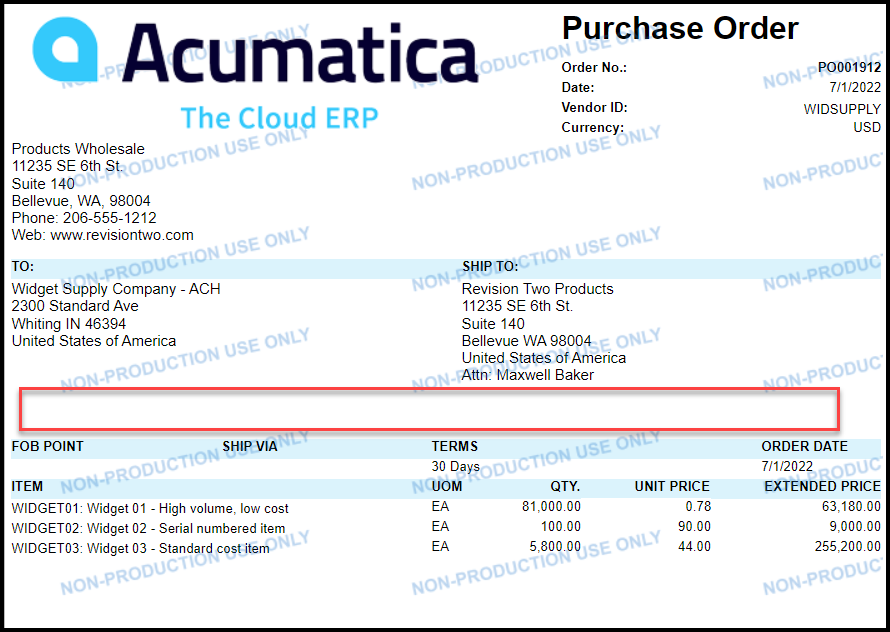
I’ve run across an issue specific to the PO form.  I cannot reduce the white space between the PO addresses and the next printed line.  As a test, I’ve reduced the size of the section to one line, I’ve reduced the size of the printed elements to 1 line, and everything else I can think of.

While I tested, I can get it to only print 1 line of the addresses when I reduce the size of the individual elements, but the white space is never reduced.  Even though I have tried taking the group section sizes down to one line tall.

Any thoughts on this?

po641000.rpx
 

Best answer by BenjaminCrisman

@ltussing03 The remedy is as @mcraig95 explained in the last post, but it could help to have a couple pictures.

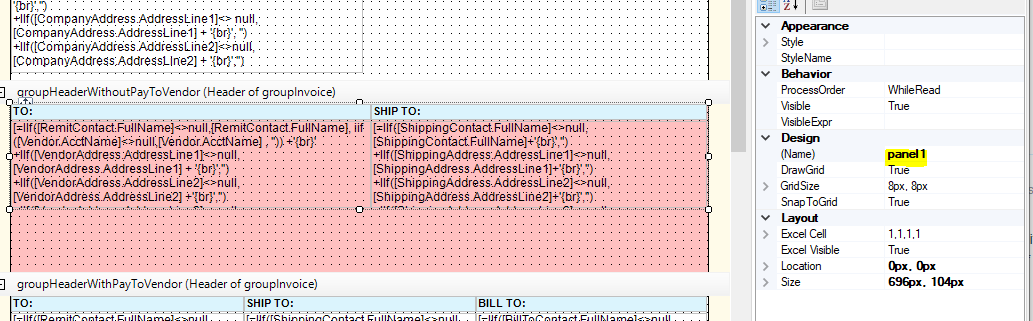
The cause of the gap is the size of the panel in the section you mentioned:

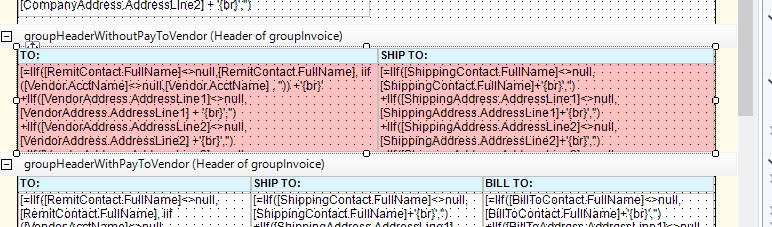
By making the panel smaller with the option on the fields to CanGrow then you can scrunch up the next header section to be just below it:

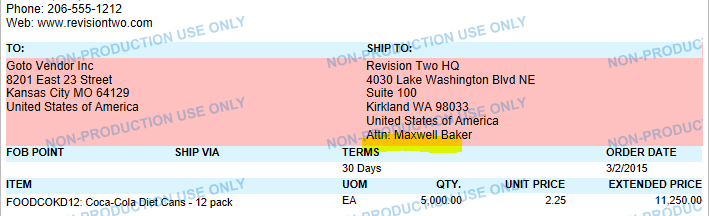
Then the result is the gap gone:


6 replies

Forum|alt.badge.img+1
  • Varsity I
  • November 29, 2022

In report designer, on the field that has to and ship to.  You can reduce the size of the area and then turn on the parameter. Can grow. Then  move up the fields below.  The panel and the line in-between need to also be scrunched.  With the Can Grow option on, the boxes will grow with the address.  The line in-between also needs to be scrunch down to fit in the panels. I tried it and it works.  I have attached attachments.  Matt


Forum|alt.badge.img+5
  • Author
  • Captain II
  • November 29, 2022

Thanks for the reply Matt!!


I have tried that with no luck


Forum|alt.badge.img+1
  • Varsity I
  • November 29, 2022

Sorry, I updated the post. You need to compress the panels and the line inbetween the address. Make the panel just a little bigger then your address fields.  Now with the line inbetween click on it. I like to adjust the size using the size parm.  The first one will be 1, the second one is the length of the line. Adjust it to be just a small bit bigger then the panel.  Now Try it. Matt


BenjaminCrisman
Acumatica Employee
Forum|alt.badge.img+4
  • Acumatica Support Team
  • Answer
  • November 29, 2022

@ltussing03 The remedy is as @mcraig95 explained in the last post, but it could help to have a couple pictures.

The cause of the gap is the size of the panel in the section you mentioned:

By making the panel smaller with the option on the fields to CanGrow then you can scrunch up the next header section to be just below it:

Then the result is the gap gone:


Forum|alt.badge.img+1
  • Varsity I
  • November 29, 2022

Thanks Benjamin


Forum|alt.badge.img+5
  • Author
  • Captain II
  • November 29, 2022

Benjamin and Matt,  THANKS!!!!


I didn’t notice that pane under the address blocks.


THANK YOU BOTH FOR TAKING THE TIME TO ASSIST!!!!