
Solved

Assign Function in Report Designer

  • October 8, 2021
  • 5 replies
  • 1122 views

TimRodman
Pro I
Forum|alt.badge.img+1

I have some questions about the Assign function in Report Designer. You can see the documentation here, also pictured below:

https://help-2021r2.acumatica.com/Help?ScreenId=ShowWiki&pageid=83fa0867-0eaa-4d93-9f9a-92c0f1b384d3
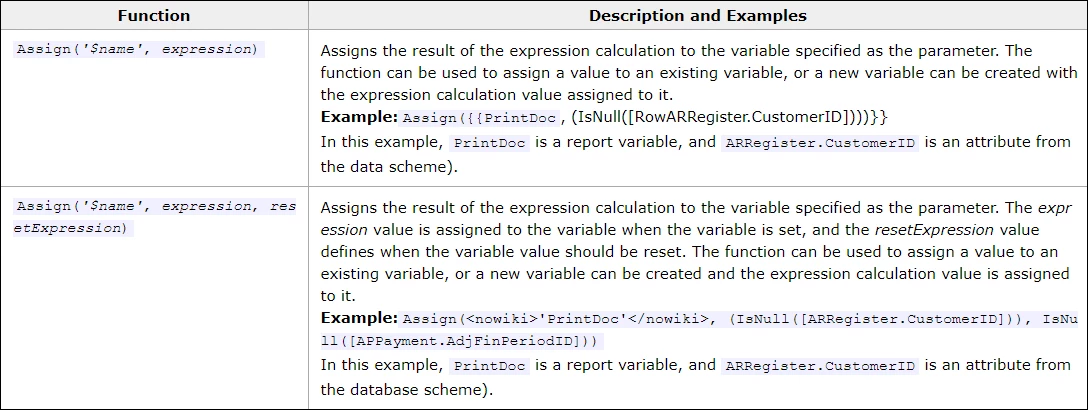
 

My questions:

1. Is there a way to use Assign in a TextBox and return a result at the same time? I tried using a semicolon like this, but it didn’t work:

=Assign('$MyVariable','some value');
'Here is My Variable: '+$MyVariable

2. In the Help pictured above, what is <nowiki> doing?

Best answer by gprice27

Hey Tim - It looks like if you use the Assign function with the 3rd parameter (resetExpression) that the calling variable takes on the value returned by the ‘expression’ as well.

Not sure of a specific use case for the resetExpression - but if you just set it to ‘False’ it should be enough to get it to work. I suspect you could use this so that the target variable becomes an accumulator - while the source variable is reset on some change in the state of data..or another Variable value.

To get this to work - I suspect you have to use a ‘calling variable’ in the textbox value parameter formula, instead of using the Assign expression in the value parameter of the textbox.

Its sort of chicken/egg scenario - so you may was well just reference the ‘target’ variable in the textbox value formula and prepend the text eg =Concat(‘Here is my Variable: ’, $MyVariable)

Hope that make some sort of sense…

I think the <nowiki> is just a tag that should not be visible in the text…. (cut and paste issue)


cheers


5 replies

darylbowman
Captain II
Forum|alt.badge.img+15

Are you trying to return the variable or some other value? In my experience, the textbox will display the variable value and you actually have to hide it if you don’t want that.


According to Wiki Markup Reference, <nowiki> is supposed to ignore wiki markup


gprice27
Jr Varsity I
Forum|alt.badge.img
  • Jr Varsity I
  • Answer
  • October 8, 2021

Hey Tim - It looks like if you use the Assign function with the 3rd parameter (resetExpression) that the calling variable takes on the value returned by the ‘expression’ as well.

Not sure of a specific use case for the resetExpression - but if you just set it to ‘False’ it should be enough to get it to work. I suspect you could use this so that the target variable becomes an accumulator - while the source variable is reset on some change in the state of data..or another Variable value.

To get this to work - I suspect you have to use a ‘calling variable’ in the textbox value parameter formula, instead of using the Assign expression in the value parameter of the textbox.

Its sort of chicken/egg scenario - so you may was well just reference the ‘target’ variable in the textbox value formula and prepend the text eg =Concat(‘Here is my Variable: ’, $MyVariable)

Hope that make some sort of sense…

I think the <nowiki> is just a tag that should not be visible in the text…. (cut and paste issue)


cheers


TimRodman
Pro I
Forum|alt.badge.img+1
  • Author
  • Pro I
  • October 20, 2021

Thanks @Deetz and @gprice27 for your comments. Much appreciated. I was hoping to be able to define and use variables in the same expression window like you can do with DAX in Power BI, but that doesn’t seem to be the way that Assign works.


Forum|alt.badge.img+1
  • Semi-Pro I
  • January 7, 2022

Not sure if you ever received an answer to this but I just came across your question while trying to do exactly the same thing you are talking about. I was also looking for a way to set a variable and then use it in a rather long nested IIf statement.

This seems to work:

=IIf(Assign('$MyVariable','some value') <> 'BANANA', '', 0) +
'Here is My Variable: ' + [$MyVariable]

It fails to validate when I click the button but gives the desired result. I think you could put whatever you like in the IIf bit as long as it doesn’t match the thing you are assigning.


TimRodman
Pro I
Forum|alt.badge.img+1
  • Author
  • Pro I
  • January 10, 2022

Thanks @ppowell for sharing! I will definitely try your solution.