Question

DocuSign Workflow - Tedious and Overcomplicated?

  • March 22, 2022
  • 10 replies
  • 358 views

Forum|alt.badge.img

We are currently using the DocuSign integration, however, we find the workflow and click requirements to be extremely tedious and excessive. We are using it to send out rental contracts (through the Sales Order screen and form) to be signed by our customers. The form we send to be signed changes very little between customers, yet we still have to manually edit every form being sent through DocuSign to place the signature lines and initial lines on the document. There is apparently no way to create a template? It takes as long, or longer in some cases, to prepare the DocuSign document than it does to prepare the Sales Order. It should take almost no clicks or time to prepare the document for signature. It should be, at most, a toggle button to say “Send DocuSign” or “Require Signature” or something along those lines. 

A copy of the “signed” document does NOT get attached to the Sales Order automatically and there is no way to track the DocuSign envelope status from within Acumatica. 

It appears that Acumatica email templates are not used at all when sending a form through DocuSign. 

All of this adds duplicate work and data entry to the workflow instead of making it easier and faster. 

DocuSign has been very unhelpful. They claim to know nothing about how their product integrates with Acumatica’s workflows. 

Does anyone know how to integrate DocuSign with Acumatica better? it appears to be a bare minimum connection with very little true “integration” in my opinion. Or maybe I am missing something major? 

Does anyone know of a contact at Acumatica who knows the DocuSign integration inside and out?

10 replies

  • Freshman I
  • February 14, 2024

Hi Ross, 


I see on the header of your post that there are 7 replies, but I don’t see any of the actual replies…

We are in process of integrating Docu-Sign with Acumatica right now and are running into this same problem. Our thoughts were spelt out exactly in your post: “the workflow and click requirements (seem) to be extremely tedious and excessive”. 


Did you ever receive feedback as to how to combat this issue, or how to make the docu-sign integration more efficient?  

Thanks! 


Chris Hackett
Community Manager
Forum|alt.badge.img
  • Acumatica Community Manager
  • February 14, 2024

Hi @amillerbernd - The number of replies you see are the number of replies the user has made not the number of replies to this post.

You will now see two replies


Forum|alt.badge.img
  • Author
  • Jr Varsity II
  • February 14, 2024

@amillerbernd - Unfortunately, I have not received any feedback on how to make the Docu-Sign integration more efficient. We have gotten used to it and are using it effectively. However, there is a LOT of room for improvement to make it more user friendly and efficient.  


Forum|alt.badge.img

@amillerbernd - Unfortunately, I have not received any feedback on how to make the Docu-Sign integration more efficient. We have gotten used to it and are using it effectively. However, there is a LOT of room for improvement to make it more user friendly and efficient.  

Ross, have you gotten any closer or had any luck since last posting?  Our VAR convinced us to go with Docusign and made a lot of promises.  We’ve ended up with a contract and big expense for a software we’ve just abandoned.  Now that we’re more comfortable with the system, I’m looking for ways to see if we can make anything work with this thing that we’re still paying for, but posts like yours don’t give me a lot of confidence.

For any Customers that are looking into this in the future - make sure you get a full demo of your actual use case and that it all works for you.  Don’t leave anything to the imagination or take anyone’s word for it with the Docusign integration as you might end up with a software bill that doesn’t do anything to improve your process to begin with.


  • Freshman I
  • July 7, 2025

Our e-signature integration (SignNow provider) addresses a lot of the shortcomings of the existing solution.


You can find more info on our integration in our community post: SignNow Acumatica Plugin


Message me if you are interested in a demo and to discuss your use cases.

Thanks


Forum|alt.badge.img+1
  • Captain I
  • September 29, 2025

Hi everyone,

I’m currently evaluating the eSign functionality in Acumatica. Before I invest time into setting it up, I’d like to clarify a few things:

  • Does this feature allow documents to be signed by external parties (contacts who are not Acumatica users)?
  • Or is it limited to internal users already configured in the system?

Thanks!


aslagle96
Freshman I
  • Freshman I
  • July 8, 2026

@raphrf  - Yes, it is able to be sent out to external parties.


@Ross - That your post is the first I come across when looking for solutions, I’m not hopeful that the integration is fully baked without some customization.  I have a client that has a simple requirement, much the same as you and just wanted to make the process more efficient by using docusign/esign.  They have gone back to manually sending out the documents as the integration is too cumbersome to use since the templates aren’t matching up the recipients, so they have to remap the fields every time they send out a document.  I have also found DocuSign to be useless in providing any assistance that is worthwhile.


If anyone has had any success, I would love to hear about any resources or references on how you got this functionality to work.  I’m not finding much online or in the community.


rkenna
Captain II
Forum|alt.badge.img+4
  • Captain II
  • July 8, 2026

Hi all,

I have implemented this several times. It is not super hard to get up and running, and while it is not the easiest of experiences to use, it actually does work well. It seems this is going away after 2025R2 as it will be in the product beginning in 2026R1. If you are not on 2026R1, you will need to publish a Customization Project you can get here:

eSign Integration | Community

Acumatica eSign - Marketplace | Acumatica Cloud ERP

This links above has a good walk through of the functionality and how to use it. eSign featuring Adobe this is another link included in the above article. Let me know if you run into any trouble getting it up and running.


Cheers,

-RJ


Forum|alt.badge.img
  • Author
  • Jr Varsity II
  • July 8, 2026

Sorry for not responding sooner. Unfortunately, I have not seen a single upgrade to the DocuSign workflow inside Acumatica since I created this post 4 years ago. 

We are still using it. However, many of my sales people refuse to use it because of the time it takes to work through the process. I ended up drastically cutting back the number of envelopes I purchased from DocuSign on my last few renewals, so the cost is not out of line anymore. 

To clarify what our workflow is, we require that our Sales Orders be signed prior to delivering our goods and services to the customer. We can very easily email a PDF copy of the Sales Order to the customer directly from the Sales Order screen with very few clicks, and Acumatica email templates work as expected when doing this. However, this is just a PDF attached to an email and the customer must physically print the PDF, sign it, scan it back into the computer, and email it back to us. In that case, we are just passing the cumbersome workflow on to our customer. In some cases, the customer will electronically sign the document themselves using Adobe or some other program. But I don’t love this as I don’t believe it is as legally binding as a wet ink signature or DocuSign. 

The workflow to send a DocuSign envelope from Acumatica is as follows:

  1. Click “Print Sales Order” - This opens a preview of the PDF form in a new tab. 
  2. Click "Send” - an email draft pops up
  3. Click “Files” - a Files register pops up
  4. Next to the PDF file you want signed, click “Edit” - this pulls up the “File Maintenance” screen in a separate window or tab.
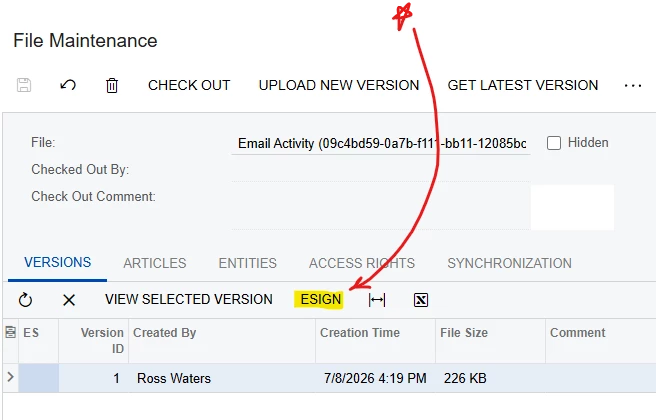
  5. In the “File Maintenance” window, find the tiny button that says “ESIGN” and click it. This opens up yet another window named “ESign Envelope.” 


  6. In the “ESign Envelope” window, you can choose who the signature request is going to be sent from, you can manually type what will show up on the email that the customer received from DocuSign, you can edit reminder options, you have to populate the names and emails for each person who is required to sign, add emails for anyone who needs to receive a copy of the signed document, and you can set the signing order if applicable. 
  7. Once the “ESign Envelope” window is filled in correctly, click “Send” 
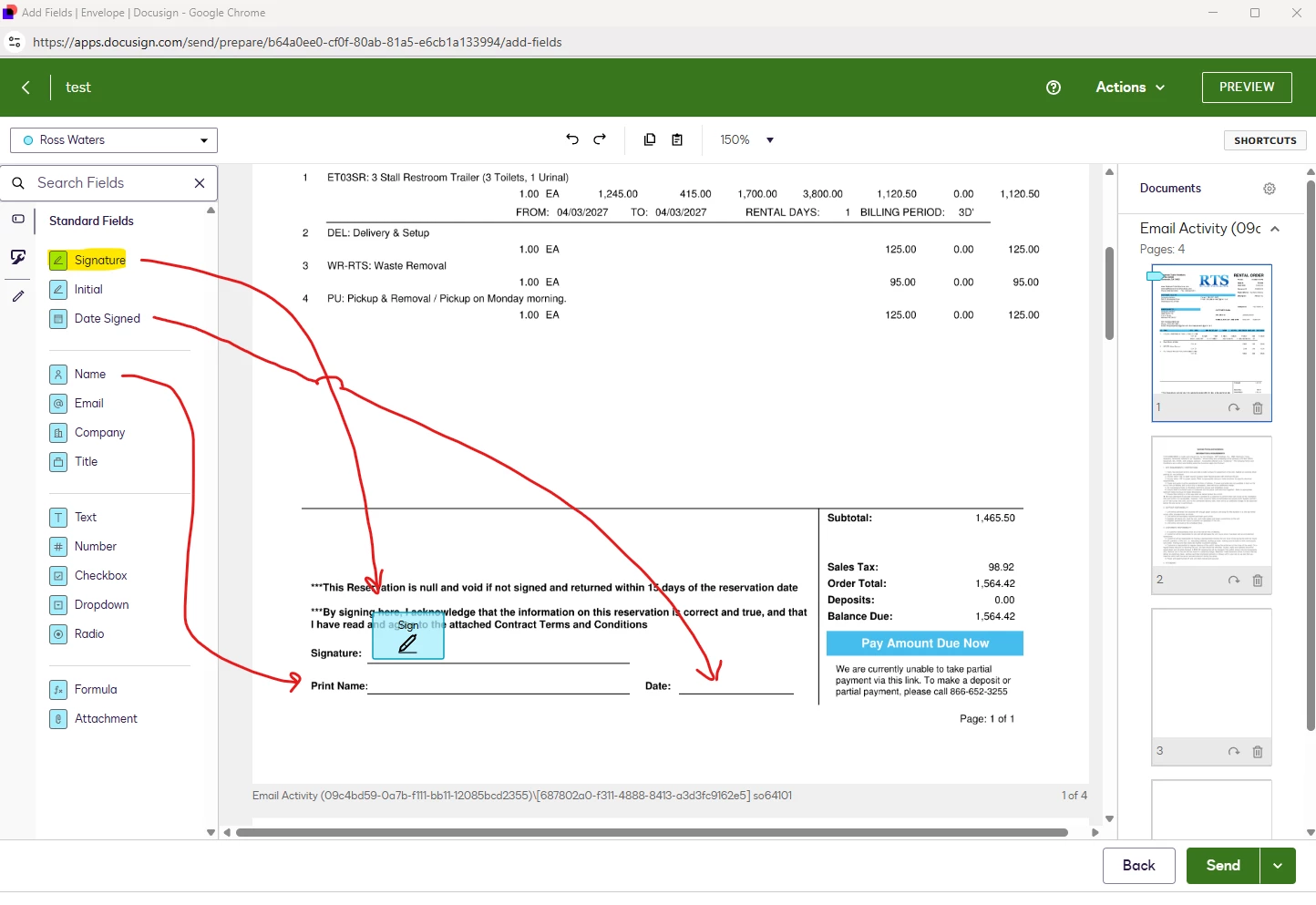
  8. This opens up the SIXTH window/tab, which is now a DocuSign web page and not Acumatica. There is a pop up that gives you the option to select a “template” here. These templates are built in DocuSign and not Acumatica. In our case (this part might function differently for other companies with different forms) these templates only populate the text that appears on the email that DocuSign sends to the customer. I believe it is “supposed” to populate the signature, date signed, name, and initial fields on the document automatically, but it doesn't. Now you either select a template or press cancel and the pop up window minimizes. You don’t have the option of editing the template text unless you go edit the actual template in the DocuSign website. So we just manually write each email in step 6.
  9. You now see the document you are trying to send for signature. Now you have to drag the DocuSign “fields” you need over to the appropriate place on your document. IE: the “Signature” field gets placed on the signature line, the “Name” field gets placed where your customer prints their name, “Date Signed” gets placed on the date line, and “Initial” field gets placed anywhere you want an initial from the customer. There are more fields that can be used. These are just the ones we use. 


  10. FINALLY, you press “Send” on this page and DocuSign sends a signature request email to the customer with your document and any text you entered for the email. This is sent from DocuSign and not Acumatica and is the same format that you have probably received when you are required to sign something via DocuSign. 
    • There is no record of the DocuSign request saved in Acumatica. We save, but don’t send, the Acumatica email draft and rename it “DocuSign Sent” so we have a manual record saved in Activities that lets us know the DocuSign envelope was sent. 
    • When the document is signed, the PDF copy is NOT automatically attached to the Sales Order in Acumatica. You have to do this manually. At least DocuSign will email it automatically so you don’t have to sign into DocuSign directly to download the PDF. 

That’s it!!! Just 10 short steps and at least 6 different screens. (Yes, I’m being sarcastic) 😑


  • Freshman I
  • July 9, 2026

Hi all,


Our esign integration allows for a direct conversion of a Sales Order record to a PDF envelope, so it’s just one step for the user. The signed PDF is synced back to the original Sales Order record when completed, so no additional steps are required afterwards. Let me know if you are interested.


Thanks!