

Answer

Filter appointment list on Mobile App

  • November 6, 2024
  • 2 replies
  • 86 views

Forum|alt.badge.img

Currently the appointments shown on the Appointment List on the mobile app shows all appointments allocated to that staff member.  We would like to only show appointments that has the ‘Not started’ and ‘In Process’ statuses.  How do we do this? 

Also I believe the Appointment List on the app is the ‘Appointment Summary’ on the web version.

Is this correct?
Best answer by Kandy Beatty

HI @steph23 

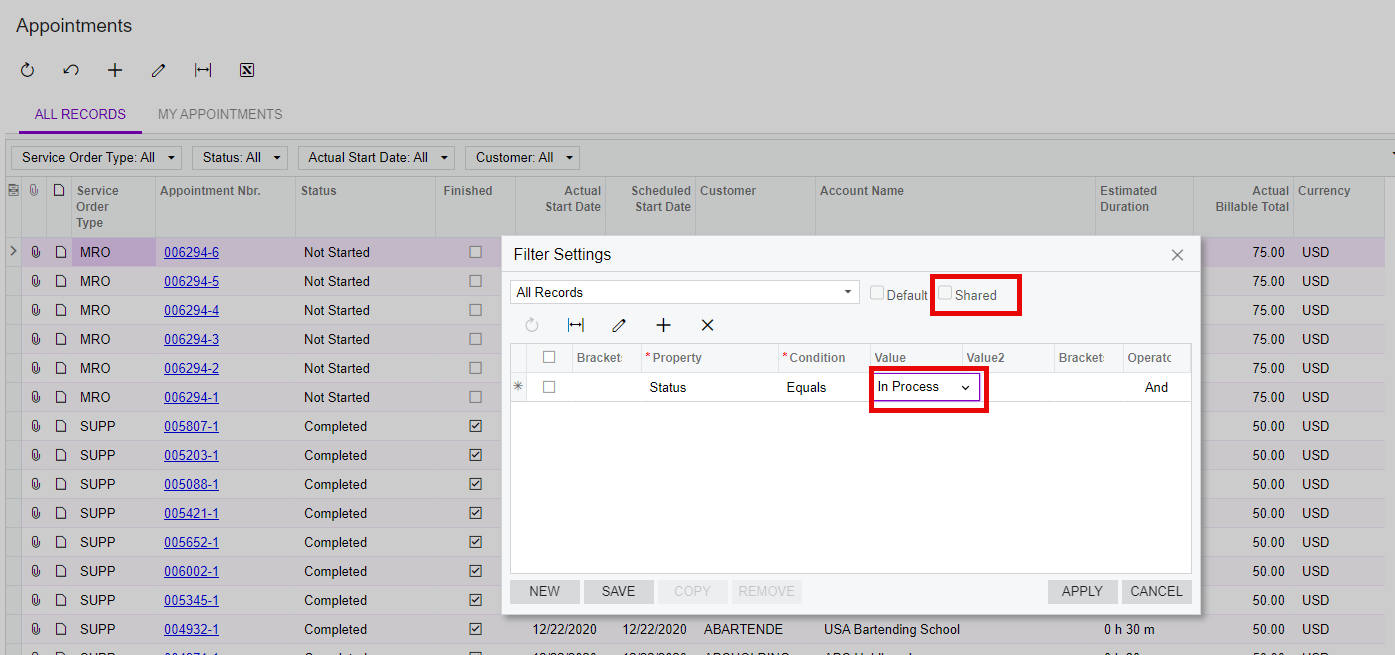
Do you have a filter on the GI for appts in Acumatica? Ensure it is a Shared filter. Refresh the mobile app and see if it appears


2 replies

Kandy Beatty
Captain II
Forum|alt.badge.img+17
  • Captain II
  • Answer
  • November 6, 2024

HI @steph23 

Do you have a filter on the GI for appts in Acumatica? Ensure it is a Shared filter. Refresh the mobile app and see if it appears


Forum|alt.badge.img
  • Author
  • Jr Varsity II
  • November 6, 2024

Thank you @Kandy Beatty that did the trick.

