

Answer

Populate Custom Data Field in Sales Order Line from Third Party API

  • June 25, 2024
  • 3 replies
  • 172 views

Forum|alt.badge.img+2

Hi All, 

I have a requirement as given below,

We have an API to integrate data from customer website into Acumatica. The API will create new Customer and Sales Order in Acumatica. In addition Payments will be created and attached to the Sales Order if provided. 

We now have another custom field added called ParentKitID in sales order line which needs to be updated from the API. How do I achieve this, I have already configured the endpoint in Acumatica for the field.
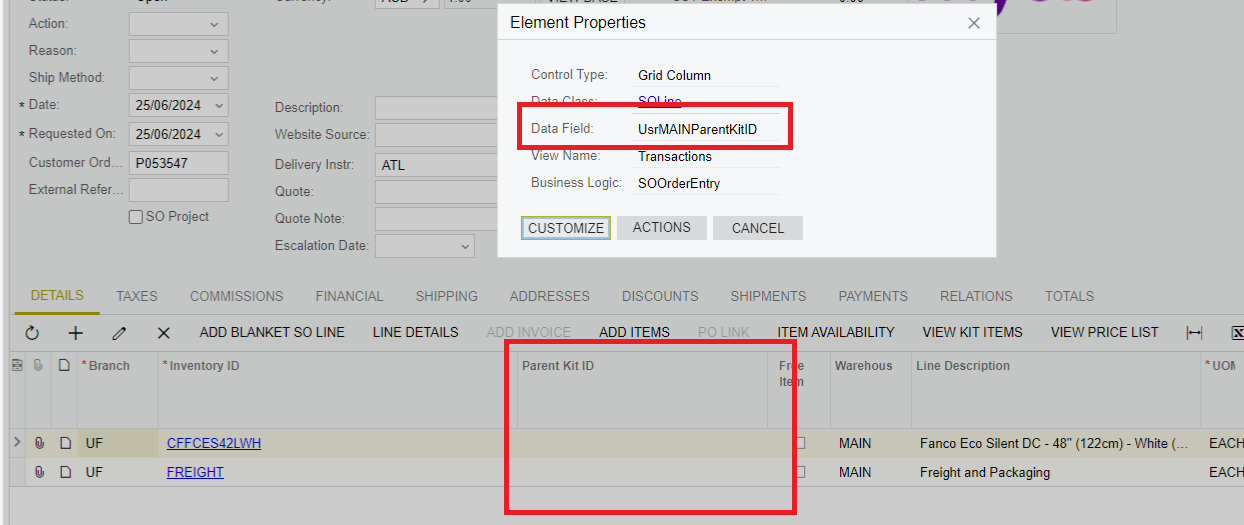
Any help would be appreciated, thank you!

Best answer by harutyungevorgyan

Hello @TharidhiP, please share your HTTP request with us. If you already have your custom field located in your custom endpoint, all you need to do is send a POST request to the {baseUrl}/auth/login first, and then send a PUT request to the baseUrl/{YourCustomEndpoint}/{YourCustomField}. Use OrderType and OrderNbr for the header section, and OrderType, OrderNbr, and LineNbr for the Details array in the JSON body.


{
"OrderType": {
"value": "SO"
},
"OrderNbr": {
"value": "{YOURORDERNBR}"
},

"Details":
[
{
"OrderNbr": { "value": "YOURORDERNBR"},
"OrderType": {"value":"SO"},
"LineNbr": {"value":1},
"UsrMAINParentKitID" : {"value":{YOURID}}
}
]
}


3 replies

Naveen Boga
Captain II
Forum|alt.badge.img+19
  • Captain II
  • June 25, 2024

@TharidhiP  Are you passing this custom field in the API Request Body?


Forum|alt.badge.img+2
  • Author
  • Pro III
  • June 27, 2024

Hi @Naveen Boga yes the request will be passed in the API body. I believe I have to expose the new field via the API.


harutyungevorgyan
Jr Varsity I
Forum|alt.badge.img+2

Hello @TharidhiP, please share your HTTP request with us. If you already have your custom field located in your custom endpoint, all you need to do is send a POST request to the {baseUrl}/auth/login first, and then send a PUT request to the baseUrl/{YourCustomEndpoint}/{YourCustomField}. Use OrderType and OrderNbr for the header section, and OrderType, OrderNbr, and LineNbr for the Details array in the JSON body.


{
"OrderType": {
"value": "SO"
},
"OrderNbr": {
"value": "{YOURORDERNBR}"
},

"Details":
[
{
"OrderNbr": { "value": "YOURORDERNBR"},
"OrderType": {"value":"SO"},
"LineNbr": {"value":1},
"UsrMAINParentKitID" : {"value":{YOURID}}
}
]
}

