

Question

Processing dialog loops/reappears after completion in custom PXAction

  • April 17, 2026
  • 7 replies
  • 87 views

Hi everyone,

I'm experiencing a strange behavior with a custom action in a processing screen (similar to Process Orders).

The Issue: When the process finishes, the "Processing" summary dialog appears correctly (showing 1 Success, 0 Errors, etc.). However, when the user clicks the "Close" button, the loading spinner appears briefly, and then the same success dialog pops up again. This creates an infinite loop where the only way to exit is to manually refresh the browser page.

Observations:

  • This happens even when the process is successful.

  • It occurs across multiple different custom actions I've developed.

  • I am using PXLongOperation.StartOperation to handle the logic.


Code Snippet: Below is the logic for one of the actions causing this:
 

public PXAction<SOOrder> FRcreateTransfer;
[PXButton(CommitChanges = true), PXUIField(DisplayName = "Create Transfer", MapEnableRights = PXCacheRights.Select)]
public virtual IEnumerable frCreateTransfer(PXAdapter adapter, [PXDate] DateTime? shipDate, [PXInt] int? siteID, [PXDate] DateTime? endDate, [PXInt] int? usrFRLocationID) 
    => ExecuteFRCreateTransfer(adapter, shipDate, siteID, endDate, usrFRLocationID, SOOperation.Issue, true);

private IEnumerable ExecuteFRCreateTransfer(PXAdapter adapter, DateTime? shipDate, int? siteID, DateTime? endDate, int? filterLocationID, string issue, bool v)
{
    List<SOOrder> list = adapter.Get<SOOrder>().ToList();

    // ... Filter logic ...

    PXLongOperation.StartOperation(Base, delegate ()
    {
        bool anyfailed = false;
        var orderEntry = PXGraph.CreateInstance<SOOrderEntry>();
        
        for (int i = 0; i < list.Count; i++)
        {
            SOOrder order = list[i];
            if (adapter.MassProcess) PXProcessing<SOOrder>.SetCurrentItem(order);

            try
            {
                // ... Business Logic (Creating Transfer) ...

                if (adapter.MassProcess) PXProcessing<SOOrder>.SetProcessed();
            }
            catch (Exception ex)
            {
                if (!adapter.MassProcess) throw;
                PXProcessing<SOOrder>.SetError(ex);
                anyfailed = true;
            }
        }

        if (anyfailed)
            throw new PXOperationCompletedWithErrorException(ErrorMessages.SeveralItemsFailed);
    });

    return list;
}


What I've tried: I suspect it might be related to how the IEnumerable returns the list or how the adapter state is being handled after the PXLongOperation starts.

Has anyone encountered this "Success Dialog Loop" before? Any advice on how to properly terminate the operation so the dialog closes permanently would be greatly appreciated.

Thanks in advance!
7 replies

Forum|alt.badge.img+3
  • Pro III
  • April 20, 2026

@mcoral62 

The issue comes from the return statement at the end of your method. After PXLongOperation.StartOperation executes, returning the same list back to the framework causes Acumatica to treat those records as still pending for processing, which results in the action being triggered repeatedly and the success dialog appearing in a loop.

To fix this, update the return statement. Replace:

return adapter.Get();


KrunalDoshi
Varsity III
Forum|alt.badge.img+1
  • Varsity III
  • April 20, 2026

Hi ​@mcoral62,

So just want to understand that on processing screen, you need Process, Process All and a custom action? I believe, you might not need the custom action unless you want to do something specific which Process/Process All button cannot handle. 

You can always change the caption of Process/Process All buttons by using Set..Caption property in your constructor of Processing screen.

<YourDataView>.SetProcessCaption("Process");
<YourDataView>.SetProcessAllCaption("Process All");

Rest you can handle in your delegate by using SetProcessDelegate method and no need to return anything.

<YourDataView>.SetProcessDelegate(<YourDelegateMethod>);

Hope this helps. 


Naveen Boga
Captain II
Forum|alt.badge.img+20
  • Captain II
  • April 22, 2026

@mcoral62  Assuming that this problem is solved by returning the adapter.Get(), if not can you please share the details?


  • Author
  • Freshman I
  • April 22, 2026

@mcoral62  Assuming that this problem is solved by returning the adapter.Get(), if not can you please share the details?


Hi @SaiKrishnaV and @Naveen Boga,

Thank you for your suggestions. Unfortunately, returning adapter.Get() did not resolve the issue. The success dialog continues to reappear in an infinite loop after clicking "Close," and the loading spinner triggers the action again.

Here is a summary of what we have tried so far without success:

  1. Changing the Return Statement: We tried returning adapter.Get(), an empty List<SOOrder>(), and the original list. The behavior remains identical in all cases.

  2. CommitChanges Property: We toggled CommitChanges to false in the PXButton attribute to prevent unnecessary postbacks, but the loop persists.

  3. Code Simplification: Even after commenting out all the business logic inside the PXTransactionScope and the PXLongOperation (leaving only the processing status calls), the dialog still loops.

  4. Graph Instance: We are using PXGraph.CreateInstance<SOOrderEntry>() inside the delegate to ensure we are not blocking the main graph's cache.

Additional Context: This is happening specifically on the Process Orders (SO501000) screen within a GraphExtension<SOOrderProcess>.

Is it possible that the framework on this specific processing screen requires a specific way to clear the PXAdapter state or the PXLongOperation reference when handled from a custom action?

I would appreciate any deeper insights you might have on why the UI keeps re-triggering the same action callback.


KrunalDoshi
Varsity III
Forum|alt.badge.img+1
  • Varsity III
  • April 22, 2026

Hi ​@mcoral62,

So just want to understand that on processing screen, you need Process, Process All and a custom action? I believe, you might not need the custom action unless you want to do something specific which Process/Process All button cannot handle. 

You can always change the caption of Process/Process All buttons by using Set..Caption property in your constructor of Processing screen.

<YourDataView>.SetProcessCaption("Process");
<YourDataView>.SetProcessAllCaption("Process All");

Rest you can handle in your delegate by using SetProcessDelegate method and no need to return anything.

<YourDataView>.SetProcessDelegate(<YourDelegateMethod>);

Hope this helps. 

Hi ​@mcoral62

Have you tried this?


  • Author
  • Freshman I
  • April 22, 2026

Hi ​@mcoral62,

So just want to understand that on processing screen, you need Process, Process All and a custom action? I believe, you might not need the custom action unless you want to do something specific which Process/Process All button cannot handle. 

You can always change the caption of Process/Process All buttons by using Set..Caption property in your constructor of Processing screen.

<YourDataView>.SetProcessCaption("Process");
<YourDataView>.SetProcessAllCaption("Process All");

Rest you can handle in your delegate by using SetProcessDelegate method and no need to return anything.

<YourDataView>.SetProcessDelegate(<YourDelegateMethod>);

Hope this helps. 

Hi ​@mcoral62

Have you tried this?


Hi @KrunalDoshi,

Thank you for the suggestion. I have implemented the SetProcessDelegate approach within a RowSelected event (since this is a Graph Extension of the standard SO501000 screen), but unfortunately, the infinite loop persists.

When the process finishes and I click "Close", the system immediately triggers the loading spinner again and the success dialog reappears.

Here is the current implementation:

  1. Delegate Assignment: I am assigning the delegate dynamically in the RowSelected handler of the filter to ensure it targets my custom logic when the "Create Transfer" action is selected.

  2. Processing Logic: The logic is isolated in a static method, and I am using PXProcessing<SOOrder>.SetProcessed() for each item.

C#


protected void _(Events.RowSelected<SOOrderFilter> e)
{
if (e.Row == null) return;
SOOrderFilter filter = e.Row;

// ... Filter and UI visibility logic ...

// Reassign process delegate as suggested
Base.Orders.SetProcessDelegate((List<SOOrder> orders) =>
{
ExecuteFRCreateTransferDelegate(orders);
});
}

public static void ExecuteFRCreateTransferDelegate(List<SOOrder> list)
{
var orderEntry = PXGraph.CreateInstance<SOOrderEntry>();
foreach (SOOrder order in list)
{
PXProcessing<SOOrder>.SetCurrentItem(order);
try
{
using (var ts = new PXTransactionScope())
{
// Business Logic here...
ts.Complete();
}
PXProcessing<SOOrder>.SetProcessed();
}
catch (Exception ex)
{
PXProcessing<SOOrder>.SetError(ex);
}
}
}

What I've noticed: Even with SetProcessDelegate, which should let the Framework handle the dialog lifecycle, the browser seems to "re-post" the last action.

Since this is the standard SOCreateShipment (SO501000) graph, could there be a conflict with the base logic that handles the "Process" buttons? Is there any other place where the state needs to be cleared to prevent the UI from re-triggering the delegate call automatically?

I would appreciate any further advice.


KrunalDoshi
Varsity III
Forum|alt.badge.img+1
  • Varsity III
  • April 23, 2026

Hi ​@mcoral62,

Thanks for posting the code and actual logic. I think now I understand what you are trying to achieve.

You should avoid calling any method in RowSelected event as it triggers everytime. For custom logic on Create Transfer you should write logic in that screen instead of writing it in the processing screen.

For instance, if Create Transfer is based on your list of Sales Orders (when in particular status), you should extend Sales Order graph. Once you test the logic works for individual Sales Order then you can map that action for the required Processing screen. This will solve your issue and not trigger the Processing dialog box again. At least it is working for me 😋

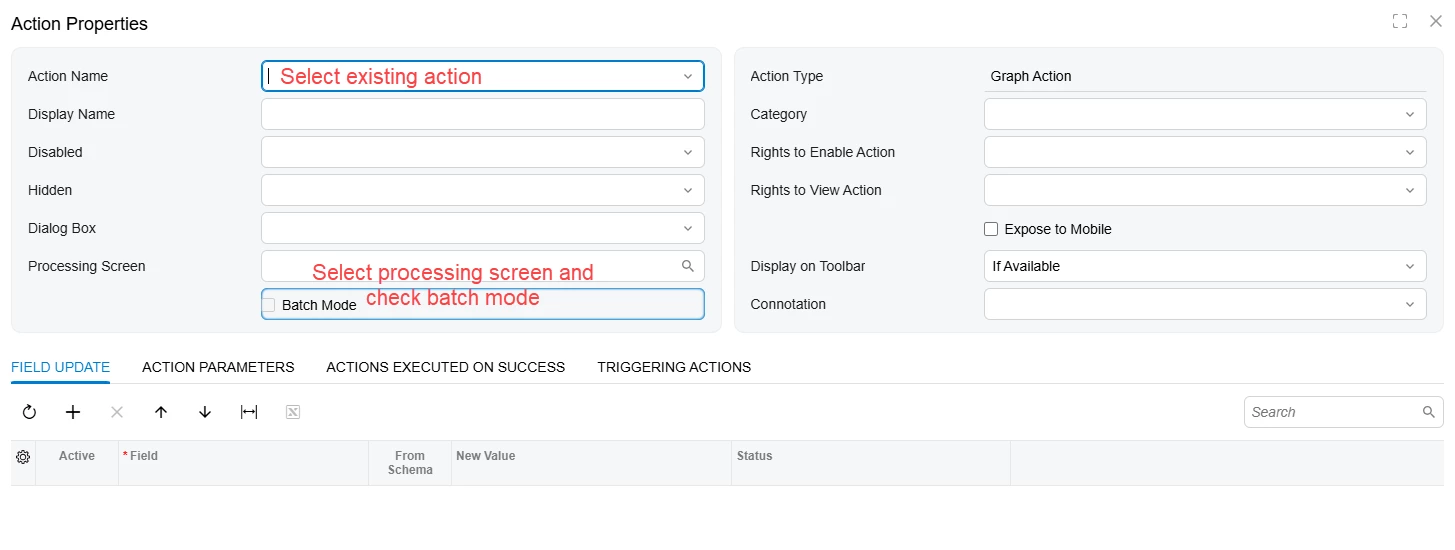
You already have a custom action. You should have this action on SOOrderEntry GraphExtension. Then you should map the action on Processing screen (see below screenshot). You need to extend the Processing graph to filter the records based on your action selected. I have included below code sample for your reference.

Hope this will resolve your issue!

public class SOInvoiceShipmentExt : PXGraphExtension<SOInvoiceShipment>
{
[PXFilterable]
public PXFilteredProcessing<SOShipment, SOShipmentFilter> Orders;

protected IEnumerable orders()
{
var filter = Base.Filter.Current;
if (filter == null)
{
yield break;
}

if (filter.Action == "SO302000$" + nameof(SOShipmentEntryExt.<CustomAction>))
{
PXSelectBase<SOShipment> shCmd = new
SelectFrom<SOShipment>.
InnerJoin<INSite>.On<SOShipment.FK.Site>.
InnerJoin<Customer>.On<SOShipment.customerID.IsEqual<Customer.bAccountID>>.SingleTableOnly.
LeftJoin<Carrier>.On<SOShipment.FK.Carrier>.
Where<
SOShipment.confirmed.IsEqual<False>.
And<Match<Customer, AccessInfo.userName.FromCurrent>>.
And<Match<INSite, AccessInfo.userName.FromCurrent>>.
And<Exists<
SelectFrom<SOOrderShipment>.
Where<
SOOrderShipment.shipmentNbr.IsEqual<SOShipment.shipmentNbr>.
And<SOOrderShipment.shipmentType.IsEqual<SOShipment.shipmentType>>>>>>.
View(Base);

int startRow = PXView.StartRow;
int totalRows = 0;

foreach (PXResult res in shCmd.View.Select(
null, null,
PXView.Searches,
PXView.SortColumns,
PXView.Descendings,
PXView.Filters,
ref startRow,
PXView.MaximumRows,
ref totalRows))
{
SOShipment shipment = PXResult.Unwrap<SOShipment>(res);

yield return res;
}

PXView.StartRow = 0;
yield break;
}

// Default behavior: filter results from the base view
foreach (SOShipment shipment in Base.Orders.Select())
{
yield return shipment;
}
}
}
Select Actions in customization for a particular screen where you have custom action defined


