Solved

GridView: new page showing add button as disabled

  • March 3, 2026
  • 19 replies
  • 131 views

Forum|alt.badge.img+2

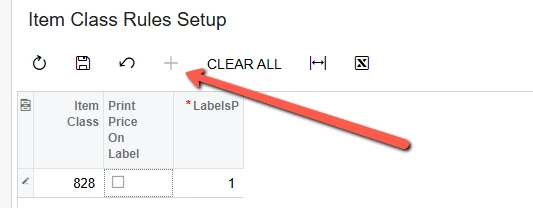
I can see the “+” symbol but it’s disabled which doesn’t make sense since I added the Mode (AllowAddNew).  I can add rows in SQL and they show up fine but I can’t edit the values or add new rows in the new customized screen.

Question: do I need to create an Action bar to create rows or edit existing rows?
I defined my HTML like this…

<%@ Page Language="C#" MasterPageFile="~/MasterPages/ListView.master" AutoEventWireup="true" ValidateRequest="false" CodeFile="IN400628.aspx.cs" Inherits="Page_IN400628" Title="Untitled Page" %>
<%@ MasterType VirtualPath="~/MasterPages/ListView.master" %>

<asp:Content ID="cont1" ContentPlaceHolderID="phDS" Runat="Server">
    <px:PXDataSource SkinID="Primary" ID="ds" runat="server" Visible="True" Width="100%"
        TypeName="updateInventory.INItemClassRulesSetupMaint" PrimaryView="Records" 
        >
        <CallbackCommands>
            <px:PXDSCallbackCommand Name="Save" CommitChanges="True" ></px:PXDSCallbackCommand>
            <px:PXDSCallbackCommand Name="DeleteAll" Visible="true" CommitChanges="true" ></px:PXDSCallbackCommand>
        </CallbackCommands>
    </px:PXDataSource>
</asp:Content>
<asp:Content ID="cont2" ContentPlaceHolderID="phL" runat="Server">
    <px:PXGrid ID="grid" runat="server" DataSourceID="ds" Width="100%" Height="150px" 
AllowPaging="True" AllowSearch="true" AdjustPageSize="Auto" 
SkinID="Primary" AllowAutoHide="false" SyncPosition="true" MatrixMode="true">
        <Levels>
            <px:PXGridLevel DataMember="Records">
                <RowTemplate>
                    <px:PXSelector ID="edItemClass" runat="server" DataField="ItemClassID" AutoRefresh="True"></px:PXSelector>
                </RowTemplate>
                <Columns>
                <px:PXGridColumn DataField="ItemClassID" Width="70" />
                    <px:PXGridColumn DataField="PrintPriceOnLabel" Type="CheckBox"></px:PXGridColumn>
                    <px:PXGridColumn DataField="LabelsPerUnit" CommitChanges="true"></px:PXGridColumn></Columns>
            </px:PXGridLevel>
        </Levels>
        <AutoSize Container="Window" Enabled="True" MinHeight="150" />
        <Mode AllowAddNew="true" />
        <ActionBar >
        </ActionBar>
    </px:PXGrid>
</asp:Content>

Here’s my DAC:

    [Serializable]
    public class INItemClassRulesSetup : PXBqlTable, IBqlTable
    {
        public class PK : PrimaryKeyOf<INItemClassRulesSetup>.By<itemClassID>
        {
            public static INItemClassRulesSetup Find(PXGraph graph, int? itemClassID) => FindBy(graph, itemClassID);
        }

        //public static class FK
        //{
        //    public class ItemClass : PrimaryKeyOf<INItemClass>.By<INItemClass.itemClassID>.ForeignKeyOf<ItemClassRulesSetup>.By<ItemClassRulesSetup> { }
        //}

        /// <summary>
        /// Item Class ID for rule
        /// </summary>
        [PXDBIdentity(IsKey = true)]
        [PXUIField(DisplayName = "Item Class")]
        [PXSelector(typeof(SearchFor<INItemClass.itemClassID>.Where<INItemClass.itemClassCD.IsNotEqual<Empty>>), DescriptionField = typeof(itemClassID))]
        public virtual int? ItemClassID { get; set; }
        [SuppressMessage("Style", "IDE1006:Naming Styles", Justification = "DAC field BQL class uses same name with different case")]
        public abstract class itemClassID : BqlInt.Field<itemClassID> { }

        /// <summary>
        /// Default location code
        /// </summary>
        [PXBool]
        [PXDefault(false)]
        [PXUIField(DisplayName = "Print Price On Label")]
        public virtual bool? PrintPriceOnLabel { get; set; }
        public abstract class printPriceOnLabel : PX.Data.BQL.BqlBool.Field<printPriceOnLabel> { }

        /// <summary>
        /// Warehouse sequence for the state
        /// </summary>
        [PXDBInt]
        [PXDefault]
        [PXUIField(DisplayName = "LabelsPerUnit", Required = true)]
        public virtual int? LabelsPerUnit { get; set; }
        [SuppressMessage("Style", "IDE1006:Naming Styles", Justification = "DAC field BQL class uses same name with different case")]
        public abstract class labelsPerUnit : BqlInt.Field<labelsPerUnit> { }

        #region Default control fields - without Noteid
        [PXDBCreatedByID]
        public virtual Guid? CreatedByID { get; set; }
        [SuppressMessage("Style", "IDE1006:Naming Styles", Justification = "DAC field BQL class uses same name with different case")]
        public abstract class createdByID : BqlGuid.Field<createdByID> { }

        [PXDBCreatedByScreenID]
        public virtual string CreatedByScreenID { get; set; }
        [SuppressMessage("Style", "IDE1006:Naming Styles", Justification = "DAC field BQL class uses same name with different case")]
        public abstract class createdByScreenID : BqlString.Field<createdByScreenID> { }

        [PXDBCreatedDateTime]
        public virtual DateTime? CreatedDateTime { get; set; }
        [SuppressMessage("Style", "IDE1006:Naming Styles", Justification = "DAC field BQL class uses same name with different case")]
        public abstract class createdDateTime : BqlDateTime.Field<createdDateTime> { }

        [PXDBLastModifiedByID]
        public virtual Guid? LastModifiedByID { get; set; }
        [SuppressMessage("Style", "IDE1006:Naming Styles", Justification = "DAC field BQL class uses same name with different case")]
        public abstract class lastModifiedByID : BqlGuid.Field<lastModifiedByID> { }

        [PXDBLastModifiedByScreenID]
        public virtual string LastModifiedByScreenID { get; set; }
        [SuppressMessage("Style", "IDE1006:Naming Styles", Justification = "DAC field BQL class uses same name with different case")]
        public abstract class lastModifiedByScreenID : BqlString.Field<lastModifiedByScreenID> { }

        [PXDBLastModifiedDateTime]
        public virtual DateTime? LastModifiedDateTime { get; set; }
        [SuppressMessage("Style", "IDE1006:Naming Styles", Justification = "DAC field BQL class uses same name with different case")]
        public abstract class lastModifiedDateTime : BqlDateTime.Field<lastModifiedDateTime> { }

        [PXDBTimestamp]
        [PXUIField(DisplayName = "Tstamp")]
        public virtual byte[] Tstamp { get; set; }
        [SuppressMessage("Style", "IDE1006:Naming Styles", Justification = "DAC field BQL class uses same name with different case")]
        public abstract class tstamp : BqlByteArray.Field<tstamp> { }
        #endregion
    }

 

Best answer by palbores

@bpgraves Because your field Item Class is using a PXDBIdentity, that is why it is incrementing by 1.
You need to create another field for Item Class that will select Item Class data and show the Item Class CD instead of the ID.


 /// <summary>
/// Item Class ID for rule
/// </summary>
[PXDBIdentity(IsKey = true)]
public virtual int? ItemClassID { get; set; }
[SuppressMessage("Style", "IDE1006:Naming Styles", Justification = "DAC field BQL class uses same name with different case")]
public abstract class itemClassID : BqlInt.Field<itemClassID> { }

/// <summary>
/// Item Class CD for rule
/// </summary>
[PXDBInt]
[PXUIField(DisplayName = "Item Class")]
[PXSelector(typeof(SearchFor<INItemClass.itemClassID>.Where<INItemClass.itemClassCD.IsNotEqual<Empty>>), SubstituteKey = typeof(INItemClass.itemClassCD), DescriptionField = typeof(INItemClass.itemClassID))]
public virtual int? ItemClassCD { get; set; }
[SuppressMessage("Style", "IDE1006:Naming Styles", Justification = "DAC field BQL class uses same name with different case")]
public abstract class itemClassCD : BqlInt.Field<itemClassCD> { }


This just gives me an error:

Shouldn’t I create a new key like ItemClassRulesID that increments and leave the ItemClassID alone so it refers to the ID in the Acumatica ItemClass table?

Yes, you can create a new field, ItemClassRulesID, with PXDBIdentity, and for the ItemClassID, remove the PXDBIdentity and change to PXDBInt.

19 replies

Forum|alt.badge.img+8
  • Captain II
  • March 3, 2026

Can you show us the Graph for the screen?


Dipak Nilkanth
Pro III
Forum|alt.badge.img+14

Hi ​@bpgraves,
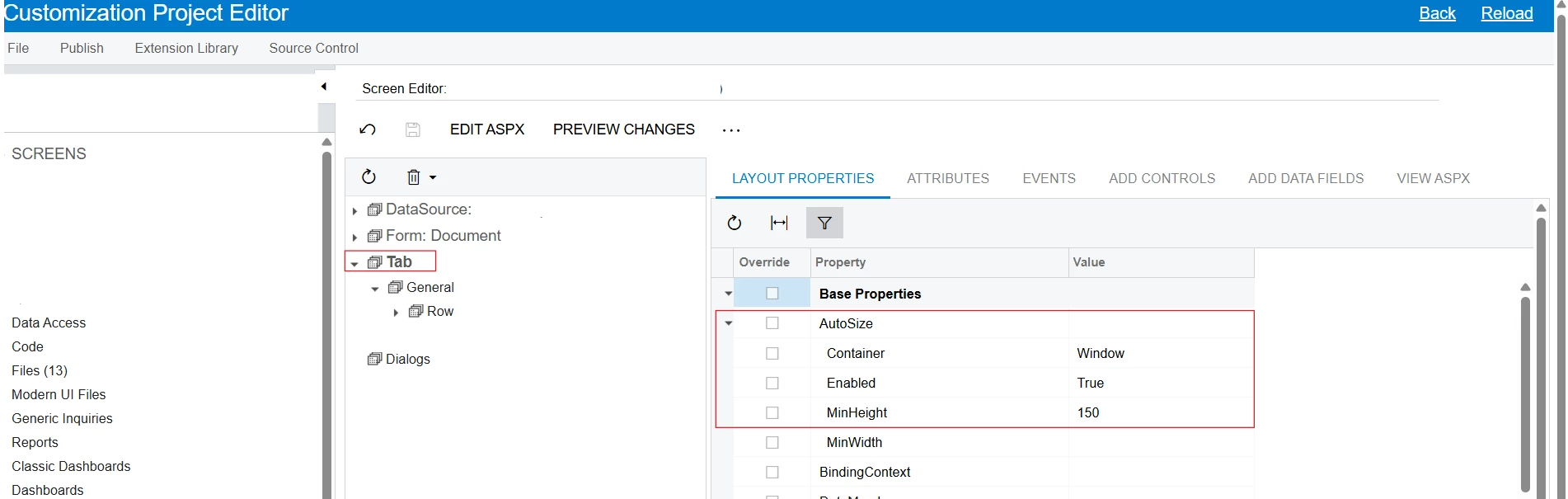
Could you please confirm that you have set the properties for that tab as shown below? I believe this should resolve your issue.


zherring
Jr Varsity II
Forum|alt.badge.img
  • Jr Varsity II
  • March 3, 2026

If it truly is an .aspx issue, try directly enabling the AddNew action within the <ActionBar> like so:
 

<ActionBar>
<Actions>
<AddNew Enabled="true" />
</Actions>
</ActionBar>


Forum|alt.badge.img+2
  • Author
  • Semi-Pro I
  • March 3, 2026

Hi ​@bpgraves,
Could you please confirm that you have set the properties for that tab as shown below? I believe this should resolve your issue.


I don’t have a Tab or AutoSize property.  This is a grid…


Forum|alt.badge.img+2
  • Author
  • Semi-Pro I
  • March 3, 2026

If it truly is an .aspx issue, try directly enabling the AddNew action within the <ActionBar> like so:
 

<ActionBar>
<Actions>
<AddNew Enabled="true" />
</Actions>
</ActionBar>


Has no effect...the + is still inactive


Forum|alt.badge.img+2
  • Author
  • Semi-Pro I
  • March 3, 2026

Can you show us the Graph for the screen?

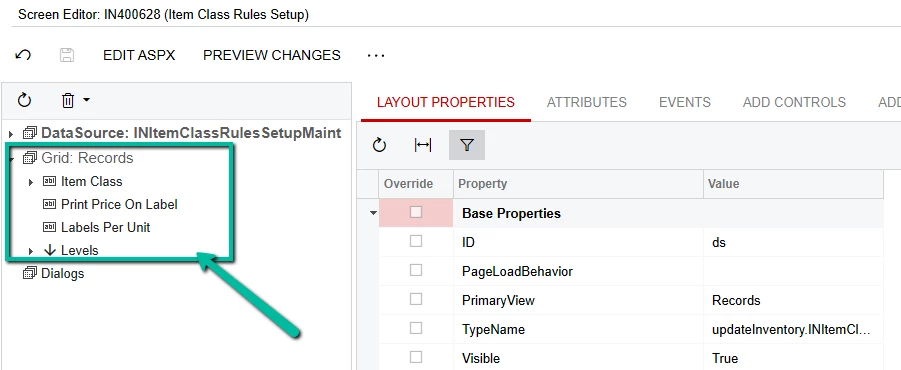
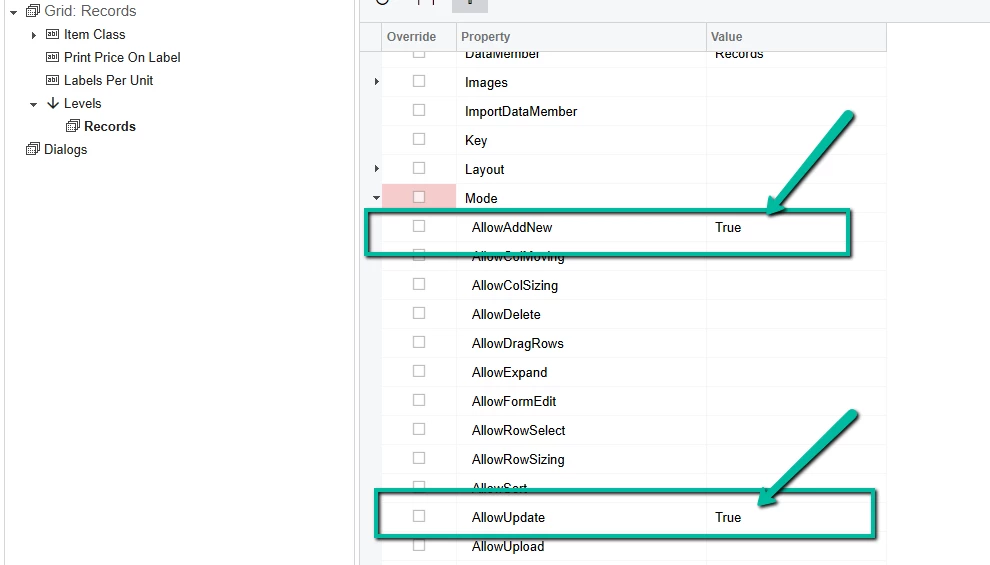
I have a Grid and I noticed that the Levels has a Mode under Ext Properties having AllowAddNew and AllowUpdate: I set this to these to True but it still has no effect on the page…


Forum|alt.badge.img+2
  • Author
  • Semi-Pro I
  • March 3, 2026

This seems to be an Access Rights issue. 

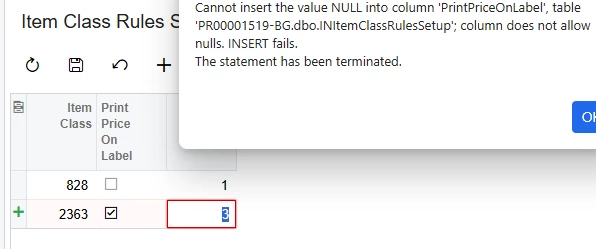
I changed Edit to Insert and it appears to have the ability to insert now (although it’s not actually able to insert):


palbores
Jr Varsity I
Forum|alt.badge.img+1
  • Jr Varsity I
  • March 3, 2026


This seems to be an Access Rights issue. 

I changed Edit to Insert and it appears to have the ability to insert now (although it’s not actually able to insert):


@bpgraves make the field have this PXDefault(false)


Forum|alt.badge.img+8
  • Captain II
  • March 3, 2026

Can you send the code from your graph: 

INItemClassRulesSetupMaint.cs?


Forum|alt.badge.img+2
  • Author
  • Semi-Pro I
  • March 3, 2026


This seems to be an Access Rights issue. 

I changed Edit to Insert and it appears to have the ability to insert now (although it’s not actually able to insert):


@bpgraves make the field have this PXDefault(false)


@palbores It is already…


palbores
Jr Varsity I
Forum|alt.badge.img+1
  • Jr Varsity I
  • March 3, 2026


This seems to be an Access Rights issue. 

I changed Edit to Insert and it appears to have the ability to insert now (although it’s not actually able to insert):


@bpgraves make the field have this PXDefault(false)


@palbores It is already…


It should be PXDBBool

[PXDBBool]

Forum|alt.badge.img+2
  • Author
  • Semi-Pro I
  • March 3, 2026

Can you send the code from your graph: 

INItemClassRulesSetupMaint.cs?


    public class INItemClassRulesSetupMaint : PXGraph<INItemClassRulesSetupMaint>
    {
        /// <summary>
        /// Importable view of <see cref="INItemClassRulesSetup"/>
        /// </summary>
        [PXImport]
        public PXViewOf<INItemClassRulesSetup> Records;

        public PXSave<INItemClassRulesSetup> Save;
        public PXCancel<INItemClassRulesSetup> Cancel;
        public PXDelete<INItemClassRulesSetup> Delete;
        /// <summary>
        /// Action used to delete all records
        /// </summary>
        public PXAction<INItemClassRulesSetup> DeleteAll;
        [PXUIField(DisplayName = "Clear All")]
        [PXButton]
        [SuppressMessage("Style", "IDE1006:Naming Styles", Justification = "Action delegate")]
        public virtual void deleteAll()
        {
            if (Records.View.Ask(Messages.ConfirmClearAll, MessageButtons.OKCancel) != WebDialogResult.OK)
            {
                return;
            }

            bool deleted = false;
            foreach (INItemClassRulesSetup row in Records.Select())
            {
                Records.Cache.Delete(row);
                deleted = true;
            }
            if (deleted)
            {
                Records.View.RequestRefresh();
            }
        }

        /// <summary>
        /// Enable the Delete All button when there are any records
        /// </summary>
        public virtual void _(Events.RowSelected<INItemClassRulesSetup> e)
        {
            DeleteAll.SetEnabled(e.Row != null);
        }

        /// <summary>
        /// Raise the field verifying events when the row is persisting
        /// </summary>
        public virtual void _(Events.RowPersisting<INItemClassRulesSetup> e)
        {
            object printPriceOnLabel = e.Row?.PrintPriceOnLabel;
            //Records.Cache.RaiseFieldVerifying<INItemClassRulesSetup.printPriceOnLabel>(e.Row, ref printPriceOnLabel);
            object labelsPerUnit = e.Row?.LabelsPerUnit;
            Records.Cache.RaiseFieldVerifying<INItemClassRulesSetup.labelsPerUnit>(e.Row, ref labelsPerUnit);
        }

        /// <summary>
        /// Set error on LocationCode field if it is the same as DefaultLocation
        /// </summary>
        public virtual void _(Events.FieldVerifying<INItemClassRulesSetup, INItemClassRulesSetup.labelsPerUnit> e)
        {
            int? newNumLabels = (int?)e.NewValue;
            if (0 == newNumLabels && newNumLabels.HasValue)
            {
                e.Cache.RaiseExceptionHandling<INItemClassRulesSetup.labelsPerUnit>(
                    e.Row,
                    newNumLabels,
                    new PXSetPropertyException<INItemClassRulesSetup.labelsPerUnit>(Messages.GreaterThanZero));
            }
        }
    }


Forum|alt.badge.img+2
  • Author
  • Semi-Pro I
  • March 3, 2026


This seems to be an Access Rights issue. 

I changed Edit to Insert and it appears to have the ability to insert now (although it’s not actually able to insert):


@bpgraves make the field have this PXDefault(false)


@palbores It is already…


It should be PXDBBool

[PXDBBool]

Thank you!  That worked!  :-)


Forum|alt.badge.img+2
  • Author
  • Semi-Pro I
  • March 3, 2026

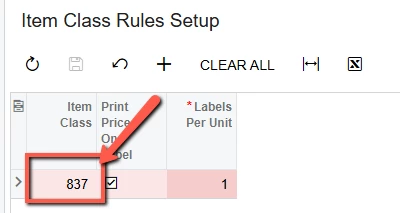
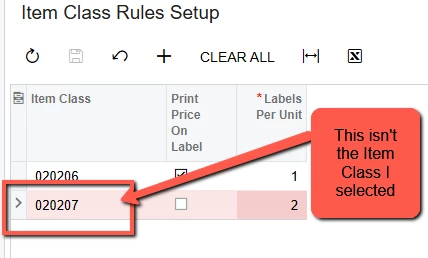
It seems that no matter which Item Class that I select in the Selector, it will save as one greater that the last one saved…

Also, is there a way to show the ItemClassCD on the page but save the ItemClassID to the database?


palbores
Jr Varsity I
Forum|alt.badge.img+1
  • Jr Varsity I
  • March 3, 2026

@bpgraves for your field, you need to add the SubstituteKey in PXSelector
Summary:
Gets or sets the field from the referenced table that substitutes the key field used as internal value and is displayed as a value in the user interface (natural key).

 [PXSelector(typeof(SearchFor<INItemClass.itemClassID>.Where<INItemClass.itemClassCD.IsNotEqual<Empty>>), SubstituteKey = typeof(INItemClass.itemClassCD), DescriptionField = typeof(INItemClass.itemClassID))]

and also try to change your graph Save to PXSavePerRow
Summary:
The Save action that you need to use instead of PX.Data.PXSave`1 for the forms with one PXGrid container where multiple records can be edited, and these records do not depend on one another, such as the Charts of Accounts (GL202500) and Site Map (SM200520) forms. If you use PX.Data.PXSavePerRow`1, an error that may occur during the saving of one record does not prevent the saving of other records.
 

​​​​​​​public PXSavePerRow<INItemClassRulesSetup> Save;


Forum|alt.badge.img+2
  • Author
  • Semi-Pro I
  • March 3, 2026

@bpgraves 

 [PXSelector(typeof(SearchFor<INItemClass.itemClassID>.Where<INItemClass.itemClassCD.IsNotEqual<Empty>>), SubstituteKey = typeof(INItemClass.itemClassCD), DescriptionField = typeof(INItemClass.itemClassID))]

and also try to change your graph Save to PXSavePerRow
Summary:
The Save action that you need to use instead of PX.Data.PXSave`1 for the forms with one PXGrid container where multiple records can be edited, and these records do not depend on one another, such as the Charts of Accounts (GL202500) and Site Map (SM200520) forms. If you use PX.Data.PXSavePerRow`1, an error that may occur during the saving of one record does not prevent the saving of other records.
 

​​​​​​​public PXSavePerRow<INItemClassRulesSetup> Save;


This changed the page display but it doesn’t change the way the rows are saved to the database.  Am I not allowed to use the ItemClassID as a primary key for the table?  Perhaps this is why it keeps increasing...


palbores
Jr Varsity I
Forum|alt.badge.img+1
  • Jr Varsity I
  • March 3, 2026

@bpgraves Because your field Item Class is using a PXDBIdentity, that is why it is incrementing by 1.
You need to create another field for Item Class that will select Item Class data and show the Item Class CD instead of the ID.


 /// <summary>
/// Item Class ID for rule
/// </summary>
[PXDBIdentity(IsKey = true)]
public virtual int? ItemClassID { get; set; }
[SuppressMessage("Style", "IDE1006:Naming Styles", Justification = "DAC field BQL class uses same name with different case")]
public abstract class itemClassID : BqlInt.Field<itemClassID> { }

/// <summary>
/// Item Class CD for rule
/// </summary>
[PXDBInt]
[PXUIField(DisplayName = "Item Class")]
[PXSelector(typeof(SearchFor<INItemClass.itemClassID>.Where<INItemClass.itemClassCD.IsNotEqual<Empty>>), SubstituteKey = typeof(INItemClass.itemClassCD), DescriptionField = typeof(INItemClass.itemClassID))]
public virtual int? ItemClassCD { get; set; }
[SuppressMessage("Style", "IDE1006:Naming Styles", Justification = "DAC field BQL class uses same name with different case")]
public abstract class itemClassCD : BqlInt.Field<itemClassCD> { }


Forum|alt.badge.img+2
  • Author
  • Semi-Pro I
  • March 3, 2026

@bpgraves Because your field Item Class is using a PXDBIdentity, that is why it is incrementing by 1.
You need to create another field for Item Class that will select Item Class data and show the Item Class CD instead of the ID.


 /// <summary>
/// Item Class ID for rule
/// </summary>
[PXDBIdentity(IsKey = true)]
public virtual int? ItemClassID { get; set; }
[SuppressMessage("Style", "IDE1006:Naming Styles", Justification = "DAC field BQL class uses same name with different case")]
public abstract class itemClassID : BqlInt.Field<itemClassID> { }

/// <summary>
/// Item Class CD for rule
/// </summary>
[PXDBInt]
[PXUIField(DisplayName = "Item Class")]
[PXSelector(typeof(SearchFor<INItemClass.itemClassID>.Where<INItemClass.itemClassCD.IsNotEqual<Empty>>), SubstituteKey = typeof(INItemClass.itemClassCD), DescriptionField = typeof(INItemClass.itemClassID))]
public virtual int? ItemClassCD { get; set; }
[SuppressMessage("Style", "IDE1006:Naming Styles", Justification = "DAC field BQL class uses same name with different case")]
public abstract class itemClassCD : BqlInt.Field<itemClassCD> { }


This just gives me an error:

Shouldn’t I create a new key like ItemClassRulesID that increments and leave the ItemClassID alone so it refers to the ID in the Acumatica ItemClass table?


palbores
Jr Varsity I
Forum|alt.badge.img+1
  • Jr Varsity I
  • Answer
  • March 3, 2026

@bpgraves Because your field Item Class is using a PXDBIdentity, that is why it is incrementing by 1.
You need to create another field for Item Class that will select Item Class data and show the Item Class CD instead of the ID.


 /// <summary>
/// Item Class ID for rule
/// </summary>
[PXDBIdentity(IsKey = true)]
public virtual int? ItemClassID { get; set; }
[SuppressMessage("Style", "IDE1006:Naming Styles", Justification = "DAC field BQL class uses same name with different case")]
public abstract class itemClassID : BqlInt.Field<itemClassID> { }

/// <summary>
/// Item Class CD for rule
/// </summary>
[PXDBInt]
[PXUIField(DisplayName = "Item Class")]
[PXSelector(typeof(SearchFor<INItemClass.itemClassID>.Where<INItemClass.itemClassCD.IsNotEqual<Empty>>), SubstituteKey = typeof(INItemClass.itemClassCD), DescriptionField = typeof(INItemClass.itemClassID))]
public virtual int? ItemClassCD { get; set; }
[SuppressMessage("Style", "IDE1006:Naming Styles", Justification = "DAC field BQL class uses same name with different case")]
public abstract class itemClassCD : BqlInt.Field<itemClassCD> { }


This just gives me an error:

Shouldn’t I create a new key like ItemClassRulesID that increments and leave the ItemClassID alone so it refers to the ID in the Acumatica ItemClass table?

Yes, you can create a new field, ItemClassRulesID, with PXDBIdentity, and for the ItemClassID, remove the PXDBIdentity and change to PXDBInt.