Question

Change graphType ONLY on a modern UI processing screen

  • November 7, 2025
  • 9 replies
  • 85 views

Forum|alt.badge.img+1

We have a customization to a screen that needs to be upgraded to modern UI.  The only thing that is different in the customization vs. the default screen is the graphType.  This particular customization required us to create a completely new graph vs. a graph extension but no changes to screen layout.

How would I create a Typescript extension that only changes the graphType value?  I actually got this to work by just changing the default GL504500.ts file and compiling but that doesn’t feel like the right way to do this as it could get overwritten by future Acumatica updates.

// #####################################################
// C:\inetpub\wwwroot\AcumaticaCCS\FrontendSources\screen\src\screens\GL\GL504500\GL504500.ts
// #####################################################

import {
PXScreen, createSingle, createCollection, graphInfo, PXPageLoadBehavior, PXView, PXFieldState,
PXFieldOptions, linkCommand, columnConfig, PXActionState, gridConfig, GridPreset
} from "client-controls";

@graphInfo({ graphType: "PX.Objects.GL.AllocationProcess", primaryView: "Filter", pageLoadBehavior: PXPageLoadBehavior.PopulateSavedValues })
export class GL504500 extends PXScreen {

ViewBatch: PXActionState;
EditDetail: PXActionState;

Filter = createSingle(AllocationFilter);
Allocations = createCollection(AllocationExt);

}


9 replies

Forum|alt.badge.img+3

Try creating a .ts extension file (e.g. GL504500_MyExt.ts) with the following code:

import { GL504500 } from "src/screens/GL/GL504500/GL504500";
import { graphInfo, PXPageLoadBehavior } from "client-controls";

export interface GL504500_MyExt extends GL504500 { }
@graphInfo({
graphType: "PX.Objects.GL.AllocationProcess", // Replace with your graph
primaryView: "Filter",
pageLoadBehavior: PXPageLoadBehavior.PopulateSavedValues
})
export class GL504500_MyExt { }


darylbowman
Captain II
Forum|alt.badge.img+15


Try creating a .ts extension file (e.g. GL504500_MyExt.ts) with the following code:

If that doesn’t work, you may need to use ‘updateDecorator’, something like this:

import { GL504500 } from "src/screens/GL/GL504500/GL504500";
import { graphInfo, PXPageLoadBehavior } from "client-controls";
export interface GL504500_MyExt extends GL504500 { }

@updateDecorator("graphInfo", {
graphType: "PX.Objects.GL.AllocationProcess", // Replace with your graph
primaryView: "Filter",
pageLoadBehavior: PXPageLoadBehavior.PopulateSavedValues
})
export class GL504500_MyExt { }


Forum|alt.badge.img+1
  • Author
  • Semi-Pro III
  • November 10, 2025

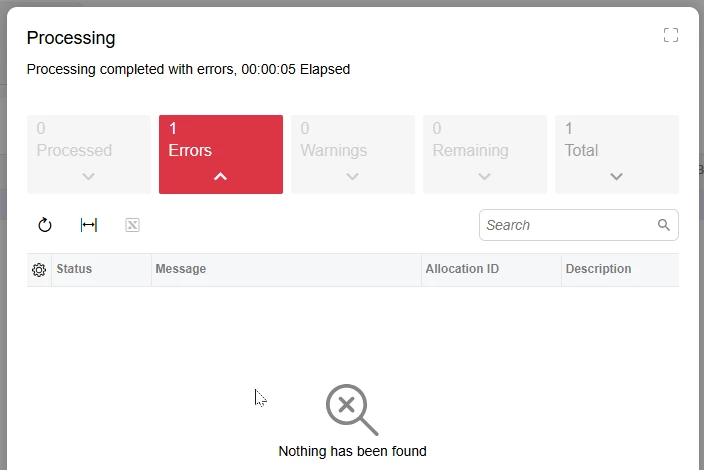
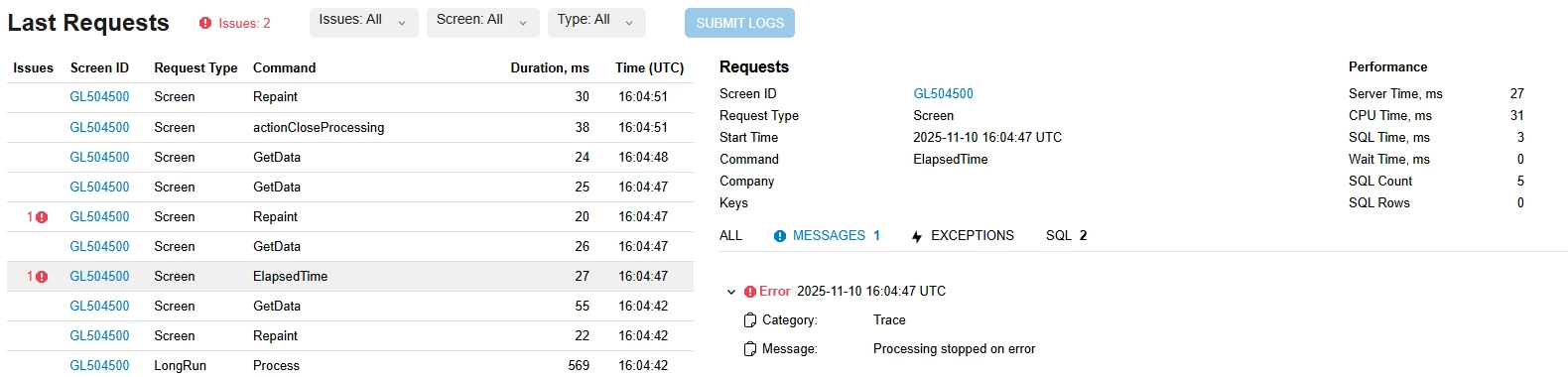
@aleksandrsechin this publishes and I see when using the inspector that indeed, my custom graph is what is loaded at runtime.  However, when I process I get an error with no information (just processing stopped on error).  

@darylbowman tried the updateDecorator and this would not publish. ts compile errors.

If I switch to Classic UI, it still works with my custom graph.


Forum|alt.badge.img+3

I think you need to debug this process. First, check if your graph actually works. Then, debug the code step by step to find the issue.


Forum|alt.badge.img+1
  • Author
  • Semi-Pro III
  • November 10, 2025

I think you need to debug this process. First, check if your graph actually works. Then, debug the code step by step to find the issue.

I attached debugger and stepped through but not able to see the problem as it seems to be at a much lower level than my code .  I know this graph works with the classic UI with only the primary graph changed on the screen editor.  This graph also works if I modify the base GL504500.ts file but for some reason can’t get it to work with any ts extension I’ve tried.  Starting to wonder if it’s even supported/possible. 

I may just try creating a whole new custom screen, copying the ts/html and hide the existing GL allocation process screen from navigation


darylbowman
Captain II
Forum|alt.badge.img+15

@darylbowman tried the updateDecorator and this would not publish. ts compile errors.

If you don’t need it, great. I believe the syntax is:

import { GL504500 } from "src/screens/GL/GL504500/GL504500";
import { graphInfo, PXPageLoadBehavior } from "client-controls";
export interface GL504500_MyExt extends GL504500 { }
@updateDecorator("graphInfo", "graphType", "PX.Objects.EP.EmployeeActivitiesEntry")
})
export class GL504500_MyExt { }


Forum|alt.badge.img+1
  • Author
  • Semi-Pro III
  • November 10, 2025

@darylbowman tried the updateDecorator and this would not publish. ts compile errors.

If you don’t need it, great. I believe the syntax is:

import { GL504500 } from "src/screens/GL/GL504500/GL504500";
import { graphInfo, PXPageLoadBehavior } from "client-controls";
export interface GL504500_MyExt extends GL504500 { }
@updateDecorator("graphInfo", "graphType", "PX.Objects.EP.EmployeeActivitiesEntry")
})
export class GL504500_MyExt { }


I got it to compile with this (notice I had to add updateDecorator to the import from client-controls).  I was so hopeful, but alas, same non-descript error on Repaint and ElapsedTime. :(

Here is my extension:

import { GL504500 } from "src/screens/GL/GL504500/GL504500";
import { graphInfo, PXPageLoadBehavior, updateDecorator } from "client-controls";
export interface GL504500_AMECustomizations_CustomProcess_Extension
extends GL504500 {}
@updateDecorator("graphInfo", "graphType", "PX.Objects.GL.AME.AllocationProcessAME")
export class GL504500_AMECustomizations_CustomProcess_Extension {}

Maybe because my graph is in a different namespace?  That’s the last thing I can think of.


darylbowman
Captain II
Forum|alt.badge.img+15

Maybe because my graph is in a different namespace?

What namespace is your graph in?


Forum|alt.badge.img+1
  • Author
  • Semi-Pro III
  • November 10, 2025

Maybe because my graph is in a different namespace?

What namespace is your graph in?

PX.Objects.GL.AME

Since it’s a completely independent graph (not an extension) I had to create my own namespace to to avoid conflicts.

I get a bunch of these compiler warnings if I don’t use my own namespace:

 warning CS0436: The type 'AccountWeight' in 'C:\inetpub\wwwroot\AcumaticaCCS\App_Data\Projects\AMECustomizations\AMECustomizations\Graphs\AllocationProcessAME.cs' conflicts with the imported type 'AccountWeight' in 'PX.Objects, Version=1.0.0.0, Culture=neutral, PublicKeyToken=null'. Using the type defined in 'C:\inetpub\wwwroot\AcumaticaCCS\App_Data\Projects\AMECustomizations\AMECustomizations\Graphs\AllocationProcessAME.cs'.