Answer

Project Task End Date

  • June 7, 2024
  • 11 replies
  • 167 views

Forum|alt.badge.img+1

Hello all, We have many tasks on our projects. They get completed, but not always on the day the work was done. I can set the end date, but when using the Complete button it updates the date to current. Is there a way around this?  


Thank you

Best answer by aaghaei

Hi @keithschm 

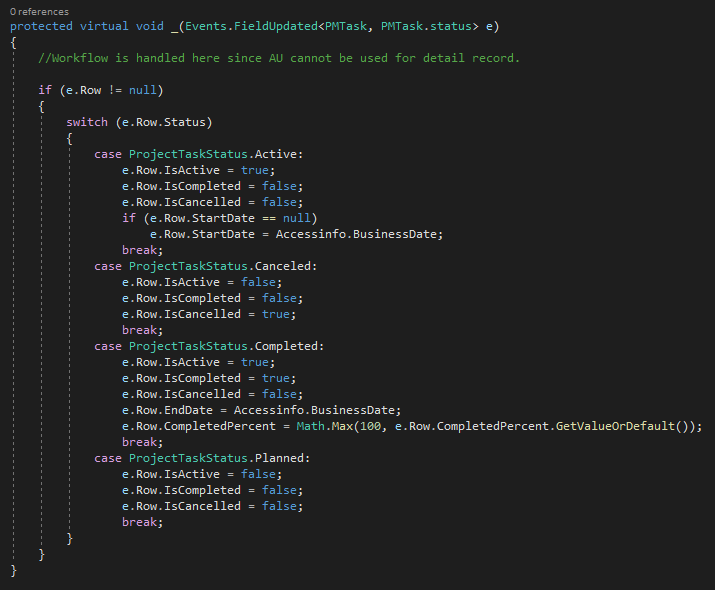
What you are experiencing is irrelevent to the “Complete” button. even if you update the task status for each task in the task grid you will experience the same. The reason is the FieldUpdated event handler on Status field. I had a look at the code and there is no switch in Project references or anywhere else to alter this behaviour. See the below snippet from Acumatica standard code. as you can see in the completed status the EndDate (Task Completion Date) is anyway updated to the current business date.
 

The only option you have is a customization that overrides this handler like this assuming you can use customization editor or some coding otherwise you need to have someone with a little bit more technicality do it for you.

protected virtual void _(Events.FieldUpdated<PMTask, PMTask.status> e, PXFieldUpdated baseHandler)
{
if (e.Row == null) return;

var endDate = e.Row.EndDate;
baseHandler?.Invoke(e.Cache, e.Args);
if ((string)e.NewValue == ProjectTaskStatus.Completed && endDate != null)
{
e.Row.EndDate = endDate;
}
}


11 replies

aaghaei
Captain II
Forum|alt.badge.img+10
  • Captain II
  • Answer
  • June 7, 2024

Hi @keithschm 

What you are experiencing is irrelevent to the “Complete” button. even if you update the task status for each task in the task grid you will experience the same. The reason is the FieldUpdated event handler on Status field. I had a look at the code and there is no switch in Project references or anywhere else to alter this behaviour. See the below snippet from Acumatica standard code. as you can see in the completed status the EndDate (Task Completion Date) is anyway updated to the current business date.


The only option you have is a customization that overrides this handler like this assuming you can use customization editor or some coding otherwise you need to have someone with a little bit more technicality do it for you.

protected virtual void _(Events.FieldUpdated<PMTask, PMTask.status> e, PXFieldUpdated baseHandler)
{
if (e.Row == null) return;

var endDate = e.Row.EndDate;
baseHandler?.Invoke(e.Cache, e.Args);
if ((string)e.NewValue == ProjectTaskStatus.Completed && endDate != null)
{
e.Row.EndDate = endDate;
}
}


Forum|alt.badge.img+1
  • Author
  • Varsity I
  • June 7, 2024

Thank you for this.   So if I set Status to Complete, Set the % to 100 and set the End Date say Via an API , that the same as what the Button is doing?


aaghaei
Captain II
Forum|alt.badge.img+10
  • Captain II
  • June 7, 2024

That is correct. Setting the completed % to 100 is not really required but that will keep it clean.


Forum|alt.badge.img+1
  • Author
  • Varsity I
  • June 7, 2024

Thank you so much


Forum|alt.badge.img+1
  • Author
  • Varsity I
  • June 7, 2024

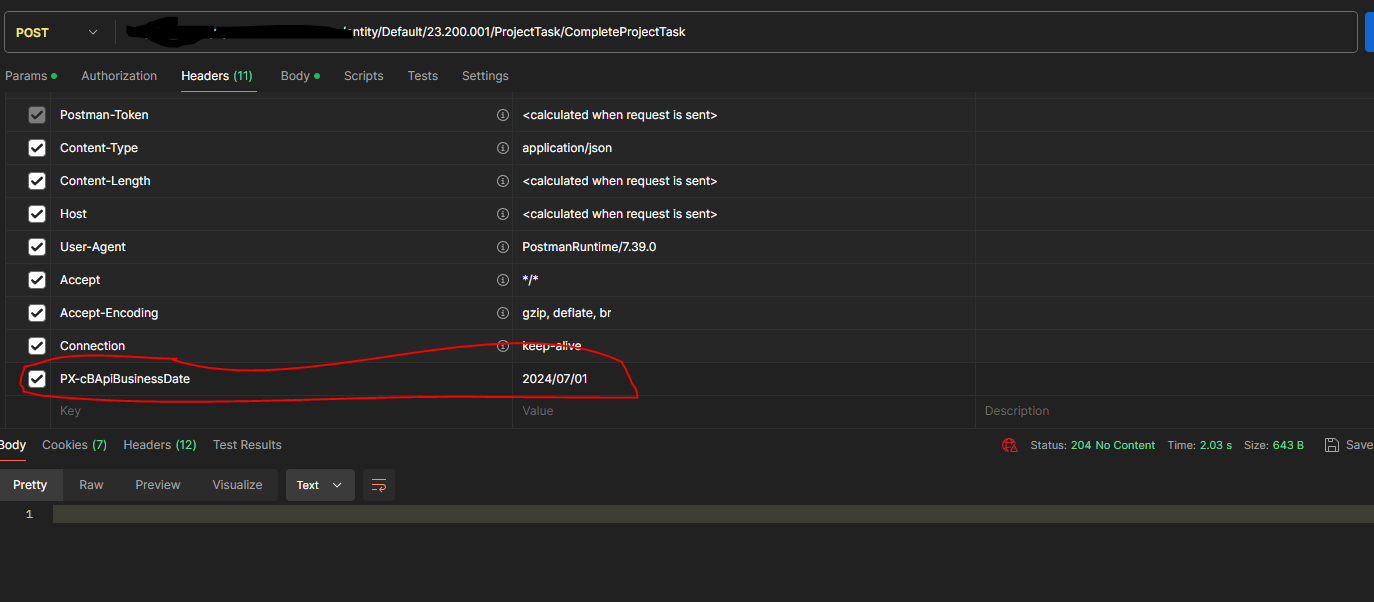
FYI, no mater what, once you change the status to Complete on the task line or through the API it changes the date. If I set the date first it will set it correctly. But once the status is changed to Completed it updates the date to current. What is odd is through the UI I can change the date after it is completed, but not through the API.  I had to extend the API as the enddate filed was not there.


Is this Normal?


aaghaei
Captain II
Forum|alt.badge.img+10
  • Captain II
  • June 7, 2024

Yes it’s pretty normal. It is what FieldUpdated does unless in the handler code API calls are excluded.

you can possibly do one get and two post. Get the value and store, then update the status and let platform do what it does and finally only update the EndDate with your stored value and post it. It should do the trick


Forum|alt.badge.img+1
  • Author
  • Varsity I
  • June 7, 2024

Thank you, I did try that, but no matter what. Once it is Completed the Enddate will not update with the API.  I need to complete and set the date at the same time. Would be fine with 2 calls if that would work, but I am not able to update it after it is completed through the API


aaghaei
Captain II
Forum|alt.badge.img+10
  • Captain II
  • June 7, 2024

Why don’t you add that piece of code I provided to the ProjectEntry graph extension. It will do the work for sure.


Forum|alt.badge.img+1
  • Author
  • Varsity I
  • June 11, 2024

Not sure why this work, but it does…


aaghaei
Captain II
Forum|alt.badge.img+10
  • Captain II
  • June 11, 2024

Happy to see it is working @keithschm 


Forum|alt.badge.img+1
  • Author
  • Varsity I
  • June 11, 2024

Thank you for all your help!!!