



Hi Everyone,
I’m trying to understand formulas in GIs. The documentation does not provide guidance on how to use formulas. There is a Report Designer guide that lists each formula and how it’s used (Isnull() on p. 63) but it lacks detail about how data types affect expressions within the formula. If you know of another resource, please share :-)
On to Isnull(). Here’s the documentation.

I’ve written a simple formula with unexpected results:
=
Isnull(
	CStr([ARInvoice.CustomerID]),
	'NULL'
)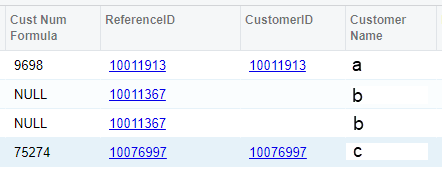
in row 1, ‘9698’ does not match either of the referenced columns. Why?
My ultimate goal is to have this algorithm in a way that Acumatica understands:
If CustomerID is null, return ReferenceID, else return CustomerID

